
Be part of JetBrains PHPverse 2026 on June 9 – a free online event bringing PHP devs worldwide together.

Max100's avatar
Level 6

vue-starter-kit errors

After installing the vue-starter-kit, I came across these errors. I haven't done anything with the app except connecting with local Postgres and migrating. I don't see any way of submitting these issues on the github, so I'll post it here in case it's helpful.

In the resources/js/app.ts file, the following errors are in the file:

  • "File 'c:/laragon/www/testapp1/node_modules/vite/client.d.ts' is not a module."

In the tsconfig.json file the following error:

  • "Cannot find type definition file for 'vue/tsx'. The file is in the program because: Entry point of type library 'vue/tsx' specified in compilerOptions"

Here is what appears in the vscode: Error messages for app.ts file

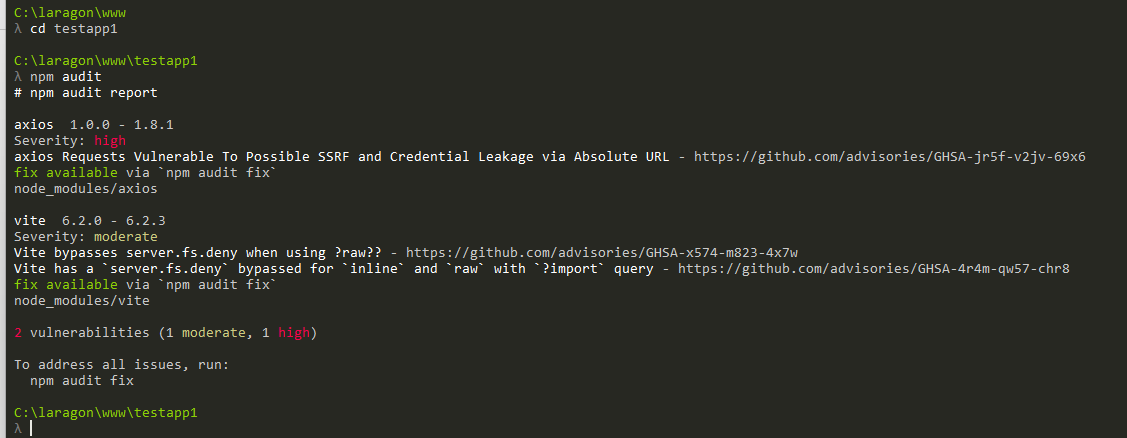
In addition, the installation of the starter kit reported 2 vulnerabilities:

vue-starter-kit vulnerabilities These were resolved by using npm audit fix, but just figured I'd point it out so they might be addressed in a later release.

Fwiw, the starter kit appears to work even with the errors shown in the editor.

What is the recommended way to report issues found in the framework or one of the other packages?

0 likes
8 replies
LaryAI's avatar
Level 58

To address the issues you're encountering with the Laravel Vue Starter Kit, let's tackle them one by one:

  1. Error: "File 'c:/laragon/www/testapp1/node_modules/vite/client.d.ts' is not a module."

    This error typically occurs when TypeScript is unable to recognize a module. To resolve this, ensure that your tsconfig.json is correctly configured to include the necessary type definitions. You might need to add the following to your tsconfig.json:

    {
      "compilerOptions": {
        "types": ["vite/client"]
      }
    }
    

    This tells TypeScript to include the type definitions for Vite's client.

  2. Error: "Cannot find type definition file for 'vue/tsx'."

    This error suggests that TypeScript is looking for a type definition that isn't installed. The vue/tsx types might not be necessary unless you're specifically using TSX with Vue. You can remove this from your tsconfig.json if it's not needed:

    {
      "compilerOptions": {
        "types": []
      }
    }
    

    If you do need TSX support, ensure you have the correct package installed. You might need to install additional types or packages that provide these definitions.

  3. Vulnerabilities reported during installation:

    It's common to encounter vulnerabilities when installing packages. Running npm audit fix is a good first step, as it attempts to automatically fix vulnerabilities. For more persistent issues, you might need to manually update specific packages or wait for the package maintainers to release updates.

  4. Reporting Issues:

    For reporting issues with the Laravel framework or its starter kits, you should:

    • Check if the issue has already been reported on the relevant GitHub repository.
    • If not, create a new issue with a detailed description, including steps to reproduce the problem, error messages, and any relevant code snippets.
    • For Laravel, you can report issues on the Laravel GitHub repository.
    • For the Vue Starter Kit, check if there's a specific repository for it or report it on the main Laravel repository if it's bundled with Laravel.

By following these steps, you should be able to resolve the errors you're encountering and contribute to improving the framework by reporting issues.

1 like
Max100's avatar
Level 6

@LaryAI Lary's answer does not appear to address the issues.

  1. "vite/client" is already listed in the "types" under "compilerOptions"
  2. I don't know whether TSX support is needed in the vue-starter-kit, so I don't know if I should delete "vue/tsx" from the "types" under "compilerOptions".
  3. npm audit fix appeared to resolve the issue and, hopefully, this will be fixed in a later release.
  4. Other than creating a pull request, there does not appear to be a way to submit these types of issues on the github repository for laravel/vue-starter-kit. I have seen other github repositories which do have an issues tab or a discussion tab, but those are not available on this repository.
jlrdw's avatar

@Max100 There are issues already for axios: https://github.com/axios/axios/issues/6463

Also thanks for pointing it out. I will rethink it's usage and may stick to fetch js.

Side note, for years I mentioned it's not good to use the latest hot package til it's tested and secure. Everyone was dropping jquery for axios because of the neat latest hot package.

Just saying.

Max100's avatar
Level 6

@jlrdw Thanks for your reply. Fwiw, the issue you mentioned with axios is closed and the npm audit fix resolved the problem, I think.

But your point is definitely right. It's not a great idea to use the latest new package until it's tested and secure. I'm wary of using the vue-starter-kit, given that the default install presents errors and, more importantly, nobody seems to care to look at or address them.

I'm also surprised there's no easy way to let the developers know about the issues, except perhaps taking a stab at fixing it and doing a pull request. The link you posted, for example, goes to the 'Issues' tab on the axios github, and someone reported an important bug there.

But the laravel/vue-start-kit github does not offer an 'Issues' tab, and I don't feel competent enough to do a pull request and make changes to the package. So I posted questions on Laracasts, but yours is the only response received.

Laravel introduced new starter kits and I imagine they're interested to address issues in the default installation. Steps to reproduce the errors ... literally, just install the vue-starter-kit and look at errors in the console on the app.ts page.

The starter kit seems to work ok and the errors are probably minor and easily fixed. But I'll wait until it's more mature before using it. So for now I guess I'll just use Breeze.

1 like
jasperfernandez's avatar

The problem in tsconfig.json Line 1

I use copilot to suggest a fix

It suggested to run npm install --save-dev @vue/babel-plugin-jsx

And the error is gone

1 like
Arasma's avatar

Any updates on this topic? The fresh install still comes with errors and there are no working solutions nor anybody willing to help.

final53's avatar

Create a new file named resources/js/vite-env.d.ts and place your declare module 'vite/client' { ... } code there. This resolves the error and follows Vite's recommended setup.

Remove the declaration from app.ts and copy to resources/js/vite-env.d.ts

declare module 'vite/client' {
    interface ImportMetaEnv {
        readonly VITE_APP_NAME: string;
        [key: string]: string | boolean | undefined;
    }

    interface ImportMeta {
        readonly env: ImportMetaEnv;
        readonly glob: <T>(pattern: string) => Record<string, () => Promise<T>>;
    }
}
1 like
Max100's avatar

Do you know if this or the other proposed fix listed above will be incorporated into the next release of vue-starter-kit?

I haven't been using the starter kit yet, but plan to in the future, so it would be great if this issue is fixed in the next starter kit release itself.

Thanks

Please or to participate in this conversation.