
Max100 wrote a reply+100 XP
1mo ago
I think OP wanted a starter kit for Laravel 12, but I don't know if you can do that with the Laravel installer. So adding Breeze separately could be a workaround.
Max100 wrote a reply+100 XP
1mo ago
Fwiw, if you install version 12 with composer, you can then install Breeze which, if you chose the correct option, will install vue, inertia and ziggy. Just follow the instructions in the earlier docs (maybe back to v.11).
If you just want to avoid the latest starter kit, I have one without the new starter kit features (shadcn and wayfinder). It uses fortify, laravel 13, inertia and vue with ziggy and daisyui instead of wayfinder and shadcn. But that won't help if you need Laravel 12.
For Laravel 12, try installing Breeze.
Max100 wrote a reply+100 XP
1mo ago
With this type of vulnerability, a Laravel 11 patch would be appropriate, even if it's outside of the LTS range. But don't hold your breath.
There's a strong push to always move forward to the latest versions, and even it it might be easy for them to implement, I doubt they'll go back to offer the patch.
Max100 wrote a reply+100 XP
1mo ago
Thanks for your reply. It doesn’t make much sense to me, but they say that’s the way it is. GO programs are apparently routinely flagged by av apps.
What I don’t understand is, I can compile one piece executables in another language that aren’t flagged by av apps, so why are go executables treated differently.
Anyway, I’m glad it’s ok, because I’m looking forward to explore frankenphp on my Windows development machine.
Thanks again!
Max100 liked a comment+100 XP
1mo ago
Conventions like MVC exist because they are the most practical approach for most projects.
Of course this can be overly structured for very simple sites, and not structured enough for much larger projects.
Yes, you could write data straight from the request to the model, this might work for simple forms, but what when the request involves MULTIPLE models? What if you need to run business logic on the data; where would you put that?
You can write php any way you like, but if you write a decent amount you will wish you had been more careful about the way it was built in the first place.
Max100 liked a comment+100 XP
1mo ago
@randy_johnson You could also just dispense with it all and put everything in a single index.php script.
Max100 started a new conversation+100 XP
1mo ago
Is anyone here using frankenphp for development on Windows? I want to explore it, but the zip file was quarantined by my av software. When I submitted to file to virustotal.com about a third of the vendors flagged it as containing malware, though they didn't all agree about which malware it contained.
On the github issue, they don't seem concerned and say it probably got flagged because the installation files are unsigned or that most Go apps get flagged by av.
I'd like to explore developing with it, but wary of installing software which may have malware. If you're using it, I'd be curious to learn of your experience with the latest release. Have you had any issues or av concerns?
Thanks
Max100 wrote a reply+100 XP
2mos ago
Great, I'll update the config. Thanks for the tip!
Max100 started a new conversation+100 XP
2mos ago
While working on a new vue-starter-kit app, I noticed the cpu fan started running most of the time, and the task manager showed npm was constantly using around 15% of the cpu activity. The problem only occurred when using npm run dev. Using npm run build was fine.
I never had this issue before using Breeze, so it seems connected to the starter kit. It may have to do with wayfinder, but not sure.
I made 2 changes to vite.config.ts which resolved the problem. The main issue seems to be that vite was watching a large number of unnecessary files. So the added server: section ignores those areas. The patterns addition to the wayfinder section also adds limits related to wayfinder.
After making these changes, the high cpu usage and cpu fan stopped. If anyone else has run into this issue, these changes will probably help.
vite.config.ts:
import inertia from '@inertiajs/vite';
import { wayfinder } from '@laravel/vite-plugin-wayfinder';
import tailwindcss from '@tailwindcss/vite';
import vue from '@vitejs/plugin-vue';
import laravel from 'laravel-vite-plugin';
import { defineConfig } from 'vite';

export default defineConfig({
    server: {		// added to fix high cpu usage
        watch: {
        // Ignore large directories that don't need hot reloading
        ignored: ['**/storage/**', '**/vendor/**', '**/node_modules/**'],
        // Only use polling if you are experiencing sync issues in Docker/DDEV
        // usePolling: true,
        // interval: 100,
        },
    },
    plugins: [
        laravel({
            input: ['resources/css/app.css', 'resources/js/app.ts'],
            refresh: true,
        }),
        inertia({ ssr: false }),
        tailwindcss(),
        vue({
            template: {
                transformAssetUrls: {
                    base: null,
                    includeAbsolute: false,
                },
            },
        }),
        wayfinder({
            formVariants: true,
			//added next line for high cpu issue
            patterns: ['app/Http/Controllers/**/*.php', 'routes/**/*.php'],
        }),
    ],
});
Max100 wrote a reply+100 XP
2mos ago
That way you can build your own front end for the authentication system, which provides better overall control of the system. Sounds like a good approach!
I have much to learn. :) Thanks again!
Max100 wrote a reply+100 XP
3mos ago
I definitely agree with your approach, because there's a lot I don't understand in breeze or the starter kit.
But I'm afraid to rely on my limited knowledge to properly implement authentication. Though I don't fully get it and the breeze 'documentation' is sparse, I've been able to use it without too much difficulty.
The problem comes as laravel moves forward. Each release makes it harder to use the old auth system with the new laravel versions.
Thanks again!
Max100 wrote a reply+100 XP
3mos ago
Thanks for your reply. When I get back to the linux setup, I'll see if I can enable that extension. Hopefully, that'll get me past this issue. Thanks again
Max100 wrote a reply+100 XP
3mos ago
It's strange that the maintainers of Laravel repositories make it so hard to even let them know about an issue.
I may not know enough to fix an issue and then create a pull request. But wouldn't they like to know there's a problem?
In this case, even if you have the fix, you can't create a pull request.
Max100 wrote a reply+100 XP
3mos ago
Thanks for your reply. Because I'm new to Linux, I tried adding composer using the software manager in Mint, but it's an older package and may be more limited. When I get brave enough, I'll remove that and just install php and the composer directly on the machine. Then, hopefully, I'll be able to install the starter kit.
I'm also considering just using Breeze and upgrading the installation to Tailwind 4 and DaisyUI 5. I think both breeze and the starter kits use fortify, so maybe that would still be ok. For new Vue/Inertia apps are most people using the starter kits or breeze?
Thanks again!
Max100 wrote a reply+100 XP
3mos ago
Thanks for your reply. I've been wondering the same thing and may go that route. But I'm so unclear about things Linux, I'm not even sure even what I need to install. There seem to be several docker related packages.
DDEV looks helpful and I installed the docker engine as a requirement. But is that different from docker compose or other docker tools?
Along the way, I've come to appreciate how good Laragon is. It's just a simple install and almost transparent. But Docker is the standard and seems like the way to go for portability, so I'll probably wind up using it. Thanks again!
Max100 wrote a reply+100 XP
3mos ago
Thanks for your reply! I'll try it out later when I get back, but it looks like that will get things sorted with Breeze/Vue.
The starter kit is another issue altogether. I posted those errors in a message above. I'd probably just stick with breeze, but I also want to keep in step with what Laravel is suggesting.
The new starter kit seems more involved for several reasons and I'd rather not get into shadcn. If necessary, I may have to upgrade the breeze to use tailwind 4 and stay with that.
Linux Mint has been excellent so far! But I'm still learning my way, so sometimes even simple things can seem confusing. :)
Thanks again for your help!
Max100 wrote a reply+100 XP
3mos ago
Thanks for your reply. The Breeze issue involved Vite not being able to access the site in ddev. I was able to get past that with the help of Gemini, but imranbru's answer below looks better, so I'll try that out.
For the starter kit, I couldn't run the laravel installer inside the ddev container because it had an issue with other files which were already there. So I tried to run it before ddev and then create the container after, but the installer failed with the following errors:
The problem may be because installed composer through the software manager and the package isn't up to date. I may need to install php on the linux machine and then install composer.


Either way, I think I'll have to learn more about ddev and composer containers. :)
Max100 started a new conversation+100 XP
3mos ago
I'm exploring moving my development from Windows to Linux Mint. I've tried DDEV, which seems pretty good, but I've had some issues with vite on breeze apps and also I couldn't create a new app from a starter kit.
Does anyone have suggestions about using the starter kits with ddev, or laravel development on linux generally?
Max100 wrote a reply+100 XP
3mos ago
Thanks, that’s what I thought, but I was a bit confused. Hopefully they’ll fix it soon. Their proofreader needs some more coffee.
Max100 wrote a reply+100 XP
3mos ago
You are seeing something different for both examples, so I'm not sure where you got those examples.
Max100 started a new conversation+100 XP
3mos ago
I happened to go to laravel.com and noticed the new site. It looks really good, but I was confused by something near the top of the first page. In the Auth example it shows 2 tabs:
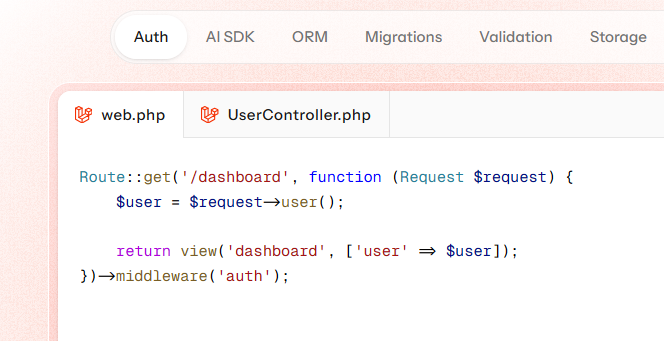

The UserController seems wrong, but it's at the top of the front page, so maybe I just don't understand it. Is this code correct or just a typo?
Max100 wrote a reply+100 XP
3mos ago
Depending on your needs, DaisyUI may be sufficient. It’s very easy to add popup modals for your forms and other dialogs. It also offers many other ui features which are easy to implement and are tailwind compatible, so modifications are simple.
Max100 wrote a reply+100 XP
5mos ago
I don't use React, so I'm not sure about your situation. However, I pass parameters in the Route() method, using named routes. I also use inertia's useForm().
So my call might look something like:
my_form.put( route( 'calls.edit', { 'param1': value1, 'param2': value2 } ) );
Inertia's useForm() is pretty helpful and route() makes the code cleaner. I don't use the method or action attributes in forms anymore. For more info, see the 'Form Helper' section in the docs:
Note the Inertia route() is slightly different than the Laravel version, because it passes the params as an object rather than an array.
Also, fwiw, I only use post, put or delete on forms.
Inertia's useForm() makes form handling fairly straightforward for most situations, and you can fall back to axios (included), if it's needed.
HTH,