obink's avatar
Level 1

Laravel Jetstream profile-photos not showing

Laravel 8 and jetstream, is it really new?

I just tried installing and playing it in fortify but I can't really understand why my profile photo not showing a picture.

update-profile-information-form

<!-- Current Profile Photo -->
<div class="mt-2" x-show="! photoPreview">
<img src="{{ $this->user->profile_photo_url }}"
          alt="{{ $this->user->name }}"
          class="rounded-full h-20 w-20 object-cover">
</div>

.Env

APP_NAME=Laravel
APP_ENV=local
APP_KEY=base64:6IJbdi+QYczKeLT7yOw3OgPsHucXn1KxVUb27hTQKpU=
APP_DEBUG=true
APP_URL=http://POroti

config/filesystems

'public' => [
            'driver' => 'local',
            'root' => storage_path('/public/storage'),
            'url' => env('APP_URL').'/public/storage/',
            'visibility' => 'public',
        ],

I've been trying the storage URL with this storage/app/public/ and that public/storage/ and I keep trying to change the path and can't remember which and what I took in this screenshot. All of the results are the same, the photo not showing

I thought when the laravel jet stream is completely installed. We got all of the scaffolding and doesn't need to change anything for it. Is it just me or anybody gets the same problem as mine?

0 likes
17 replies
frankielee's avatar

Is the profile picture stored successfully?

(Window) If yes, these are the steps I fixed it:

  1. Delete the shortcut folder storage created at /project/public/
  2. Use the command php artisan storage:link again
  3. Refresh the webpage and it solved.
10 likes
obink's avatar
Level 1

hi @frankielee, about the stored picture, it's a bit odd. I don't know where the photo will be stored

look at these pictures stored

2 pictures with the same hash and the same image stored in two different places. this is a screenshot I just took, and I'm sure uploading multiple pictures while testing this problem.

simply said, where are the other pictures go?

frankielee's avatar

All the files are stored under /project/storage/ , the storage under /public/storage is the shortcut of the /project/storage/ folder which created by php artisan storage:link

2 likes
obink's avatar
obink
OP
Best Answer
Level 1

SO this question is already answered in here

https://laracasts.com/discuss/channels/laravel/image-cant-loaded-when-using-laravel-jetstream

by a good guy named @Snapey.

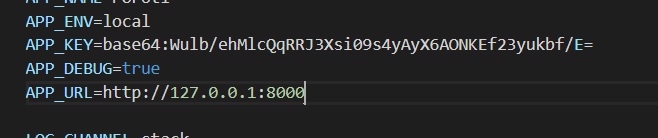
so simply said, you have to change this APP_URL in the .env file

like so, if you are in your localhost you have to know which localhost server are you on.

In my case, it was PHP artisan serve so obviously I change my APP_URL into this http://127.0.0.1:8000, if you are at xampp, change it into localhost/htdocs or whatever your links saying.

18 likes
Mahir41's avatar

I had the same issue. You had to change 2 things.

First, you have to update the "APP_URL" from the ".env" file. You have to write your exact local URL like "http://127.0.0.1:8000/".

Than, you need to remove "/" from the 54th line in config/filesystems.php

'public' => [ 'driver' => 'local', 'root' => storage_path('app/public'), 'url' => env('APP_URL').'storage', 'visibility' => 'public', ],

Hope it helps.

3 likes
javerleo's avatar

The original problem is not solved.

You assumed that the issue is caused by a wrong URL value inside env file, but it is not always the case.

I'm using Homestead VM inside a Windows 10 pro host. The URL is something normal (no port involved).

The profile photo is created an uploaded to profile-photos folder, but after that the web server can not find it (404 error).

Previously I had issues with the storage link. I was forced to use mklink command with /J parameter from Windows command line in order to create the directory link between public/storage and storage/app/storage.

If I use the ls command inside the Ubuntu VM, the "public/storage" folder looks like a symlink, but it is listed with red color which is not normal. So the problem is related with that symlink, shared between Linux and Windows systems. The web server has some kind of problem when trying to serve the image.

Any other suggestions?

1 like
alex@alx.company's avatar

@javerleo I had the same issue when restoring an app from a git repo. I fixed this with some file permissions and then going into the project and running the

php artisan storage:link

and then just to verify everything else was in its place a ran

php artisan view:cache

Then made sure everything was fresh with a

php artisan optimize:cache

That got my project up and running on a new public server. Hope that helps someone

anony253's avatar

Anyone tried to uncomment this line under config/jetstream.php ?

Features::profilePhotos(),
2 likes
Jampire's avatar

While running Jetsream with Sail on Linux be sure to comment APP_URL and run sail artisan storage:link. It will run link command in the container, not on host machine. Or, you can run php artisan storage:link directly inside docker container.

1 like
mehdi9500's avatar
<img  src="{{ auth()->user()->profile_photo_url }}" alt="">
1 like
f.alabakhsh@gmail.com's avatar

and for alt you can use:

<img src="{{ $this->user->profile_photo_url }}" alt="{{ $this->user->name }}" class="rounded-full h-20 w-20 object-cover">

or

@foreach ($users as $value)
  <img  class="object-cover w-full h-full rounded-full"  src="{{$value->profile_photo_url }}"  alt="{{ $value->name }}" loading="lazy"/>

@endforeach
all1.ai's avatar

In case none of this solves your problem like me, A good way of troubleshooting is implementing Jetsreams User traits into your model. In my case I had followed someone suggestions a few months ago to change the default ui-avatars to Gravatar and I forgot and my user model was implementing the hasProfilePhoto trait's functions... now if this is not the case for you I recommend implementing the related functions into your User model, specially since JetStream is not meant to be an updateable vendor package but a bootstrap starting point for your application. The very least you can play with these functions outputs and figure out where the problem is. It seems that the main problem is that the photo is uploaded but not retrieved through the function below that you can implement into the User model and see what part of the output is incorrect:

 public function getProfilePhotoUrlAttribute()
    {
        return $this->profile_photo_path
                    ? Storage::disk($this->profilePhotoDisk())->url($this->profile_photo_path)
                    : $this->defaultProfilePhotoUrl();
    }

I hope this helps.

Please or to participate in this conversation.