Be part of JetBrains PHPverse 2026 on June 9 – a free online event bringing PHP devs worldwide together.

marcoplus's avatar

Laravel count 3 tickets per time and display ticket number, date and results

I have already opened a discussion where I received help for some problems I had, now I would like to improve the code but I need help. I would like to display the ticket number, date and result in the same table which currently only displays the results of counting tickets every hour. Eventually I should have a complete table of data to view. I have to do the count from 07:00 to 15:00 every day and count the tickets every hour He currently works with a set date but I would like to automate the monthly count and thus have monthly reports for each year. Thanks to all who help me and give their contribution

$uptimeData = Ticket::where('created_at',  '>=', '2023-01-01 07:00:00')
                        ->where('created_at',  '<=', '2023-01-01 15:00:00')
                        ->orderBy('created_at', 'asc')
                        ->select('ticket_Id', 'created_at')
                        ->get();
        $intervals = \Carbon\CarbonInterval::hours(1)->toPeriod( '2023-01-01 07:00:00', '2023-01-01 15:00:00');
        $uptimeDataTimeline = $uptimeData->groupBy(function ($item, $key) use ($intervals) {
            $date = Carbon::parse($item->created_at);
            foreach ($intervals as $key => $interval) {
                if ($date->hour == Carbon::parse($interval)->addHours(1)->hour) {
                $actualHour1 = Carbon::parse($interval)->hour;
                if (strlen($actualHour1) == 1) $actualHour1 = "0$actualHour1";
                return $date->format("Y-m-d $actualHour1:00:00");
                }
                else if ($date->hour == Carbon::parse($interval)->addHours(1)->hour) {
                $actualHour2 = Carbon::parse($interval)->subHours(1)->hour;
                if (strlen($actualHour2) == 1) $actualHour2 = "0$actualHour2";
                return $date->format("Y-m-d $actualHour2:00:00");
                }

            }
            return $date->format('Y-m-d H:00:00');
        });

        $uptimeDataTimeline = $uptimeDataTimeline->map(function($checksInPeriod, $key){
            $down = 0;
            $up = 0;
            $total = 0;
            $uptime = 0;
            $fill = '#1fc777';

            foreach($checksInPeriod as $key => $value){
                $total++;
                if ($total <= 3) {
                    $up++;
                } else {
                    $down++;
                }
            }

            $uptime = floatval(number_format(round($up / $total, 5) * 100, 2, '.',','));

            if ($uptime < 100) $fill = '#9deab8';
            if ($uptime < 99) $fill = '#fbaa49';
            if ($uptime < 98) $fill = '#e0465e';

            return [
                'total_ticket_Id' => $total,
                'down_ticket_Id' => $down,
                'up_ticket_Id' => $up,
                'uptime' => $uptime,
                'fill' => $fill,
            ];
        });

blade file

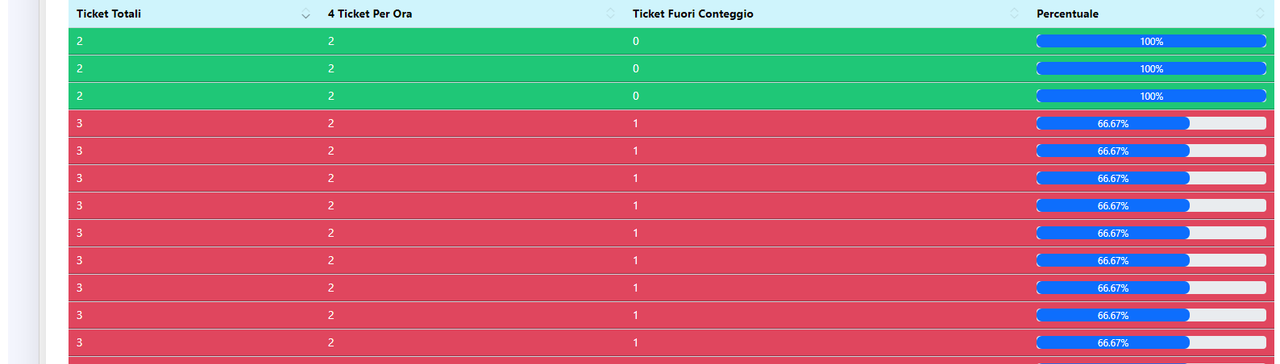
                                    <table id="sections" class="table">
                                        <thead class="table-info">
                                            <tr>
                                                <th>
                                                    Ticket Total
                                                </th>
                                                <th>
                                                   Ticket  UP
                                                </th>
                                                <th>
                                                    Ticket down
                                                </th>
                                                <th>
                                                    Uptime
                                                </th>
                                            </tr>
                                        </thead>
                                        <tbody style="color:#ffffff;">
                                            @foreach($uptimeDataTimeline as $ticket)
                                                <tr style="background: {{ $ticket['fill'] }}">
                                                    <td>
                                                        {{$ticket['total_ticket_Id']}}
                                                    </td>
                                                    <td>
                                                        {{ $ticket['up_ticket_Id'] }}
                                                    </td>
                                                    <td>
                                                        {{ $ticket['down_ticket_Id'] }}
                                                    </td>
                                                    <td>
                                                        <div class="progress" title="{{ $ticket['uptime'] }}%">
                                                            <div class="progress-bar progress-bar-success" style="width: {{ $ticket['uptime'] }}%">{{ $ticket['uptime'] }}%</div>
                                                        </div>
                                                    </td>
                                                </tr>
                                            @endforeach
                                        </tbody>
                                    </table>
0 likes
32 replies
azimidev's avatar

Welcome back! I guess this is the continuation of your last question. I modifies your code:

$startOfMonth = Carbon::now()->startOfMonth();
$endOfMonth = Carbon::now()->endOfMonth();

$uptimeData = Ticket::whereBetween('created_at', [$startOfMonth->format('Y-m-d 07:00:00'), $endOfMonth->format('Y-m-d 15:00:00')])
                    ->orderBy('created_at', 'asc')
                    ->select('ticket_Id', 'created_at')
                    ->get();

// rest of the code remains the same

And to automate the monthly count and have monthly reports for each year, you can use a for loop to iterate through the months in a year, get the start and end of each month and perform the count.

for ($month = 1; $month <= 12; $month++) {
    $startOfMonth = Carbon::now()->month($month)->startOfMonth();
    $endOfMonth = Carbon::now()->month($month)->endOfMonth();

    $uptimeData = Ticket::whereBetween('created_at', [$startOfMonth->format('Y-m-d 07:00:00'), $endOfMonth->format('Y-m-d 15:00:00')])
                        ->orderBy('created_at', 'asc')
                        ->select('ticket_Id', 'created_at')
                        ->get();

    // rest of the code remains the same

    // store the result of the monthly count in an array or database to view the reports
}


marcoplus's avatar

@azimidev Thanks for the answer and for the code, but now to see the data I have to create a data input form because now I don't see any data after inserting the code you suggested?

azimidev's avatar

@marcoplus if you don't see any data does your data in your tickets table match the criteria defined in your query? dd($uptimeData) does show anything?

marcoplus's avatar

now after inserting the code you wrote me I don't see any data

@azimidev Illuminate\Database\Eloquent\Collection {#2573 ▼ // app/Http/Controllers/TicketsController.php:100
  #items: []
  #escapeWhenCastingToString: false
}
for ($month = 1; $month <= 12; $month++) {
            $startOfMonth = Carbon::now()->startOfMonth();
            $endOfMonth = Carbon::now()->endOfMonth();

            $uptimeData = Ticket::whereBetween('created_at', [$startOfMonth->format('Y-m-d 07:00:00'), $endOfMonth->format('Y-m-d 15:00:00')])
                        ->orderBy('created_at', 'asc')
                        ->select('ticket_Id', 'created_at')
                        ->get();
            $intervals = \Carbon\CarbonInterval::hours(1)->toPeriod($startOfMonth, $endOfMonth);
            $uptimeDataTimeline = $uptimeData->groupBy(function ($item, $key) use ($intervals) {
                $date = Carbon::parse($item->created_at);
                foreach ($intervals as $key => $interval) {
                    if ($date->hour == Carbon::parse($interval)->addHours(1)->hour) {
                    $actualHour1 = Carbon::parse($interval)->hour;
                    if (strlen($actualHour1) == 1) $actualHour1 = "0$actualHour1";
                    return $date->format("Y-m-d $actualHour1:00:00");
                    }
                    else if ($date->hour == Carbon::parse($interval)->addHours(1)->hour) {
                    $actualHour2 = Carbon::parse($interval)->subHours(1)->hour;
                    if (strlen($actualHour2) == 1) $actualHour2 = "0$actualHour2";
                    return $date->format("Y-m-d $actualHour2:00:00");
                    }

                }
            return $date->format('Y-m-d H:00:00');
            });

            $uptimeDataTimeline = $uptimeDataTimeline->map(function($checksInPeriod, $key){
                $down = 0;
                $up = 0;
                $total = 0;
                $uptime = 0;
                $fill = '#1fc777';

                foreach($checksInPeriod as $key => $value){
                    $total++;
                    if ($total <= 4) {
                        $up++;
                    } else {
                        $down++;
                    }
                }

                $uptime = floatval(number_format(round($up / $total, 5) * 100, 2, '.',','));

                if ($uptime < 100) $fill = '#9deab8';
                if ($uptime < 99) $fill = '#fbaa49';
                if ($uptime < 98) $fill = '#e0465e';

                return [
                    'total_ticket_Id' => $total,
                    'down_ticket_Id' => $down,
                    'up_ticket_Id' => $up,
                    'uptime' => $uptime,
                    'fill' => $fill,
                ];
            });
        }

marcoplus's avatar

I made a few attempts and I managed to view the data now I need to figure out how to add ticket_id and created_at, now I only see them if I enter uptimeData, but I need to view them with uptimeDataTimeline

        for ($month = 1; $month <= 12; $month++) {
            $startDate = Carbon::createFromFormat('Y-m-d H:i:s', '2023-01-01 07:00:00');
            $endDate = Carbon::createFromFormat('Y-m-d H:i:s', '2023-01-31 15:00:00');
            $uptimeData = Ticket::where('created_at', '>=', $startDate)
                        ->where('created_at', '<=', $endDate)
                        ->orderBy('created_at', 'asc')
                        ->select('ticket_Id' ,'created_at')
                        ->get();
marcoplus's avatar

Anyone know how to do this? I'm trying but I haven't yet managed to find the solution to write the results in the table with the ticket_id number and date next to the count results. Can anyone help me?

azimidev's avatar

@marcoplus

    for ($month = 1; $month <= 12; $month++) {
        $startDate = Carbon::createFromFormat('Y-m-d H:i:s', '2023-01-01 07:00:00');
        $endDate = Carbon::createFromFormat('Y-m-d H:i:s', '2023-01-31 15:00:00');
        $uptimeData = Ticket::where('created_at', '>=', $startDate)
                    ->where('created_at', '<=', $endDate)
                    ->orderBy('created_at', 'asc')
                    ->get();
                    
        $uptimeDataTimeline = [/* your code to generate timeline data */];
        
        $data = [
            'ticket_id' => $uptimeData->ticket_Id,
            'created_at' => $uptimeData->created_at,
            'uptimeDataTimeline' => $uptimeDataTimeline,
        ];
        
        // You can now use the $data array to access the ticket_id, created_at, and uptimeDataTimeline.
    }
1 like
marcoplus's avatar

@azimidev hello thanks for your answer but now you return me an error, I've tried both with select and without and the result is always the same. If i check uptimeData response i see ticket_Id

            $data = [
                'ticket_Id' => $uptimeData->ticket_Id,
                'created_at' => $uptimeData->created_at,
                'uptimeDataTimeline' => $uptimeDataTimeline,
            ];

Exception
PHP 8.1.0
9.50.2
Property [ticket_Id] does not exist on this collection instance.

dd($uptimeData)

Illuminate\Database\Eloquent\Collection {#3012 ▼ // app/Http/Controllers/TicketsController.php:106
  #items: array:3 [▼
    0 => App\Models\Ticket {#3026 ▼
      #connection: "mysql"
      #table: "tickets"
      #primaryKey: "id"
      #keyType: "int"
      +incrementing: true
      #with: []
      #withCount: []
      +preventsLazyLoading: false
      #perPage: 15
      +exists: true
      +wasRecentlyCreated: false
      #escapeWhenCastingToString: false
      #attributes: array:22 [▼
        "id" => 714926
        "ticket_Id" => 714926
marcoplus's avatar

@azimidev I'm trying in every way to be able to use your code but I can't figure out why it doesn't work, it looked like the solution but it doesn't work as I hoped, why does it return me that and it doesn't give me the right result?

psrz's avatar

Kinda late to the party, but can you show the migration for the table ticket and a screenshot of some data ?

Maybe it could be solved with only sql queries. Are you using mysql or postgres ?

marcoplus's avatar

@psrz i am using mysql

    public function up()
    {
        Schema::create('tickets', function (Blueprint $table) {
            $table->id();
            $table->string('ticket_Id');
            $table->string('ticket_tipo');
            $table->string('ticket_stato');
            $table->string('ticket_segnalazione');
            $table->integer('employer_id');
            $table->integer('admin_id');
            $table->integer('admin_type');
            $table->string('status');
            $table->timestamps('created_at');
            $table->timestamps('updated_at');
        });
    }

1-2.png

psrz's avatar

@marcoplus

So you select ticket_Id and created_at from the tickets table and group the results by hour. If in any given hour, for example from 9:00 to 10:00 there are 7 tickets that means total_ticket_Id = 7, up_ticket_Id = 3, down_ticket_Id = 4 and uptime just the percentage of up_ticket_Id

I'm confused with the hour restriction from 07:00 to 15:00 though.

In your first query you're using '2023-01-01 07:00:00' and '2023-01-01 15:00:00' which seems to indicate you don't want to count tickets outside those hours, for example at 16:00

But then, when you are working with a month you use this:

$startOfMonth = Carbon::now()->startOfMonth();
$endOfMonth = Carbon::now()->endOfMonth();

So if now() it's January, then those end up being '2023-01-05 07:00:00' and '2023-31-05 15:00:00' respectively. Those parameters will NOT exclude tickets at 16:00 hours on the 2nd, 3rd, etc, which is not consistent with your first query

marcoplus's avatar

@psrz exact, I have to exclude the tickets that are not between 7 and 15, I have to count only that time slot and see the ticket number, the date, the result of the calculation I'm making attempts to figure out where the code is incorrect to get to the conclusion but for now nothing at all

every day between 07:00:00 and 15:00:00, I have to calculate 3 tickets every hour (now in the real tests I wrote 4), column up if there are 3 tickets in the hour and column down if they exceed the number up, uptime is the difference between up and down tickets, I see the results but I can't insert the ticket_id and the reference date into the results

 $startDate = Carbon::createFromFormat('Y-m-d H:i:s', '2023-01-01 07:00:00');
 $endDate = Carbon::createFromFormat('Y-m-d H:i:s', '2023-01-31 15:00:00');
psrz's avatar
psrz
Best Answer
Level 10

@marcoplus

Allright, then when you are using an entire month as parameter then that alone is not enough since you are not excluding the hours you do not want.

I find doing the "grouping" and counting with Laravel collection quite hard to follow and more complicated that it needs to be. You can do all that with mysql,

select 
	date_format(created_at, '%Y-%m-%d %H:00:00') as date_and_hour,
	count(*) as total_ticket_Id,
	case when count(*) >= 4 then 4 else count(*) end as up_ticket_Id,   
	case when count(*) > 4 then count(*) - 4 else 0 end as down_ticket_Id
from tickets
where created_at between '2023-01-01 07:00:00' and '2023-01-31 15:00:00'
	and cast(date_format(created_at, '%H') as SIGNED)  between 7 and 15
group by date_format(created_at, '%Y-%m-%d %H:00:00');

You don't need to group for an actual field on the database, it can be any mysql expresion: group by date_format(created_at, '%Y-%m-%d %H:00:00')

That's enough to group records by day and hour, which is what you are trying to get.

The condition cast(date_format(created_at, '%H') as SIGNED) between 7 and 15 is needed so you only include the hours you want when the range for the query is more than one day.

As for inserting the ticket_id into the results, I'm not entirely sure what you want to achieve. It seems you are trying to get both the "summary" of those tickets by grouping / counting but also the detail. That could be tricky.

The reference date you already have it with the field date_and_hour (which is the exact same expresion as the group by)

If you also need the ids for that group you can use the group_concat() function, quite convenient for these cases:

select 
	date_format(created_at, '%Y-%m-%d %H:00:00') as date_and_hour,
	count(*) as total_ticket_Id,
	case when count(*) >= 4 then 4 else count(*) end as up_ticket_Id,   
	case when count(*) > 4 then count(*) - 4 else 0 end as down_ticket_Id,
	group_concat(id separator ', ') as ticket_ids
from tickets
where created_at between '2023-01-01 07:00:00' and '2023-01-31 15:00:00'
	and cast(date_format(created_at, '%H') as SIGNED)  between 7 and 15
group by date_format(created_at, '%Y-%m-%d %H:00:00');

Checkout the results with TablePlus or whatever and see if that looks good for your case

marcoplus's avatar

@psrz Thank you for your effort and for your advice and code, where should I put that code to check if it works? yes, I wanted to see the ticket_id number in the count results in order to check the ticket numbers that are in the up column and in the down column to know exactly which one is included and where

psrz's avatar

@marcoplus

hmmm... you don't use any kind of database client ? I use TablePlus, since it works with most database types.

How do you look at your data ?

Regarding the ticket_id, in the query I gave there is no way of identifiying which ones are "up" or "down". It's just a count() by the hour which includes both . Then it's arbitrarily 4 (or 3) for "up" , the rest for "down"

What makes a ticket "up" as opposed being "down" ?

marcoplus's avatar

@psrz I only have to count 3 every hour the first 3 tickets every hour and these go up while the rest go down, every hour the first 3 tickets are counted up and if more than 3 tickets are opened in an hour the rest go down down, I have to see the ticket id, I tried to associate the tickets table that I already have but I couldn't. I check the database with phpmyadmin

psrz's avatar

@marcoplus

Phpmyadmin is fine. You can drop the query there. But like i said, the ticket_id is not segregated by "up" or "down" only by hour

Sorry, I'm not understanding what this report/view you are trying to build really is. Furthermore, I get the impression I'm not helping you with these sql queries.

marcoplus's avatar

@psrz I don't understand why I can't find the solution to this problem, I can count but I can't see the ticket_id number and the date even if they are used in the count, I can't see the final result in the way that I I need

psrz's avatar

@marcoplus

If you really need the ticket_id then you can't get rid of the models when you are couting

   $start = Carbon::create(2023, 1)->startOfMonth();
    $end = Carbon::create(2023. 6)->endOfMonth();
    Audit::query()
        ->select(['audit_pk','created_at'])
        ->orderBy('created_at', 'asc')
        ->whereBetween('created_at', [$start, $end])
        ->whereRaw("cast(date_format(created_at, '%H') as SIGNED)  between 7 and 15")
        ->get()
        ->groupBy(fn (Audit $audit) => $audit->created_at->format('Y-m-d H:00:00'))
        ->map(function(Collection $collection) {

            [$up, $down] = $collection->partition(fn ($audit, $index) => $index <= 3);

            return [
                'up' => $up,
                'down' => $down,
            ];
        })
        ->dd()
    ;

The key thing is inside the map() method, there you have to split - using the partition method - all the models for a given hour into two collections, one containing the first 4 models and another with the rest of them (could be empty)

Just add any other calculation, attribute you need and that should be it regarding the data.

1 like
marcoplus's avatar

@psrz Thank you so much for your time to help me, I'm trying to use the code you suggested but for now I haven't been able to split the data and I see a unique block, I hope I can finally solve this huge problem I'm facing

[{"ticket_Id":714926,"created_at":"2023-01-01T06:47:21.000000Z"}],
[{"ticket_Id":714934,"created_at":"2023-01-01T07:38:37.000000Z"},
{"ticket_Id":714936,"created_at":"2023-01-01T07:47:52.000000Z"}],
psrz's avatar

@marcoplus

One thing I do sometimes to "see" the data structure of a collection is to dump it into json file, with the JSON_PRETTY_PRINT flag. That can help more than dd();

Anyways, if you don't know what to do with that "block" then you need watch/read tutorials for Laravel/php That's basic stuff, sorry. No wonder you're struggling so much with this.

This one is free. It's for version 8 but I think pretty much everything still aplies https://laracasts.com/series/laravel-8-from-scratch

1 like
marcoplus's avatar

@psrz if someone help me to get out of this problem i am also willing to pay for support, i need this code working and i am going crazy to fix it without success

marcoplus's avatar

@psrz thanks for the advice yes I'm not an expert I'm trying to figure out how to do it, I see the results well but I can't put them in columns, thanks for your help I hope I can figure out how to do it and solve this, this thing is too complex for me knowledge for this I asked for help.

marcoplus's avatar

@psrz if I wanted to create a table with this count and then see in laravel, what should I change to make it run and write the result in a new table? ie sorry, perhaps translation errors, now I create a new table already with the result of the query count, but can it be automated to make it run for example every day or week?

marcoplus's avatar

without entering this code, I can see the data but I don't see the date and the ticket number I also need to see the ticket id number and date along with the result of the count

 $data = [
                'ticket_Id' => $uptimeData->ticket_Id,
                'created_at' => $uptimeData->created_at,
                'uptimeDataTimeline' => $uptimeDataTimeline,
            ];

with this code i see this

for ($month = 1; $month <= 12; $month++) {
            $startOfMonth = Carbon::now()->startOfMonth();
            $endOfMonth = Carbon::now()->endOfMonth();

            $uptimeData = Ticket::whereBetween('created_at', [$startOfMonth->format('Y-m-d 07:00:00'), $endOfMonth->format('Y-m-d 15:00:00')])
                        ->orderBy('created_at', 'asc')
                        ->select('ticket_Id', 'created_at')
                        ->get();
            $intervals = \Carbon\CarbonInterval::hours(1)->toPeriod($startOfMonth, $endOfMonth);
            $uptimeDataTimeline = $uptimeData->groupBy(function ($item, $key) use ($intervals) {
                $date = Carbon::parse($item->created_at);
                foreach ($intervals as $key => $interval) {
                    if ($date->hour == Carbon::parse($interval)->addHours(1)->hour) {
                    $actualHour1 = Carbon::parse($interval)->hour;
                    if (strlen($actualHour1) == 1) $actualHour1 = "0$actualHour1";
                    return $date->format("Y-m-d $actualHour1:00:00");
                    }
                    else if ($date->hour == Carbon::parse($interval)->addHours(1)->hour) {
                    $actualHour2 = Carbon::parse($interval)->subHours(1)->hour;
                    if (strlen($actualHour2) == 1) $actualHour2 = "0$actualHour2";
                    return $date->format("Y-m-d $actualHour2:00:00");
                    }

                }
            return $date->format('Y-m-d H:00:00');
            });

            $uptimeDataTimeline = $uptimeDataTimeline->map(function($checksInPeriod, $key){
                $down = 0;
                $up = 0;
                $total = 0;
                $uptime = 0;
                $fill = '#1fc777';

                foreach($checksInPeriod as $key => $value){
                    $total++;
                    if ($total <= 4) {
                        $up++;
                    } else {
                        $down++;
                    }
                }

                $uptime = floatval(number_format(round($up / $total, 5) * 100, 2, '.',','));

                if ($uptime < 100) $fill = '#9deab8';
                if ($uptime < 99) $fill = '#fbaa49';
                if ($uptime < 98) $fill = '#e0465e';

                return [
                    'total_ticket_Id' => $total,
                    'down_ticket_Id' => $down,
                    'up_ticket_Id' => $up,
                    'uptime' => $uptime,
                    'fill' => $fill,
                ];
            });
        }

2.png

marcoplus's avatar

now the error is on uptimeDataTimeline

            $data = [
                'ticket_Id' => $uptimeData,
                'created_at' => $uptimeData,
                'uptimeDataTimeline' => $uptimeDataTimeline,
            ];
array:3 [▼ // app/Http/Controllers/TicketsController.php:114
  "ticket_Id" => Illuminate\Database\Eloquent\Collection {#4934 ▶}
  "created_at" => Illuminate\Database\Eloquent\Collection {#4934 ▼
    #items: array:1425 [▶]
    #escapeWhenCastingToString: false
  }
  "uptimeDataTimeline" => array:1 [▼
    0 => Illuminate\Support\Collection {#4905 ▼
      #items: array:503 [ …503]
      #escapeWhenCastingToString: false
    }
  ]
]
marcoplus's avatar

scenario changed but I don't understand what's not working and this thing is absurd and nerve-wracking. Here is the result now dd($data)

array:3 [▼ // app/Http/Controllers/TicketsController.php:174
  "ticket_Id" => Illuminate\Database\Eloquent\Collection {#4934 ▶}
  "created_at" => Illuminate\Database\Eloquent\Collection {#4934 ▶}
  "uptimeDataTimeline" => Illuminate\Support\Collection {#4905 ▼
    #items: array:503 [▼
      "2023-01-01 06:00:00" => array:5 [ …5]
      "2023-01-01 07:00:00" => array:5 [ …5]
      "2023-01-01 14:00:00" => array:5 [ …5]
      "2023-01-01 15:00:00" => array:5 [ …5]
      "2023-01-01 17:00:00" => array:5 [ …5]
      "2023-01-01 18:00:00" => array:5 [ …5]
      "2023-01-01 19:00:00" => array:5 [ …5]
      "2023-01-01 21:00:00" => array:5 [ …5]
      "2023-01-02 23:00:00" => array:5 [ …5]
      "2023-01-02 02:00:00" => array:5 [ …5]
      "2023-01-02 06:00:00" => array:5 [ …5]
      "2023-01-02 07:00:00" => array:5 [ …5]
      "2023-01-02 08:00:00" => array:5 [ …5]
      "2023-01-02 09:00:00" => array:5 [ …5]

but if i go to see the result i get this message but with any entry I enter I get that as a result, it doesn't work with anything

 <tbody>

                                            @foreach((array)$dataset as $ticket)

                                                <tr>

                                                    <td>

                                                        {{$ticket['created_at']}}

                                                    </td>

                                                    <td>

                                                        {{ $ticket['ticket_Id'] }}

                                                    </td>

                                                </tr>

                                            @endforeach

                                        </tbody>

ErrorException
PHP 8.1.0
9.50.2
Undefined array key "created_at"

marcoplus's avatar

i am going crazy i cant figure it out and i cant stop looking for the solution but how can such an answer be

 <tbody>
                                            @foreach($dataset as $ticket)
                                                <tr>
                                                    <td>
                                                        {{$ticket->$uptimeDataTimeline['total_ticket_Id']}}
                                                    </td>
                                                    <td>
                                                        {{ $ticket->$uptimeDataTimeline['up_ticket_Id'] }}
                                                    </td>
                                                    <td>
                                                        {{ $ticket->$uptimeDataTimeline['down_ticket_Id'] }}
                                                    </td>
                                                    <td>
                                                        <div class="progress" title="{{ $ticket->$uptimeDataTimeline['uptime'] }}%">
                                                            <div class="progress-bar progress-bar-success" style="width: {{ $ticket->$uptimeDataTimeline['uptime'] }}%">{{ $ticket->$uptimeDataTimeline['uptime'] }}%</div>
                                                        </div>
                                                    </td>
                                                </tr>
                                            @endforeach
                                        </tbody>
Exception
PHP 8.1.0
9.50.2
Property [{"2023-01-01 06:00:00":{"total_ticket_Id":1,"down_ticket_Id":0,"up_ticket_Id":1,"uptime":100,"fill":"#1fc777"},"2023-01-01 07:00:00":{"total_ticket_Id":2,"down_ticket_Id":0,"up_ticket_Id":2,"uptime":100,"fill":"#1fc777"},"2023-01-01 14:00:00":does not exist on this collection instance.
marcoplus's avatar

I tried to do a test, and now in this way I receive an answer, but now to insert the results in a table, how can I do it? Does anyone know how to help me complete this?

        for ($month = 1; $month <= 12; $month++) {
            $startDate = Carbon::createFromFormat('Y-m-d H:i:s', '2023-01-01 07:00:00');
            $endDate = Carbon::createFromFormat('Y-m-d H:i:s', '2023-01-31 15:00:00');

            $uptimeData = Ticket::where('created_at', '>=', $startDate)
                        ->where('created_at', '<=', $endDate)
                       ->select('ticket_Id','created_at')
                        ->orderBy('created_at', 'asc')
                        ->get();

            $intervals = \Carbon\CarbonInterval::hours(1)->toPeriod($startDate, $endDate);

            $uptimeDataTimeline = $uptimeData->groupBy(function ($item, $key) use ($intervals) {
                $date = Carbon::parse($item->created_at);
                foreach ($intervals as $key => $interval) {
                    if ($date->hour == Carbon::parse($interval)->addHours(1)->hour) {
                    $actualHour1 = Carbon::parse($interval)->hour;
                    if (strlen($actualHour1) == 1) $actualHour1 = "0$actualHour1";
                    return $date->format("Y-m-d $actualHour1:00:00");
                    }
                    else if ($date->hour == Carbon::parse($interval)->addHours(1)->hour) {
                    $actualHour2 = Carbon::parse($interval)->subHours(1)->hour;
                    if (strlen($actualHour2) == 1) $actualHour2 = "0$actualHour2";
                    return $date->format("Y-m-d $actualHour2:00:00");
                    }

                }
                return $date->format('Y-m-d H:00:00');
            });

            $uptimeDataTimeline = $uptimeDataTimeline->map(function($checksInPeriod, $key) {
                $down = 0;
                $up = 0;
                $total = 0;
                $uptime = 0;
                $fill = '#1fc777';

                foreach($checksInPeriod as $key => $value){
                    $total++;
                    if ($total <= 4) {
                        $up++;
                    } else {
                        $down++;
                    }
                }

                $uptime = floatval(number_format(round($up / $total, 5) * 100, 2, '.',','));

                if ($uptime < 100) $fill = '#9deab8';
                if ($uptime < 99) $fill = '#fbaa49';
                if ($uptime < 98) $fill = '#e0465e';

                return [
                    'total_ticket_Id' => $total,
                    'down_ticket_Id' => $down,
                    'up_ticket_Id' => $up,
                    'uptime' => $uptime,
                    'fill' => $fill,
                ];
            });

            $dataset = [
                'uptimeData' => $uptimeData,
                'uptimeDataTimeline' => $uptimeDataTimeline,
            ];
        }
                            {{ $dataset['uptimeDataTimeline'] }}
                            {{ $dataset['uptimeData'] }}
{"2023-01-01 06:00:00":{"total_ticket_Id":1,"down_ticket_Id":0,"up_ticket_Id":1,"uptime":100,"fill":"#1fc777"},"2023-01-01 07:00:00":{"total_ticket_Id":1,"down_ticket_Id":0,"up_ticket_Id":1,"uptime":100,"fill":"#1fc777"},"2023-01-01 14:00:00":

[{"ticket_Id":714926,"created_at":"2023-01-01T06:47:21.000000Z"},{"ticket_Id":714934,"created_at":"2023-01-01T07:38:37.000000Z"},{"ticket_Id":714971,"created_at":"2023-01-01T14:56:47.000000Z"},{"ticket_Id":714973,"created_at":"2023-01-01T15:49:55.000000Z"},{"ticket_Id":714978,"

marcoplus's avatar

fixed by putting this code in the blade file

 <tbody>
                                                    @php
                                                        $i=0;
                                                    @endphp
                                                    @foreach ($dataset['uptimeDataTimeline'] as $uptimeDataTimeline)
                                                   @php
                                                       $i++;
                                                   @endphp
                                                        <tr>
                                                            <td style="background: {{ $uptimeDataTimeline['fill'] }}">
                                                                {{ $uptimeDataTimeline['total_ticket_Id'] ?? '' }}
                                                            </td>
                                                            <td>
                                                                {{ $uptimeDataTimeline['up_ticket_Id'] ?? '' }}
                                                            </td>
                                                            <td>
                                                                {{ $uptimeDataTimeline['down_ticket_Id'] ?? '' }}
                                                            </td>
                                                            <td>
                                                                <div class="progress-bar bg-success" style="width: {{ $uptimeDataTimeline['uptime'] ?? '' }}%">{{ $uptimeDataTimeline['uptime'] ?? '' }} %</div>
                                                            </td>
                                                            <td>
                                                                {{ $dataset['uptimeData'][$i] ['ticket_Id'] ?? '' }}
                                                            </td>
                                                            <td>
                                                                {{ $dataset['uptimeData'][$i] ['created_at'] ?? ''}}
                                                            </td>
                                                        </tr>
                                                    @endforeach
                                                </tbody>
marcoplus's avatar

I generated a view from the database counting directly with a query in mysql

Please or to participate in this conversation.