Be part of JetBrains PHPverse 2026 on June 9 – a free online event bringing PHP devs worldwide together.

MikePageDev's avatar

500 Error on al routes but '/' Laravel 8

Hi All

I have been trying to figure this out since the weekend. I have a small Laravel 8 app that I am trying to deploy to Ionos 1&1. the /' route works fine but any other throughs a 500 error.

My project folder permissions 777. My storage folder and all folders below are 707and all the files are 606

I cant see and info on the laravel.log.

I have tried cache:clear and config:clear, and done composer.phar dump-autoload.

I have not found any other solutions.

I hope someone can help me out with this one.

Thanks Michael

0 likes
23 replies
automica's avatar

@mikepage its entirely likely that 777 is your problem.

directories should be 755. your ISP may block you from having 777 on directories as its a security risk.

individual files should be 644

MikePageDev's avatar

Changed the permissions. Still have the issue Sorry

automica's avatar

@mikepage probably worth raising a support ticket with ionos 1&1 as they'll be able to check your servers error log.

Snapey's avatar

if the / route works fine, add a log entry into this page to prove that your logging works.

k-frame's avatar

What's your route file? Can you share it? We can't help you with nothing. Remember that the route "format" has changed on Laravel 8.

MikePageDev's avatar

Here are my routes:

Route::get('/', [BodyStatsController::class, 'index'])->name('body_stats.index');

Route::post('/result', [BodyStatsController::class, 'result'])->name('body_stats.result');

Route::post('/save', [BodyStatsController::class, 'save'])->name('body_stats.save');

Sinnbeck's avatar

So only post routes? What if you add another get route?

Route::get('/foo', [BodyStatsController::class, 'index'])->name('foo');
MikePageDev's avatar

Hi I have added a log entry and it is working fine.

Sinnbeck's avatar

Is there a htacces file in the public folder? Can you share its contents? And consider asking your host if mod_rewrite is enabled on the server (if apache)

MikePageDev's avatar

Here it the .htacces in the public folder

  <IfModule mod_rewrite.c>
    <IfModule mod_negotiation.c>
      Options -MultiViews -Indexes
    </IfModule>

    RewriteEngine On

    # Handle Authorization Header
    RewriteCond %{HTTP:Authorization} .
    RewriteRule .* - [E=HTTP_AUTHORIZATION:%{HTTP:Authorization}]

    # Redirect Trailing Slashes If Not A Folder...
    RewriteCond %{REQUEST_FILENAME} !-d
    RewriteCond %{REQUEST_URI} (.+)/$
    RewriteRule ^ %1 [L,R=301]

    # Send Requests To Front Controller...
    RewriteCond %{REQUEST_FILENAME} !-d
    RewriteCond %{REQUEST_FILENAME} !-f
    RewriteRule ^ index.php [L]
</IfModule>
Sinnbeck's avatar

Ok, that looks perfectly fine. My best bet is that mod_rewrite isn't enabled or the virtual host config is wrong. Contact the provider like @automica suggested

Snapey's avatar

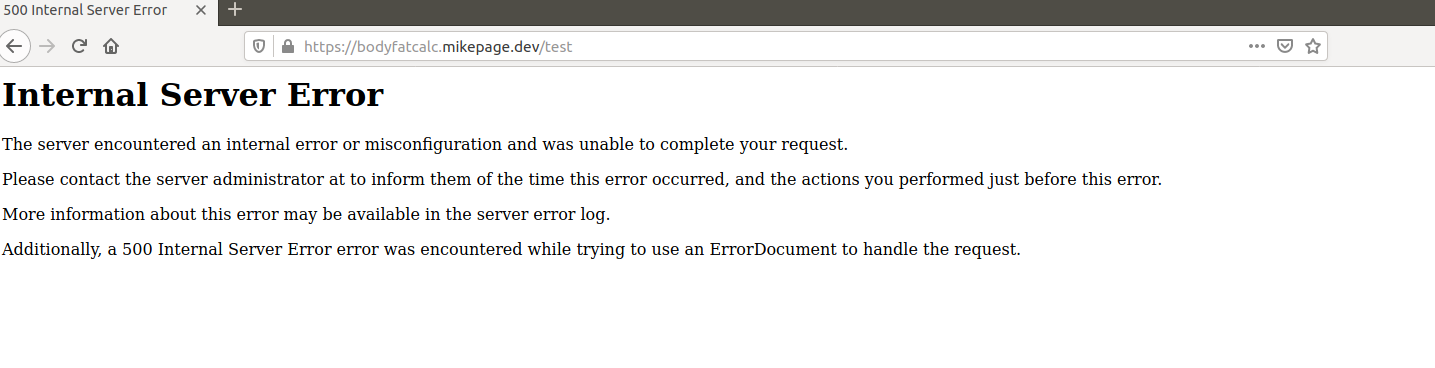
Does the 500 error look like a Laravel page?

It would be unusual for the framework to issue a 500 error and not be able to write anything to the logfile.

Perhaps your webserver itself is generating the 500 error?

MikePageDev's avatar

@sinnbeck

I'm going to give them a call today. The only thing that is making me think it's not the sever, is that I am getting the same problem on AWS and Digital Ocean to.

Sinnbeck's avatar

Can you post a screenshot of the 500 error page, so we can see if it is laravel or server that throws it?

Sinnbeck's avatar

Ok, then they can probably check the server logs for the error :)

MikePageDev's avatar
MikePageDev
OP
Best Answer
Level 4

It's fixed. It turns out that I needed to add the following

RewriteBase /

Before line 6 in the .htaccess file in public.

Thank you everyone for your help.

5 likes

Please or to participate in this conversation.