Be part of JetBrains PHPverse 2026 on June 9 – a free online event bringing PHP devs worldwide together.

JeffreyWay's avatar

Important Elixir Folder Change

Hey, everyone -

Quick note that I'm about to push an Elixir update that will change the base directory for your JavaScript and CSS files. Currently, the default is set to resources/js and resources/css, respectively; however, we're changing this to be more in line with your other assets, like Sass and CoffeeScript files.

So, now, the default locations will be resources/assets/js and resources/assets/css. If/When you update Elixir, be sure to check your Gulpfile to see if you need to update any paths.

And, of course, if you want to stick with the original default locations, you can override the base directory, like so:

mix.scripts(['one.js', 'two.js'], null, './resources/js');

It's possible that you're already doing this. If so, you don't need to do anything.

The third argument to both scripts() and styles() is for overriding the base directory. Okay, I'll push this change up right now.

image

0 likes
14 replies
RachidLaasri's avatar

Great update, i guess most of use already use "assets" folder.

Ramon's avatar

God bless you, Jeffrey. nice update.

unitedworx's avatar

I don't get that folder structure at all, both the old one or even the new one!

Why do I need to have my css or less or sass in different folders?

Isn't it better to keep the in a single folder called styles? Or a simple folder called scripts? If it's for the sake of compiling everything in a folder then you can easily tell what is what by the file extension! In any case this does not affect me, I think, since I like to keep my js and css files in respectively named folders inside my views. I find it much easier to have them in there since css/js/views control the presentation layer of my app

bashy's avatar

Yup, already use assets folder, it's a clear choice since there's a views folder etc...

rleger's avatar

I always found the old structure a bit inconsistent in that regard. Nice update, thanks.

tjm's avatar

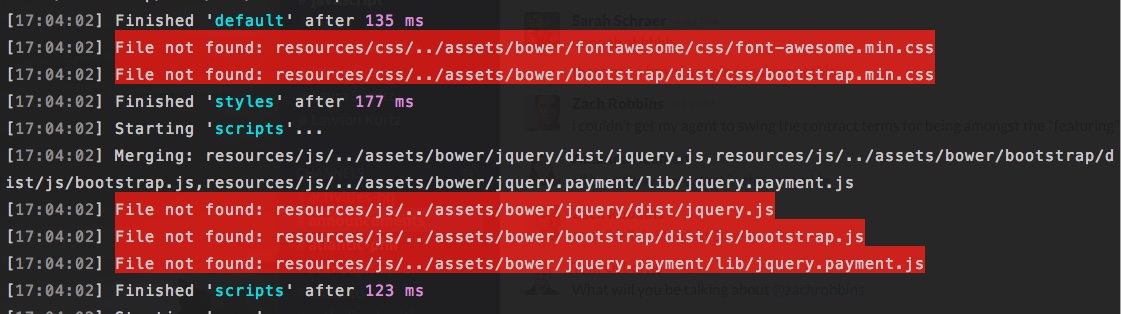
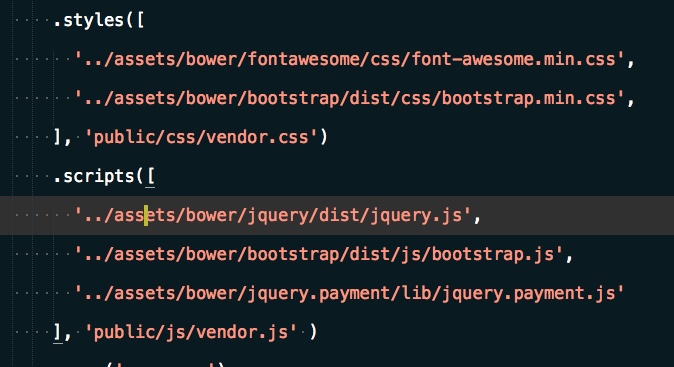
This is a totally welcome change! However, can this be released with a version number? I just cloned someone's repo relying on bower and the paths seem to be messed up?

Screenshot

and the gulpfile.js

Screenshot

JeffreyWay's avatar

@tjm - If you want the old default paths, stick with ~0.18.0 of Elixir. Otherwise, just set the third argument for those two method calls in your screenshot, and you're done. Two seconds.

Going forward, the main Laravel app will come with ^1.0.0 of Elixir, rather than *.

1 like
constb's avatar

@JeffreyWay I hope after it hits 1.0 there's gonna be less backwards incompatible changes. :)

developeritsme's avatar

@JeffreyWay - what I would like to see is possibility to change the default output path for mix.version(), actually I do not want to have build in my path appended.

// ingredients/version.js - 
buildDir = buildDir ? buildDir + '/build' : 'public/build'; // line 22
constb's avatar

@developeritsme I think the problem here is that on php side elixir() helper also has /build hardcoded. There's currently no config in the application that would be available to both php and gulp.js code. And creating one with the only purpose of making elixir version's build path customizable is an overkill.

Also, and I think it's important to understand, is that elixir is not exactly a general purpose build tool, but an instrument to help you start using gulp right away if you didn't use it before. As a result it (obviously) has limitations and opinionated defaults - which is good to start from, you know. But if you feel like it limits you, well, you can always use gulp without elixir and it's gonna work just fine. After all, elixir is nothing more than a simple wrapper around several popular gulp components.

5150studios's avatar

For anyone finding this from a Google search, here is what I did to solve it...

gulpfile.js Note the elixir.config line...

var elixir = require('laravel-elixir');

elixir(function(mix) {
    elixir.config.versioning.buildFolder = '/';

    mix.sass('app.scss');
    mix.styles('main.css');
    mix.browserify('app.js');
    mix.version(['css/main.css', 'css/app.css', 'js/app.js']);

    if (elixir.config.production) {
        mix.copy('resources/assets/images', 'public/images')
            .copy('node_modules/font-awesome/fonts', 'public/fonts');
    }

});

Bootstrap/Autoload.php included my helper file here instead of via composer.json

require __DIR__.'/../app/Helpers/views.php';
require __DIR__.'/../vendor/autoload.php';

/*
|--------------------------------------------------------------------------
| Include The Compiled Class File
|--------------------------------------------------------------------------

**.env ** Nice and handy...

...
ELIXIR_DIRECTORY=/
...

app/Helpers/views.php Taken directly from Support/Helpers.php and modded with env()

<?php

/**
 * Get the path to a versioned Elixir file.
 *
 * @param string $file
 *
 * @return string
 *
 * @throws \InvalidArgumentException
 */
function elixir($file)
{
    static $manifest = null;

    if (is_null($manifest)) {
        $manifest = json_decode(file_get_contents(public_path(env('ELIXIR_DIRECTORY', 'build').'rev-manifest.json')), true);
    }

    if (isset($manifest[$file])) {
        return env('ELIXIR_DIRECTORY', 'build').$manifest[$file];
    }

    throw new \InvalidArgumentException("File {$file} not defined in asset manifest.");
}

I hope this get's put into a config section under views.php or even app.php and then we can extend via .env from a fresh install of Laravel. The only reason I did this was to get rid of that ugly /build directory so I could just have a standard css, js, etc... folder in my /public folder.

Cheers.

1 like

Please or to participate in this conversation.