Level 73
Sounds to me that you forgotten to run npm run build to publish you JS and CSS.

Be part of JetBrains PHPverse 2026 on June 9 – a free online event bringing PHP devs worldwide together.

I am in the process of deploying laravel to cpanel . I have uploaded the files and everything is working except that format is broken for all pages except welcome page. I went back and did npm run build and still format broken. what can i do to fix this
Sounds to me that you forgotten to run npm run build to publish you JS and CSS.
I did that , app.css has something while app.js is empty. still styles are gone. is there any configuration that i ought to have done before uploading the files to cpanel?
@ojwando when you access the page locally, then you have npm run dev enabled, and the Vite server is running.
Since you shouldn't use a Vite server in production, you need to build the js and css, and then upload them.
I take it with upload you mean ftp.
I would suggest moving to using some kind of CI that does the build during your deploy.
Make sure that cPanel is publishing your public folder as the document root.
If you see public in your site’s urls then it’s a sign that it is configured wrong.
This can lead to broken urls for assets
I have my project in the folder blog.edufocus.co.ke in the root . in public_html i have a sub folder that contains the content of laravel public folder. index.php is here. in the root folder i also have public which contains build folder . I have tried to sort out this problem using the above suggestion but still no success.y if there is anyone understands this problem with the new information provided , kindly help
Put Laravel structure back how it should be. Delete public_html folder then recreate it as a symlink pointing to the project's public folder.
@Snapey my website is running. The problem is with styles. I've been wondering why app.js has nothing. When I add cdn link for tailwind the original format is back but wilh a vertical scrollbar. You have to scroll to see content but sidebar is just okay
@ojwando exactly. Yes, thats what we are trying to fix here.
When you load the site, with developer tools open, and network tab selected, you see broken uploads for your css.

Enable debug mode temporarily APP_DEBUG=true in .env to see detailed error messages probably you will figure a clue.
@Ayoola32 the site is running. The problem is styles

@ojwando can i see your index.php and vite.config.js file ?
` import { defineConfig } from 'vite'; import laravel from 'laravel-vite-plugin'; import tailwindcss from "@tailwindcss/vite";
export default defineConfig({
plugins: [
    laravel({
        input: ['resources/css/app.css', 'resources/js/app.js'],
        refresh: [`resources/views/**/*`],
    }),
    tailwindcss(),
],
server: {
    cors: true,
},
}); `
look at this, ignore the first one:import { defineConfig } from 'vite'; import laravel from 'laravel-vite-plugin'; import tailwindcss from "@tailwindcss/vite";
export default defineConfig({
plugins: [
    laravel({
        input: ['resources/css/app.css', 'resources/js/app.js'],
        refresh: [`resources/views/**/*`],
    }),
    tailwindcss(),
],
server: {
    cors: true,
},
});
``
@srushti_kansagara index.php
`<?php
use Illuminate\Foundation\Application; use Illuminate\Http\Request;
define('LARAVEL_START', microtime(true));
// Determine if the application is in maintenance mode... if (file_exists($maintenance = DIR.'/../storage/framework/maintenance.php')) { require $maintenance; }
// Register the Composer autoloader... require DIR.'/../../blog.edufocus.co.ke/vendor/autoload.php';
// Bootstrap Laravel and handle the request... /** @var Application $app */ $app = require_once DIR.'/../../blog.edufocus.co.ke/bootstrap/app.php';
$app->handleRequest(Request::capture());
`
@ojwando did you write this index.php on your own ??? also please provide the folder structure if you can
@srushti_kansagara i edited index.php and the file is the one i have already posted
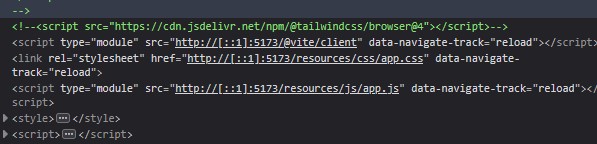
From what I can see on the URL you provided, it seems you haven't run npm run build. Indeed, the URLs are those of the Vite development server (npm run dev).
https://i.postimg.cc/3NZbgjg0/Capture-d-cran-2025-06-18-080832.jpg
@Vable i have run npm run build . I have public->build->assets/manifest and inside assets i have app-BlPSe9NK.css and app-l0sNRNKZ.js but app-l0sNRNKZ.js is empty
It's not what I can see here : https://blog.edufocus.co.ke/register Look at the source code. 👀
@Vable Does what you're seeing at https://blog.edufocus.co.ke/register suggest that I haven't run npm run build?
` c:\xampp\htdocs\exam-gen>npm run build
build vite build
vite v6.2.0 building for production... ✓ 2 modules transformed. Generated an empty chunk: "app". public/build/manifest.json 0.27 kB │ gzip: 0.15 kB public/build/assets/app-B4CTIKUE.css 165.41 kB │ gzip: 24.19 kB public/build/assets/app-l0sNRNKZ.js 0.00 kB │ gzip: 0.02 kB ✓ built in 5.16s `
@ojwando did you change your .env to APP_ENV=local to APP_ENV=production and changed the APP_URL ? also please try Clearing Laravel cache, view, route etc
@ojwando Have a look in the public folder of your application to see if there’s a "hot" file.
If it is present, delete it. Perhaps you have run an npm run dev on your production server or inadvertently transferred the "hot" file. This starts the Vite development server.
At that moment, Laravel detects this development mode due to the presence of the public/hot file. (which results in a URL like http://[::1]:5173/@vite)
@ojwando @ojwando shouldn't it be _DIR_
TRY THIS
https://www.iankumu.com/blog/deploy-laravel-on-shared-hosting/
@srushti_kansagara any strategy which starts with zip your files is flawed and should no5 be followed.
@Snapey ohh i didn't know that ... in my company i always deploy with the ftp they gave me the all the credentials tho so i don't know
Please or to participate in this conversation.