Be part of JetBrains PHPverse 2026 on June 9 – a free online event bringing PHP devs worldwide together.

Zalo's avatar
Level 19

NPM run prod in Forge

Hello all! I'm having a weird issue about deploying an app in Forge. I'm using a simple deploying script, with typical Laravel setup:

php artisan down
git pull
composer install
php artisan migrate
npm install
etc.

At the end, I have:

npm run prod
php artisan up

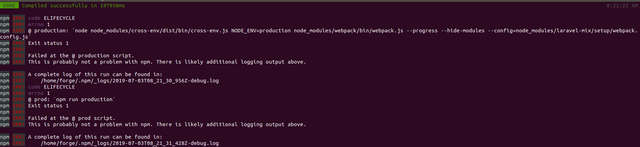
Here is the problem I guess. It take too long to complete the compilation 197950ms (thats is normal?), showing a 'compiled successfully' message, but, immediately after, it shows an error:

npm-prod

I dont know whats happening there. It compiles correctly but Forge assumes it finished with incorrect state, blowing up all my deploying script :( making impossible to execute php artisan up.

Any tip? Thx!

0 likes
7 replies
rawilk's avatar

Try checking your log files for more information.

Zalo's avatar
Level 19

Hi, thx for reply! Checking logs does not throw too much information...

0 info it worked if it ends with ok
1 verbose cli [ '/usr/bin/node', '/usr/bin/npm', 'run', 'production' ]
2 info using [email protected]
3 info using [email protected]
4 verbose run-script [ 'preproduction', 'production', 'postproduction' ]
5 info lifecycle @~preproduction: @
6 info lifecycle @~production: @
7 verbose lifecycle @~production: unsafe-perm in lifecycle true
8 verbose lifecycle @~production: PATH: /usr/lib/node_modules/npm/node_modules/npm-lifecycle/node-gyp-bin:/home/forge/app.my-site.com/node_modules/.$
9 verbose lifecycle @~production: CWD: /home/forge/app.my-site.com
10 silly lifecycle @~production: Args: [ '-c',
10 silly lifecycle   'node node_modules/cross-env/dist/bin/cross-env.js NODE_ENV=production node_modules/webpack/bin/webpack.js --progress --hide-modules --co$
11 silly lifecycle @~production: Returned: code: 1  signal: null
12 info lifecycle @~production: Failed to exec production script
13 verbose stack Error: @ production: `node node_modules/cross-env/dist/bin/cross-env.js NODE_ENV=production node_modules/webpack/bin/webpack.js --progress --$
13 verbose stack Exit status 1
13 verbose stack     at EventEmitter.<anonymous> (/usr/lib/node_modules/npm/node_modules/npm-lifecycle/index.js:301:16)
13 verbose stack     at EventEmitter.emit (events.js:198:13)
13 verbose stack     at ChildProcess.<anonymous> (/usr/lib/node_modules/npm/node_modules/npm-lifecycle/lib/spawn.js:55:14)
13 verbose stack     at ChildProcess.emit (events.js:198:13)
13 verbose stack     at maybeClose (internal/child_process.js:982:16)
13 verbose stack     at Process.ChildProcess._handle.onexit (internal/child_process.js:259:5)
14 verbose pkgid @
15 verbose cwd /home/forge/app.my-site.com
16 verbose Linux 4.15.0-1007-aws
17 verbose argv "/usr/bin/node" "/usr/bin/npm" "run" "production"
18 verbose node v10.16.0
19 verbose npm  v6.9.0
20 error code ELIFECYCLE
21 error errno 1
22 error @ production: `node node_modules/cross-env/dist/bin/cross-env.js NODE_ENV=production node_modules/webpack/bin/webpack.js --progress --hide-modules --$
22 error Exit status 1
23 error Failed at the @ production script.
23 error This is probably not a problem with npm. There is likely additional logging output above.
24 verbose exit [ 1, true ]

My npm version is 6.9.0

I dont know what is happening :(

rawilk's avatar

Hmm, maybe try running npm clean-install and then try running the command again.

Zalo's avatar
Level 19

I tried, but same error is throwed... It really weird. And its only happening in my dev server. In Production its working fine (after 94629ms building time). Hmmmm

Zalo's avatar
Zalo
OP
Best Answer
Level 19

Well, finally I found the solution. Its was about AWS machine... In Development It was a 'micro' instance, so increasing to a bigger one fixed the npm run prod problem. A micro instance only have 1GB of RAM and that was not enough for compiling assets :)

penmuji's avatar

If upgrading to a bigger machine is not an option, you can also try running your production script with the --silent flag:

npm run production --silent
4 likes
jozeperez's avatar

That worked for me. Why does --silent make it work?

1 like

Please or to participate in this conversation.