Max100's avatar

Laravel website - is this correct?

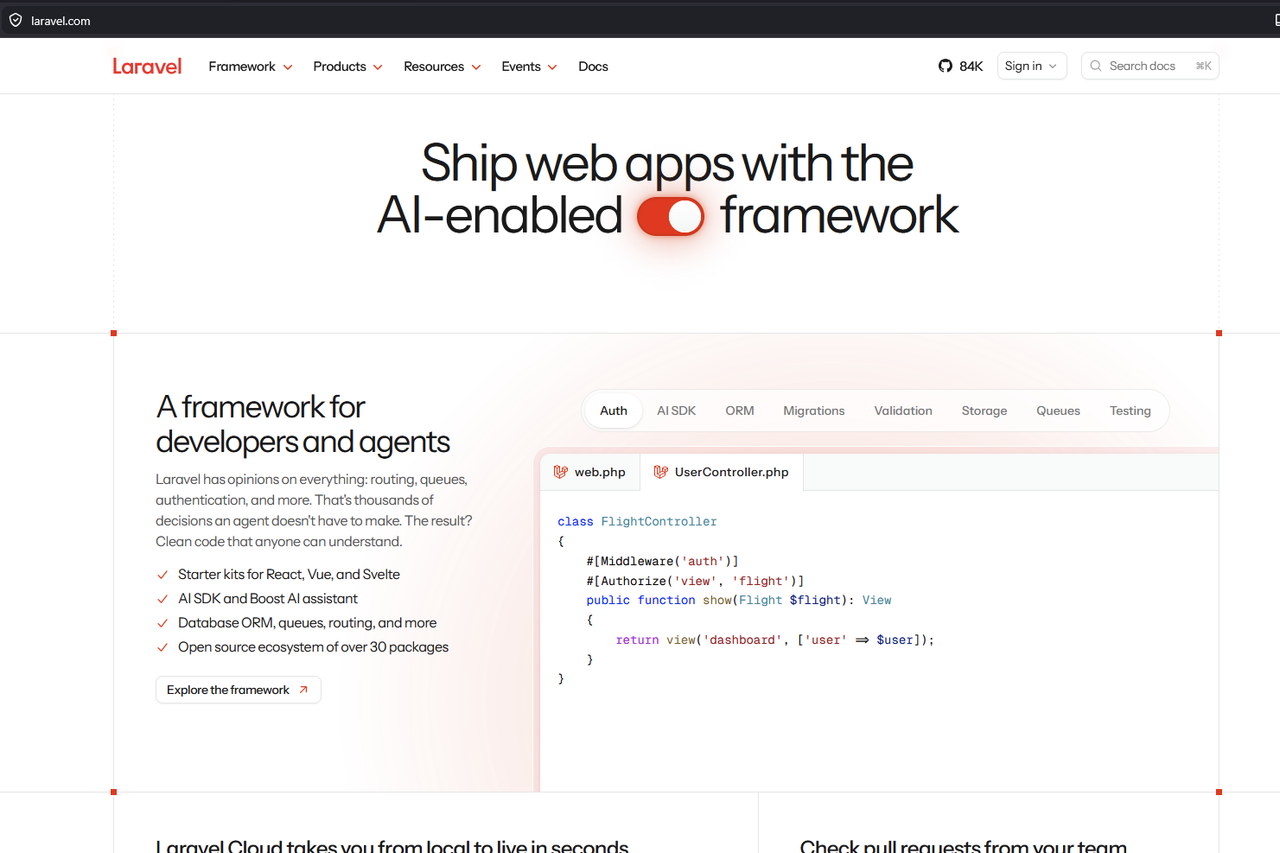
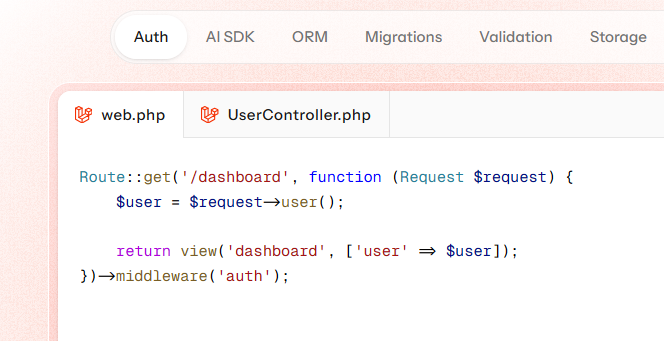
I happened to go to laravel.com and noticed the new site. It looks really good, but I was confused by something near the top of the first page. In the Auth example it shows 2 tabs:

Laravel_auth_example1.

Laravel_auth_example2.

The UserController seems wrong, but it's at the top of the front page, so maybe I just don't understand it. Is this code correct or just a typo?

3 likes
18 replies
LaryAI's avatar
Level 58

Certainly! Here is a solution addressing the question about the UserController example shown on the Laravel homepage:


The code examples shown in the screenshots from the Laravel homepage are meant to demonstrate how Laravel's route definitions and controllers work in a simple and elegant way. Here's what the code is showing:

Example 1:

Route::get('/profile', [UserController::class, 'show']);

This creates a route for the /profile URL, handled by the show method of UserController.

Example 2:

class UserController extends Controller
{
    public function show(Request $request)
    {
        return $request->user();
    }
}

This controller method receives the current Request object and returns the currently authenticated user (assuming authentication middleware is in place).

Is this correct?

Yes, the code is correct (for demonstration purposes)!
From an educational example point of view, nothing is wrong with this code. It shows:

  • How to define a route that points to a controller method.
  • A controller method that accesses the authenticated user via $request->user().

However, in a real-world scenario, you might want to:

  • Make sure the route is protected by authentication middleware, like so:
    Route::get('/profile', [UserController::class, 'show'])
        ->middleware('auth');
    
  • Consider returning a proper resource or view instead of just dumping the user instance, especially for APIs.

But for the purposes of an introductory example on the homepage, the code is correct and is intended to illustrate Laravel’s simple and expressive syntax. There doesn’t appear to be a typo.

Summary

  • The example is correct for Laravel's intended demonstration.
  • For production code, ensure you handle authentication and return responses suitable for your application.

If you try this code in a fresh Laravel app with authentication set up, it will work as shown!


Max100's avatar

You are seeing something different for both examples, so I'm not sure where you got those examples.

2 likes
jlrdw's avatar

That site doesn't look like laravel.com.

1 like
jlrdw's avatar

What link goes to that page?

1 like
JussiMannisto's avatar

laravel.com

If you don't see it, they may be doing canary testing before full roll-out.

1 like
jlrdw's avatar

I found it, he just has a tab showing auth example for route and one for controller, there is nothing wrong with that. Just quick preview stuff.

1 like
JussiMannisto's avatar

They mixed up FlightController and UserController. It uses a $user variable that doesn't exist.

1 like
vincent15000's avatar

Why do you have the FlightController class inside the UserController.php file ?

vincent15000's avatar

I have read the post, sure ... nothing is talking about this.

JussiMannisto's avatar

I have read the post, sure ... nothing is talking about this.

Then you didn't understand what you read.

They posted screenshots from laravel.com, the official website of Laravel.

Why do you have the FlightController class inside the UserController.php file ?

They don't. Laravel.com has.

2 likes
vincent15000's avatar

Oh ok ... I thought it was his own code.

Effectively it looks like the Laravel documentation ;).

DigitalArtisan's avatar

Its a play on words. Read the paragraph beside the images:

Laravel has opinions on everything: ...

Just add this code if you cannot rename the classes:

class_alias(
    App\Http\Controllers\UserController::class,
    App\Http\Controllers\FlightController::class
);
1 like
MadMikeyB's avatar

image

The laravel.com page is wrong, you're absolutely correct.

class FlightController

Should not exist in a file named UserController.php. Laravel's example on their marketing website is incorrect. If they've not yet been notified, they should be, and I have no doubt it will be fixed soon.

1 like
Max100's avatar

Thanks, that’s what I thought, but I was a bit confused. Hopefully they’ll fix it soon. Their proofreader needs some more coffee.

2 likes

Please or to participate in this conversation.