Be part of JetBrains PHPverse 2026 on June 9 – a free online event bringing PHP devs worldwide together.

nekooee's avatar

Vite with Laravel and Vue 3 show blank screen

I installed Laravel 9 and Vue 3. But when the Vue is mounted, all the elements inside the app are removed. vite.config.js:

import { defineConfig } from 'vite';
import laravel from 'laravel-vite-plugin';

export default defineConfig({
    plugins: [
        laravel([
            'resources/css/app.css',
            'resources/js/front.js',
        ]),
    ],
});

front.js:

import { createApp } from 'vue'

const app = createApp({
    data() {
        return {
            count: 0
        }
    }
})
app.mount('#app')

master.blade.php:

<!DOCTYPE html>
<html>
<head>
    @vite('resources/js/front.js')
    <title>test</title>
</head>
<body>
<div id="app">
    <div>test</div>
    <button @click="count++">@{{ count }}</button>
</div>
</body>
</html>

postcss.config.js:

module.exports = {
    plugins: {
        tailwindcss: {},
        autoprefixer: {},
    },
};

result:

<body>
<div id="app" data-v-app=""><!----></div>
</body>
0 likes
20 replies
nekooee's avatar

@MohamedTammam Thankful. I updated the vite.config.js:

import {defineConfig} from 'vite';
import laravel from 'laravel-vite-plugin';
import vue from '@vitejs/plugin-vue';

export default defineConfig({
    plugins: [
        laravel([
            'resources/css/app.css',
            'resources/js/front.js',
        ]),
        vue({
            template: {
                transformAssetUrls: {
                    base: null,
                    includeAbsolute: false,
                },
            },
        }),
    ],
    resolve: {
        alias: {
            '@': '/resources/js',
        },
    },
});

But there is still a problem!

nekooee's avatar

VueDevtools detected Vue, but the page is blank!

Screen Shot

nekooee's avatar

I added this alias to vite.config.js and now works fine!

  'vue': 'vue/dist/vue.esm-bundler.js'

but why? This is not said anywhere in the document!

7 likes
MohamedTammam's avatar

@nekooee TBH, I don't know.

Are you sure it doesn't work without the alias? Maybe because you just re-ran it again

nekooee's avatar

@MohamedTammam yes I am sure. When I searched on the internet, other people had the same problem and by adding this alias, their problem was solved. But I don't know why there is no such thing in the document or what is the difference in my project that needs this alias.

MohamedTammam's avatar

@nekooee Is it also the case if you import vue as a different name from @vitejs/plugin-vue

Example:

import vuePlugin from '@vitejs/plugin-vue';

export default defineConfig({
    plugins: [
        laravel([
            'resources/css/app.css',
            'resources/js/front.js',
        ]),
        vuePlugin({
            template: {
                transformAssetUrls: {
                    base: null,
                    includeAbsolute: false,
                },
            },
        }),
    ],
    resolve: {
        alias: {
            '@': '/resources/js',
        },
    },
});
nekooee's avatar

@MohamedTammam No, changing the name does not solve the problem. I get this warning in the console:

[Vue warn]: Component provided template option but runtime compilation is not supported in this build of Vue. Configure your bundler to alias "vue" to "vue/dist/vue.esm-bundler.js". 
  at <App>
thinkverse's avatar

@nekooee Please mark the solution so other users can find it if they have the same issue. 👍

1 like
jxjj's avatar

@nekooee Brilliant!! Thank you – aliasing vue to vue.esm-bundler.js worked. ✅

Here's my working vite.config.ts for the curious:

import { defineConfig } from "vite";
import laravel from "laravel-vite-plugin";
import vue from "@vitejs/plugin-vue";

export default defineConfig({
  plugins: [
    laravel(["resources/assets/js/app.ts"]),
    vue({
      template: {
        transformAssetUrls: {
          base: null,
          includeAbsolute: false,
        },
      },
    }),
  ],
  resolve: {
    alias: {
      "@": "/resources/assets/js",
     // use vue's runtime compiler to support vue components
     // directly within blade templates
      vue: "vue/dist/vue.esm-bundler.js",
    },
  },
  envPrefix: ["VITE_", "MIX_"],
});

I guess I need this because I have vue components directly in my blade templates, so they require runtime compilation to render:

From https://github.com/vuejs/core/tree/main/packages/vue#with-a-bundler:

vue.esm-bundler.js: includes the runtime compiler. Use this if you are using a bundler but still want runtime template compilation (e.g. in-DOM templates or templates via inline JavaScript strings). You will need to configure your bundler to alias vue to this file.

1 like
musuyaba's avatar

@nekooee I followed your answer but that is not working.

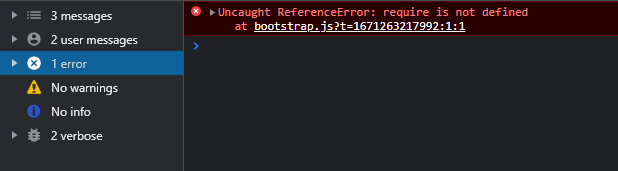
check-the-error-in-console.png I figure there is an error on bootstrap.js so I change the code like these.

// replace
// window._ = require('lodash');
// with
import _ from 'lodash'
window._ = _

and

// replace
// window.axios = require('axios');
// with
import axios from 'axios';
window.axios = axios;

window.axios.defaults.headers.common['X-Requested-With'] = 'XMLHttpRequest';

Maybe this will help someone.

nekooee's avatar

@musuyaba With Vite, you should use only "import" inside your js and vue files. The Vite does not define "require". please read the Vite document

Nick76's avatar

I had the issue of the blank screen, did several things so thought of sharing.

  1. Updated my nodejs version to the latest, then ran npm install then npm run dev. (Was using node v14, vite is not supported hence the error vite not found)
  2. I had not loaded my scripts with @vite(['resources/css/app.css', 'resources/js/app.js']), this can be found here: laravel.com/docs/9.x/vite
nekooee's avatar

@denifelixe I meant Laravel documentation. Of course, this post is old and may have been updated by now. Even in the Vue document, it may have been added later.

denifelixe's avatar

@nekooee Yup, I know this post is old, but I've just left the trace for someone who might encounter the same problem in the future. The same case for me. I landed on this post because I had the same problem. And the problem/issue you asked about is not specifically related to Laravel (That's why you won't find it in Laravel Docs). It's the Vue things.

Build tools (like Vite) main purpose is actually for SFC things. And for SFC, things are pre-compiled with <template></template> in the .vue files. So that's why the ideal is you should put nothing inside the root element because the element is defined in the .vue files.

If you want to Vue to work with the element that existed in the root element, ideally you should just use the global build that you can build with just one file that contains only importing and include the builded .js file in your html, or you can just use the CDN.

1 like

Please or to participate in this conversation.