Mnowak's avatar

Static image handling help with Laravel 9 and Vite

We are on a new Laravel 9 project and trying to understand how to use Vite to show a static image. We are using the Vite facade inside a blade template to show an image like this:

<img src="{{ Vite::asset('resources/images/home/map_1.png') }}" alt="" />

The rendered HTML looks like this, on our local development machine:

<img src="http://127.0.0.1:8000/build/assets/map_1.ad008ab0.js" alt="">

That js file is loading the static file and exporting it:

const a="/build/assets/map_1.0a1f870c.png";export{a as default};

But no image appears. I am more of a back-end guy but can you have the src of img tag be a javascript file? Is there some script or some other component that we are missing that will load the file and actually render the image?

0 likes
24 replies
rodrigo.pedra's avatar
  1. Create the directory ./public/images/
  2. Move your static images there (mind any sub-directories you are using)
  3. Use the asset() helper instead of Vite::asset()
<img src="{{ asset('images/home/map_1.png') }}" alt="" />

Note you don't need to add public when calling asset()

If you want to automate file copying, you can write a js file and add as a package.json script, or call (import) it from your vite.config.js . Use plain node functions for copying.

Or you can write an Envoy script and copy the assets before running npm run prod

references:

Mnowak's avatar

Hi Rodrigo. That's what we decided to do as a fall back but shouldn't I be able to use Vite::asset() (available now in Laravel 9.26 and later) and edit up with a versioned document? By default Laravel sets up public in the .gitignore file so we were trying to avoid putting stuff in public and trying to do it the new "right" way.

rodrigo.pedra's avatar

@Mnowak but you can keep your assets into the resources folder, and only copy them to public when deploying.

That is the idea of having a deploy script =)

Mnowak's avatar

@rodrigo.pedra yes but npm run build does copy the resources to public/build just in that odd JavaScript format that we’re trying to get our heads around.

rodrigo.pedra's avatar

I decided to delay using vite until rollup version 3 is released. Currently if you run your production building you can end up with different file hashes when using assets versioning, even when the file contents haven't changed a letter. And having the assets cache cleared on every deploy is a show stopper for me right now.

I understand the idea of doing things "right", but "right" is what makes sense for each project. Laravel Mix provided a helper to copy folders and files to the public folder on building. ~~Vite does not and won't from a github issue I will find the link and post here~~ (edit: it now does).

You can add rollup scripts on vite's pipeline to mimic that feature, when I was experimenting with Vite I did that. This was my vite.config.js file.

import {execSync} from 'child_process';
import path from 'path';
import {defineConfig, splitVendorChunkPlugin} from 'vite';
import laravel from 'laravel-vite-plugin';
import svgLoader from 'vite-svg-loader';
import vue from '@vitejs/plugin-vue';
import {viteStaticCopy} from 'vite-plugin-static-copy';

const generateRoutes = function generateRoutes() {
    [
        'php artisan ziggy:generate --url=/ --group=app',
        'php artisan ziggy:generate ./resources/js/ziggy-registration.js --url=/ --group=registration',
        'php artisan ziggy:generate ./resources/js/ziggy-internal-registration.js --url=/ --group=internal-registration',
    ].forEach(function (command) {
        console.log(command);
        execSync(command, {cwd: __dirname, stdio: [0, 1, 2]});
    });
};

export default defineConfig({
    plugins: [
        {
            name: 'ziggy-pre',
            enforce: 'pre',
            buildStart: generateRoutes,
        },
        {
            name: 'ziggy-hot',
            enforce: 'post',
            handleHotUpdate({file}) {
                if (file.includes('/routes/') && file.endsWith('.php')) {
                    generateRoutes();
                }
            },
        },
        viteStaticCopy({
            targets: [
                {src: path.join(__dirname, '/resources/images'), dest: path.join(__dirname, '/public')},
                {src: path.join(__dirname, '/resources/favicon'), dest: path.join(__dirname, '/public')},
                {src: path.join(__dirname, '/resources/favicon/favicon.ico'), dest: path.join(__dirname, '/public')},
            ],
        }),
        laravel({
            input: [
                'resources/sass/app.scss',
                'resources/sass/home.scss',
                'resources/js/client-light.js',
                'resources/js/client-dark.js',
                'resources/js/registration.js',
                'resources/js/internal-registration.js',
            ],
            ssr: 'resources/js/ssr.js',
        }),
        vue({
            template: {
                transformAssetUrls: {
                    base: null,
                    includeAbsolute: true,
                },
                compilerOptions: {
                    whitespace: 'preserve',
                },
            },
        }),
        svgLoader(),
    ],
    resolve: {
        alias: {
            '@': path.join(__dirname, '/resources'),
            ziggy: path.join(__dirname, '/vendor/tightenco/ziggy/dist/index.m.js'),
        },
    },
    build: {
        chunkSizeWarningLimit: 1024,
    },
});

I also use envoy for both commiting and deploying my personal projects. Envoy is a first-party package, so in the sense of doing what seems "right" there is no harm on using it.
1 like
rodrigo.pedra's avatar

This is one tweet I read back when Laravel Vite was launched where staying with mix is recommended if missing any Mix feature:

https://twitter.com/taylorotwell/status/1540453587918422016

But it is clear that now it does support it:

https://laravel.com/docs/9.x/vite#blade-processing-static-assets

There is also another tweet in reply to a user stating migrating an existing project was being difficult, and Taylor responds:

Just don’t migrate to Vite then?

https://twitter.com/taylorotwell/status/1562454810414047239

I remember reading from a core member that Mix was built to be an abstraction over Webpack complexity, while Laravel Vite does not have this goal. But I can't find it, yet. If I find it later I post it here.

rodrigo.pedra's avatar

Oh, it was a direct message reply from a Laravel core member that worked creating Laravel Vite when I asked her about some issues I was having with extracting SFC style tags in Vue:

The Laravel Vite plugin is a bit different from Mix because it doesn't wrap Vite in the same way that Mix wrapped webpack. It's intended to just help to configure Vite in a way that makes sense for Laravel, leaving the developer free to use any other Vite features they like without needing it to be implemented in our plugin.

At second thought I decided to remove the screenshot as I didn't ask her for permission. But as she replied back in July, the view on what Laravel Vite plugin should do could have changed

1 like
Mnowak's avatar

Thanks will look into that. Vite is currently built into Laravel 9 so it is a little hard to avoid.

rodrigo.pedra's avatar

@Mnowak

Vite plugin was added on a minor release. You can still use Mix perfectly, it won´t go anywhere anytime soon.

Whenever you can, read the following blog post it is a classic:

https://mcfunley.com/choose-boring-technology

And finally, what I shared was my vite.config.js, which I saved for waiting Rollup 3 release.

Until there I can't deploy it as the versioning hashes are inconsistent which bust cache if we deploy during commercial hours. As Vite's by default do lazy loading of scripts and keeps its internal cache of hashes before loading any file, if some hash changed while a user is logged in it will try to load an old hash that won't exist.

Mnowak's avatar

@rodrigo.pedra I don’t think a fresh Laravel install has any static images to try out. When I get to my desk I will post my vite.config.js but I think it’s basically what you get out of the box. Can you try a static image in the resources directory with your fresh install?

rodrigo.pedra's avatar

@Mnowak

I don’t think a fresh Laravel install has any static images to try out

Of course it doesn't. I meant a fresh install in the sense of using the latest Laravel version.

I added an image, altered the welcome.blade.php file to reference the image, and the app.js file to add the import to an app's entry point. This is a key part, as a dangling import that is not referenced nowhere else won't work as you expect. This is related to this part from Laravel Vite's docs:

However, it lacks some features that Laravel Mix supports, such as the ability to copy arbitrary assets into the build that are not referenced directly in your JavaScript application.

https://laravel.com/docs/9.x/vite#vite-or-mix

A fresh install also does not include the changes outlined in the docs.

  • Why do you think I would test it without adding an image?
  • Why would I state it works out-of-the box at the same time when I said I followed the documentation?
  • Why would I waste my time trying to help someone without actually testing something when I said I did?
  • What would you think if I affirmed you didn't read the docs, by saying something like "I don't believe the docs says what you said you did"?

Well, you can refer to this issue, where they recommend linking a storage directory for static assets. You can link a resources sub-directory, read the docs, it won't be available out-of-the-box on a fresh Laravel install:

If they recommended to keep static assets separated from generated content, this approach can also be classified as the "right" way, doesn't it?

Or maybe you can manage to provide a reproduction repository for this issue, as in some other issues reported -- with the same problem you describe -- core team members didn't seem to be able to reproduce - neither I did.

If you believe there is an actual problem, open an issue in Laravel GitHub's issue tracker. You can reference this thread to flag you already asked for support on the support forums.

Good luck, and have a nice day =)

Mnowak's avatar

I would love to hear if anyone else has gotten Vite to work with a static image on Laravel 9.26 or later.

1 like
Mnowak's avatar

Thanks for all your help which we appreciate. We did do the steps outlined in the docs including adding:

import.meta.glob(["../images/**", "../fonts/**"]);

to resources/js/app.js.

We also added the Vite facade to config/app.php:

 'aliases' => Facade::defaultAliases()->merge([
        // 'ExampleClass' => App\Example\ExampleClass::class,
        'Vite' => \Illuminate\Support\Facades\Vite::class,
    ])->toArray(),

This was based on following the instructions here: https://laravel.com/docs/9.x/vite#working-with-blade-and-routes

I will try creating a basic project with one image and then I can submit an issue in Github.

@rodrigo.pedra Could you explain why Vite might generate a reference to an image like this:

<img src="http://127.0.0.1:8000/build/assets/map_1.ad008ab0.js" alt="">

where the contents of /build/assets/map_1.ad008ab0.js is:

const a="/build/assets/map_1.0a1f870c.png";export{a as default};
rodrigo.pedra's avatar

@Mnowak

I am sorry, but I won't invest any more of my volunteer time in this thread.

If you believe this thread is not receiving attention from other responders due to the amount of messages already here, I don't think there will be a problem on opening a fresh thread, people will understand.

Also, as I said before, you can try reporting the issue you are having on Laravel's issue tracker. Feel free to reference this thread as an attempt to seek help on support forums.

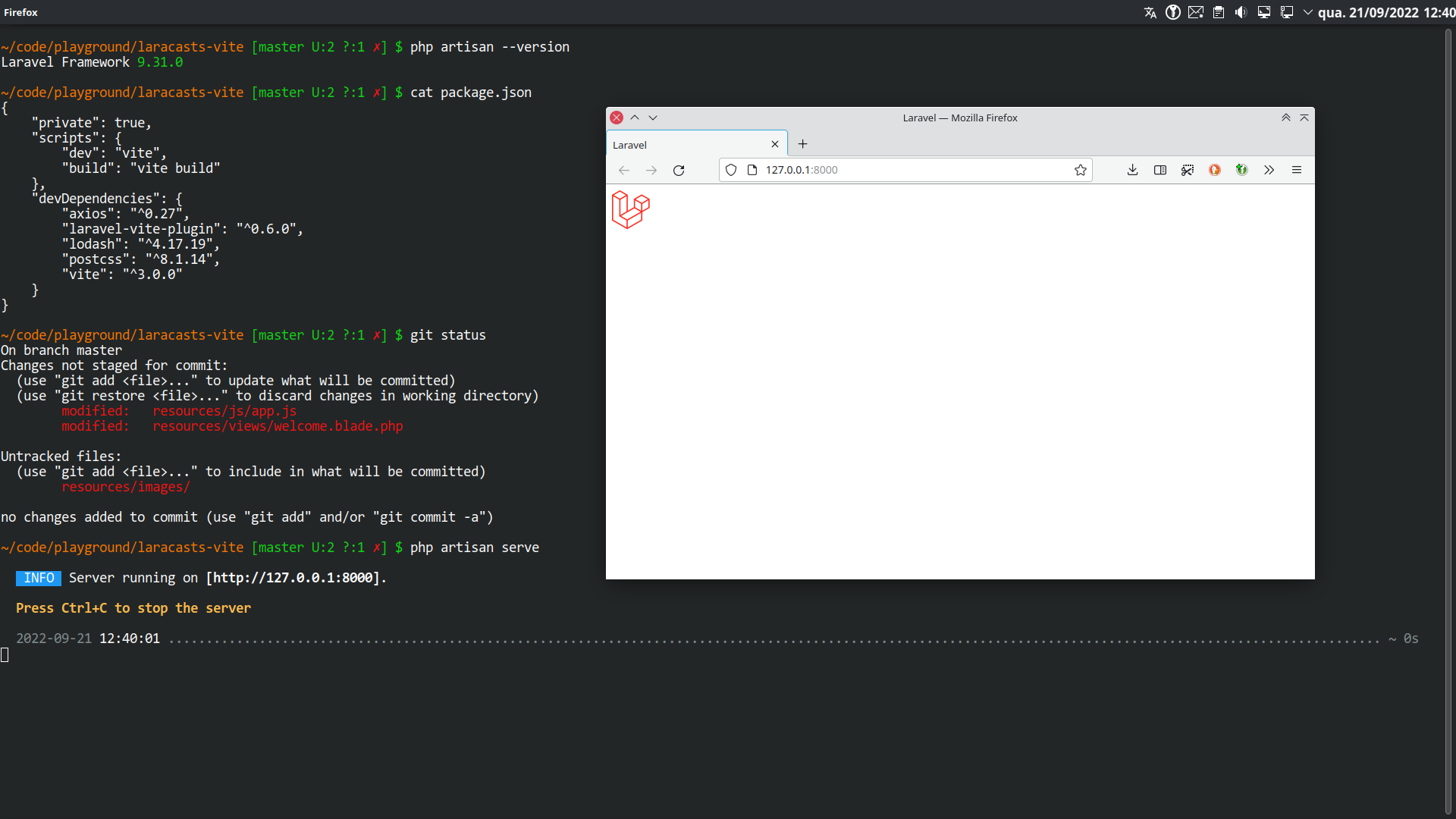
And to show I actually tried it on a fresh install, here is a screenshot of the test I did:

I wish you the best luck on finding a solution to your issue. Have a nice day =)

Sinnbeck's avatar

@Mnowak if you create an issue on the official issue tracker, remember to create a demo repo with the problem. :)

1 like
Mnowak's avatar

@rodrigo.pedra Incidentally, I apologize if I didn't make this clear -- it works for us when you use:

npm run dev

It didn't work for us when we run:

npm run build
Mnowak's avatar

@rodrigo.pedra I appreciate your time -- if you could post your blade template source, that might help us understand your solution but I understand if you don't have anymore time.

Mnowak's avatar
Mnowak
OP
Best Answer
Level 2

By creating a fresh project, I was finally able to figure it out -- our project was using vite 3.0.4. When I installed the new project -- it did work as @rodrigo.pedra suggested but the version of vite in package.json was different, being vite 3.1.3. That fixed the issue.

3 likes
alisalehi's avatar

If you use Vite::asset() to call the images from /resources/images directory, you must according to the Laravel document Processing Static Assets With Vite

import.meta.glob([
 '../images/**',
 '../fonts/**',
]);

add in the app.js file so that it is included in the manifest.json file when running npm run build.

I hope it is useful.

2 likes

Please or to participate in this conversation.