
cxbdia's avatar

Just started using Vite. No app.css or app.js file found

I've just migrated from Laravel Mix to Vite when I upgraded from Laravel 8 to Laravel 10. I have made all the changes as suggested by Laravel Shift.

In my blade layout file, I'm referencing the app.css and app.js file using

@vite(['resources/css/app.css', 'resources/js/app.js'])

When I open the browser source code, I see this:

<script type="module" src="http://0.0.0.0:5173/@vite/client" data-navigate-track="reload"></script>

<link rel="stylesheet" href="http://0.0.0.0:5173/resources/css/app.css" data-navigate-track="reload" />

<script type="module" src="http://0.0.0.0:5173/resources/js/app.js" data-navigate-track="reload"></script>

On opening http://0.0.0.0:5173, I see the vite landing page (screenshot below)

enter image description here

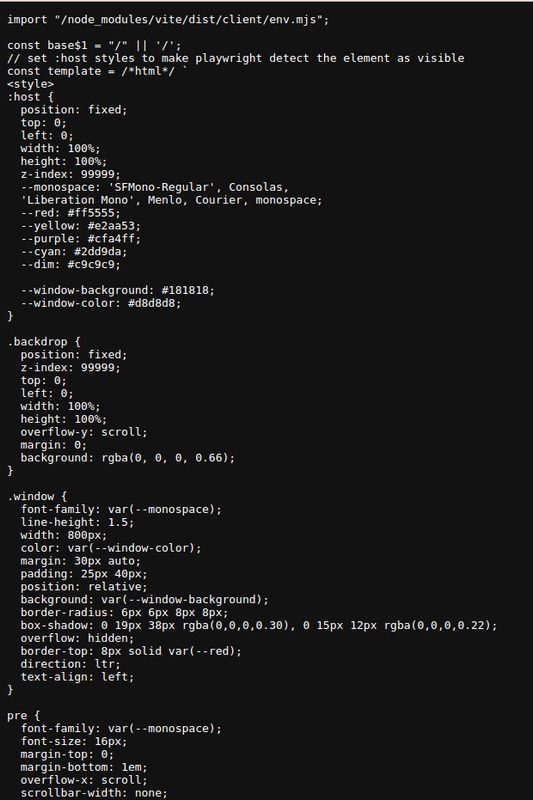
When I open the first URL from above http://0.0.0.0:5173/@vite/client in a browser, I see the following:

enter image description here

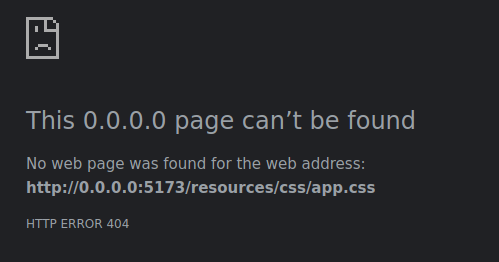
And opening the other files shows me this error (for both app.js and app.css):

enter image description here

Due to app.css and app.js not being loaded, no styles are being applied to my layout. How do I fix this?

My vite.config.js is as follows:

import { defineConfig } from 'vite';
import laravel from 'laravel-vite-plugin';

export default defineConfig({
	server: {
		host: '0.0.0.0',
	},
    plugins: [
        laravel({
            input: [
                'resources/css/app.scss',
                'resources/js/app.js',
            ],
            refresh: true,
        }),
    ],
});

Additionally, npm run build generates files in public/build/assets which have random suffixes to app.js and app.css

public/build/manifest.json               0.39 kB │ gzip:  0.16 kB
public/build/assets/app-ff1b956e.css   257.18 kB │ gzip: 38.75 kB
public/build/assets/app-d379582c.js    106.47 kB │ gzip: 32.96 kB

How is my application supposed to know what suffixes will be assigned to these assets so that I can reference them in my layout files to be loaded? I'm pretty sure I'm doing something wrong fundamentally but after going through numerous articles and also the laravel documentation on Vite, I'm still not finding an answer on how to embed my vite assets into my blade files.

0 likes
11 replies
LaryAI's avatar
Level 58

It looks like you've set up Vite correctly in your vite.config.js file, but you're encountering issues with loading the assets in your Blade templates. Vite handles assets differently compared to Laravel Mix, and it uses an asset manifest to map the source files to their output files, which include the hash for cache busting.

Here's how you can fix the issue:

  1. Ensure that Vite's development server is running when you're working in development mode. You can start it using the following command:
npm run dev
  1. In your Blade layout file, you should use the @vite directive as you've done, but make sure that the paths you provide match the input files specified in your vite.config.js. Since you're using app.scss as an input file, you should reference it instead of app.css:
@vite(['resources/css/app.scss', 'resources/js/app.js'])
  1. When you build your assets for production using npm run build, Vite will generate the assets with hashes in their filenames and update the manifest.json file accordingly. Laravel's Vite integration will automatically use this manifest to resolve the correct asset paths in your Blade templates.

  2. Make sure that you have installed the laravel-vite-plugin package and that it is up to date. This package provides the integration between Laravel and Vite, including the Blade directive that resolves the asset paths using the manifest file.

  3. If you're still having issues, clear your Laravel view cache using the following command:

php artisan view:clear
  1. Also, ensure that you're not caching the configuration or routes during development, as this can cause issues with asset loading. You can clear the configuration cache with:
php artisan config:clear

And clear the route cache with:

php artisan route:clear

By following these steps, your application should be able to resolve the correct paths for app.js and app.scss (which compiles to app.css) both in development and production. The @vite directive will handle the inclusion of the correct asset paths in your Blade templates.

cxbdia's avatar

Tried all of the steps above, did not work.

sirwan's avatar

Having the same issue, npm run build, generates the hashed css file in public/build/assets/app-AG5kxafP.css but @vite(['resources/sass/app.scss', 'resources/js/app.js']) is not pulling the hashed css file from build/assets/ its grabbing the app.scss instead of the hashed version ..

martinbean's avatar

@cxbdia @sirwan You’re both opening the wrong URL. You want to open your application’s URL and not the Vite server URL.

yabdab's avatar

Make sure that the "hot" file (vite uses) did not get accidentally published to your production server.

2 likes
leoramsy's avatar

@yabdab This just saved be the few remaining hairs left in hair. Thanks!

1 like
lmottasin's avatar

@yabdab Thanks, stuck about this and found your solution. btw you can find hot file public/hot

1 like
Asr's avatar

i have faced similar issue that after npm run build the styles and js not working . so in the APP_ENV=production in the app.blade or the main layout file @if (app()->environment('local')) @vite(['resources/css/app.css', 'resources/js/app.js']) @else @php $manifest = json_decode(file_get_contents(public_path('build/manifest.json')), true); @endphp <link rel="stylesheet" href="{{ asset('build/' . $manifest['resources/css/app.css']['file']) }}"> <script src="{{ asset('build/' . $manifest['resources/js/app.js']['file']) }}" defer></script> @endif this fixed my issue

Please or to participate in this conversation.