Level 7
I got this working with this alpine code, but for some reason x-init doesn't work but @click does
x-data="{ scroll: () => { $el.scrollTo(0, $el.scrollHeight); }}"
x-init="scroll()"
@click="scroll()"
1 like
Summer Sale! All accounts are 50% off this week.
I am trying to get scrolling to the bottom working for chat messages as default with Alpine Js or Livewire. Sorta how regular chat messengers work.
I am currently doing some JS tutorials, but having trouble with understanding how to get this to work with alpine. I found a bunch of examples of this.

<div class="flex h-80 w-48 bg-blue-100  m-4 p-4 overflow-hidden">
    <div class="chat_container h-full w-full overflow-y-auto flex flex-col space-y-4 bg-green-200 "
        x-ref="scrollToBottom"
        x-data="{scroll: () => {
            var el = this.$refs.scrollToBottom;
            el.scrollTop = el.scrollHeight;
        } }"
        x-init="scroll()"
        >

        <div class="h-56 w-full flex flex-none bg-red-200">
                Test Content
        </div>
        <div class="h-56 w-full flex flex-none bg-red-200">
            Test Content
        </div>
        <div class="h-56 w-full flex flex-none bg-red-200">
            Test Content
        </div>

    </div>
</div>
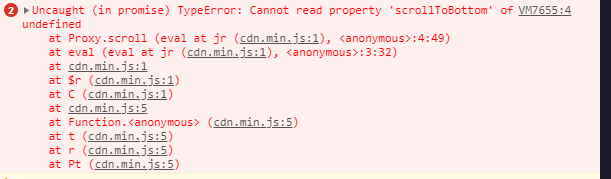
I am getting this error, but honestly my entire code could be wrong
Some examples I found https://stackoverflow.com/questions/270612/scroll-to-bottom-of-div
function scrollToBottom (id) {
   var div = document.getElementById(id);
   div.scrollTop = div.scrollHeight - div.clientHeight;
}
https://codepen.io/jakub003/pen/xxdLYgr
$(function scrollToBottom() {
    var ChatDiv = $('.chat_container');
    var height = ChatDiv[0].scrollHeight;
    ChatDiv.scrollTop(height);
});
Is there some tips on how to convert js code to work with alpine in general?
I was able to use the alpine plugin intersect to somewhat get this working
x-data="{ scroll: () => { $el.scrollTo(0, $el.scrollHeight); }}"
x-intersect="scroll()"
Its a good solution for now :)
Please or to participate in this conversation.