Level 24
i remeber is 2 hours if no action, u will get that page
but i just press ctrl+F5 in Firefox then all is fine
Summer Sale! All accounts are 50% off this week.
The page with the form:
    <form method="POST" action="{{ route('admin.users.update', $user) }}">
         @method('PUT')
         @csrf
         . . .
... was opened in Firefox for some time and there was no activity (I was AFK).
When I came back and tried to submit it - I got the following message:
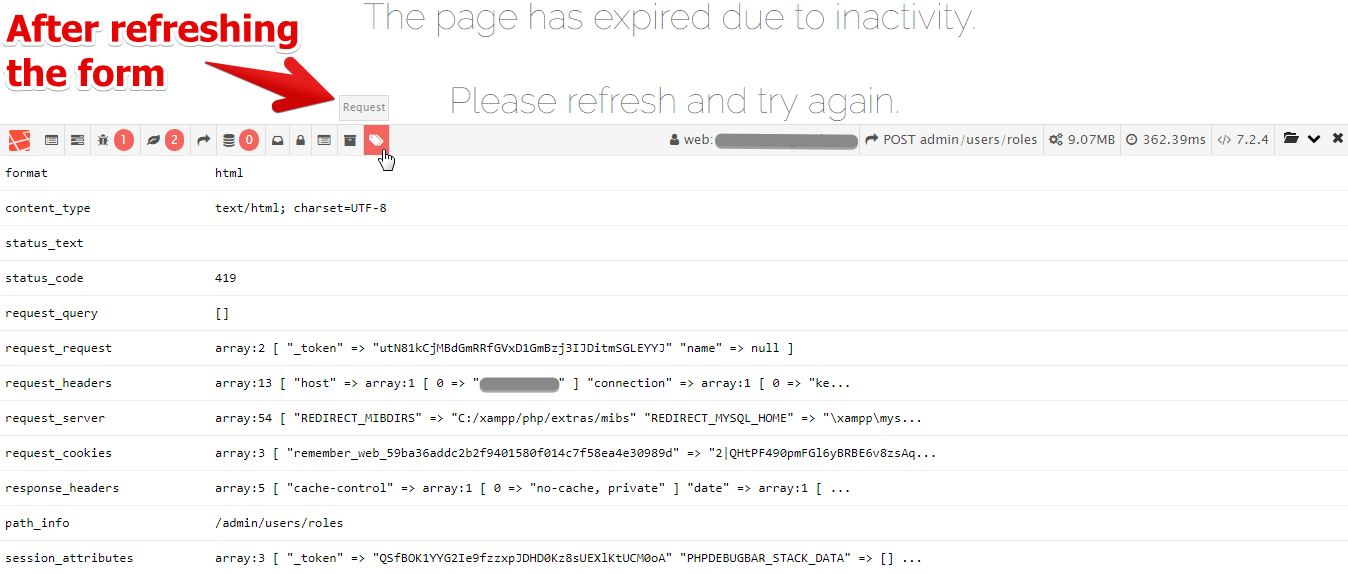
The page has expired due to inactivity. Please refresh and try again.
... which was expected. But the problem is that I cannot get rid of this message.
Going back one page and refreshing the form (_Ctrl + Shift + R_ to get the new token) doesn't solve the problem - I'm still getting this error message.
I also tried to clean browser's cache and Laravel cache (php artisan cache:clear, php artisan config:clear, php artisan view:clear) - but that didn't work.
Closing and re-opening the browser seems to solve this problem sometimes.
############################
I'm worried about the end users of the website, if that happens to them - they will be lost...
As for the possible misconfiguration (on my side) - session.php was not changed after installation:
'driver' => env('SESSION_DRIVER', 'file'),
'lifetime' => env('SESSION_LIFETIME', 120),
'expire_on_close' => false,
'encrypt' => false,
'files' => storage_path('framework/sessions'),
'connection' => null,
'table' => 'sessions',
'store' => null,
'lottery' => [2, 100],
'cookie' => env(
    'SESSION_COOKIE',
    str_slug(env('APP_NAME', 'laravel'), '_').'_session'
),
'path' => '/',
'domain' => env('SESSION_DOMAIN', null),
'secure' => env('SESSION_SECURE_COOKIE', false),
'http_only' => true,
'same_site' => null,
... and there's nothing in .env that is used in config/session.php except:
SESSION_DRIVER=file
SESSION_LIFETIME=120
... which was already there after installing Laravel.
Please or to participate in this conversation.