ezrabutler's avatar

POSTing from Javascript

Hi! I'm trying to create a two button counter (using Javascript) that counts the clicks and then posts the final tally to my SQLite DB. (It actually pops each click's time onto an array, and then sends the length of the array and the array to the DB after a second of no clicks.) The Javascript logic has been tested and works, besides for the $.post function. But I am receiving a 405 (Method Not Allowed) in the console and I have no idea why. I'd really appreciate any help! Thank you!

Route:

    Route::get('Moods', 'MoodsController@postMoods');

Script:

$(document).ready(function(){
    var timer;
      
       var happymood = [];
        $('#Happy').click( function() {
            clearTimeout(timer);
            nothappymood = [];
            happymood[happymood.length] = new Date($.now());
            timer = setTimeout(function() {$.post('http://localhost:8000/Moods', {
                                            valence: '0',
                                            magnitude: happymood.length,
                                            times: happymood.slice()
                                            });  happymood =[];}, 1000);
    });
            var nothappymood = [];
         $('#NotHappy').click( function() {
                clearTimeout(timer);
                happymood = [];
                nothappymood[nothappymood.length] = new Date($.now());
                timer = setTimeout(function() {$.post('http://localhost:8000/Moods', {
                                        valence: '1',
                                        magnitude: nothappymood.length,
                                        times: nothappymood.slice()
                                            }); nothappymood =[];}, 1000);
    });
});

Controller:

class MoodsController extends Controller
{
  public function postMoods(Request $request) {
        $valence = $request->input('valence');
        $magnitude = $request->input('magnitude');
        $times = $request->input('times');
    }
}

HTML:

          <button class="btn btn-primary" id='Happy' type="submit">Happy</button>
           <button class="btn btn-primary" id='NotHappy' type="submit">Not Happy</button>

Table:

Schema::create('moods', function (Blueprint $table) {
          $table->increments('id');
          $table->boolean('valence');
          $table->integer('magnitude')->unsigned();
          $table->datetime('times');
        });
0 likes
18 replies
ezrabutler's avatar

@zachleigh fixed that (the most embarrassing mistake ever), but now I luckily have a 500 (Internal Server Error) instead :)

zachleigh's avatar

Are you doing anything else in the controller? Is there a stack trace with the 500 error? (You can usually see it from browser dev tools.)

ezrabutler's avatar

@zachleigh Thanks so much for helping. Here it is:

jquery.js:8630 
POST http://localhost:8000/Moods 500 (Internal Server Error)
k.cors.a.crossDomain.send @ jquery.js:8630
n.extend.ajax @ jquery.js:8166
n.(anonymous function) @ jquery.js:8311
(anonymous function) @ functions.js:8
zachleigh's avatar

You probably need to send the csrf token in your ajax call.

1 like
ezrabutler's avatar

I'm still completely at wit's end about this. The biggest problem is that I'm not sure where exactly the problem is: i.e. if it is coming from the JS side or the Laravel side.

My updated code is:

Route

Route::post('moods', 'MoodsController@post');

Controller

public function post(Request $request) {
        $moods = New Moods;
        $moods->valence = $request->valence;
        $moods->magnitude = $request->magnitude;

        $moods->save();
        return redirect()->back();
    }

Javascript

$(document).ready(function(){
                var timer;
        var happymood = [];
        $('#Happy').click( function() {
                clearTimeout(timer);
            nothappymood = [];
            happymood[happymood.length] = new Date($.now());
            timer = setTimeout(function() {$.post('/moods', {
                                            _token: $('meta[name=csrf-token]').attr('content'),
                                            valence: '0',
                                            magnitude: happymood.length
                                            })
            .done(function(data) {
                          alert(data);
                      })
            .fail(function() {
                alert( "error" );
            });  
        happymood =[];}, 1000);
    });
            var nothappymood = [];
         $('#NotHappy').click( function() {
                clearTimeout(timer);
                happymood = [];
            nothappymood[nothappymood.length] = new Date($.now());
            timer = setTimeout(function() {$.post('/moods', {
                                      _token: $('meta[name=csrf-token]').attr('content'),
                                        valence: '1',
                                        magnitude: nothappymood.length
                                    })
                    .done(function(data) {
                                alert(data);
                         })
                          .fail(function() {
                               alert( "error" );
                            }); 
            nothappymood =[];}, 1000);
             });
});

Index.blade.php

                 <form>
                 <button class="btn btn-primary" id='Happy' data-token="{{ csrf_token() }}" type="button">Happy</button>
                 <button class="btn btn-primary" id='NotHappy' data-token="{{ csrf_token() }}" type="button">Not Happy</button>
                 </form>

Again, I'm not sure where exactly the problem is, but I'm getting an 500 Internal Error in the console.

POST http://localhost:8000/moods 500 (Internal Server Error) jquery.js:8630 
k.cors.a.crossDomain.send @ jquery.js:8630
n.extend.ajax @ jquery.js:8166
n.(anonymous function) @ jquery.js:8311
(anonymous function) @ functions.js:8

Any suggestion - or even helping identify the issue - would be greatly appreciated!

zachleigh's avatar

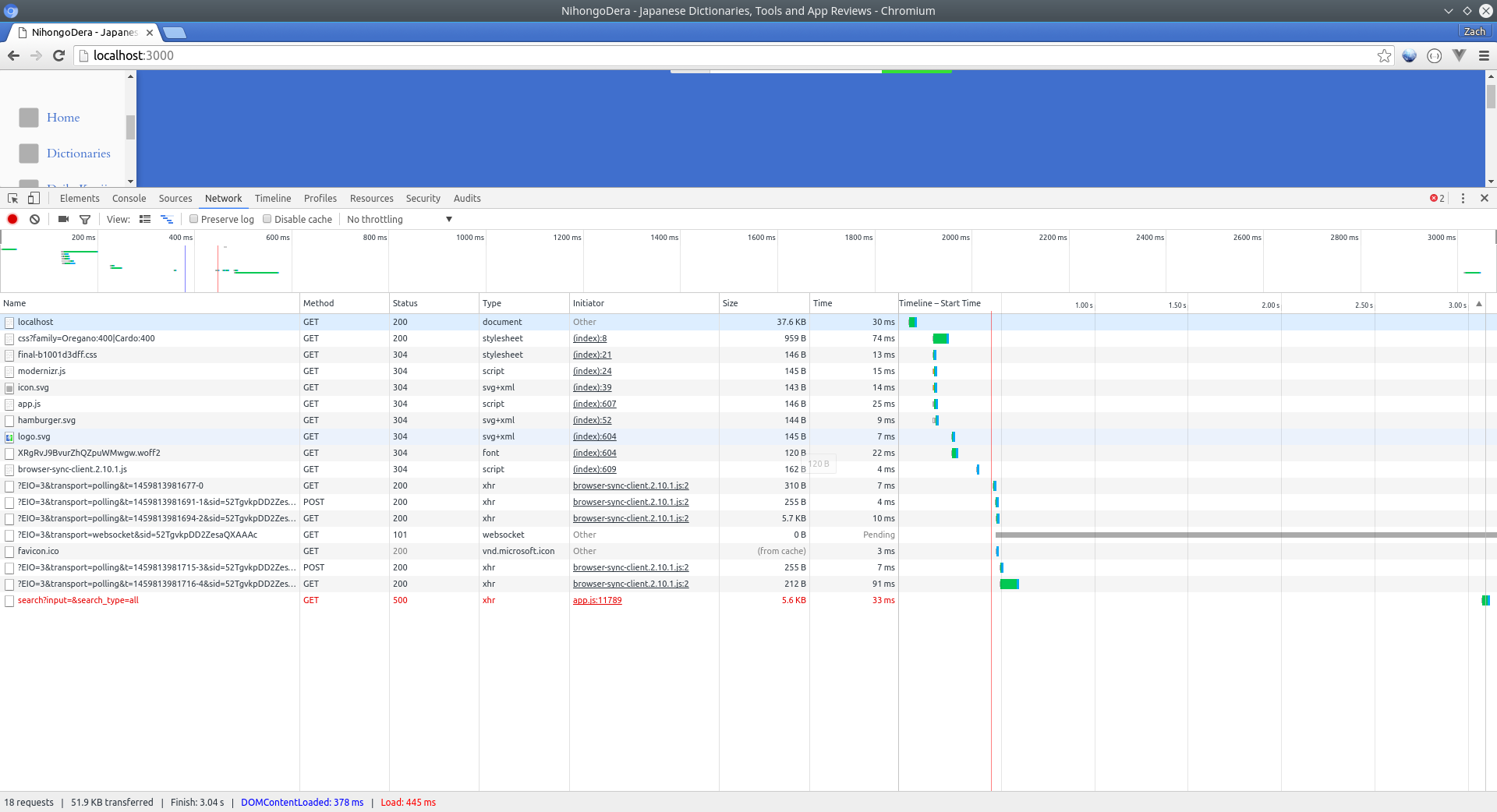
Can you view the Laravel error message in browser dev tools? In Chrome, when there is an ajax error, if you click on the network tab in dev tools, you'll see the failed ajax request in red. If you click on it, you can usually see the full Laravel error message.

ezrabutler's avatar

@zachleigh this is the first of the 4.

try {
                    // Do send the request (this may raise an exception)
                    xhr.send( options.hasContent && options.data || null );
                } catch ( e ) {
                    // #14683: Only rethrow if this hasn't been notified as an error yet
                    if ( callback ) {
                        throw e;
                    }
                }
            },
zachleigh's avatar

I mean in Chrom dev tools. Looks like this: screenshot Notice that the last network activity is red? It failed. If you click on it, the full Laravel stack trace should come up.

1 like
ezrabutler's avatar

@zachleigh again, you are brilliant.

TokenMismatchException in VerifyCsrfToken.php line 67:

in VerifyCsrfToken.php line 67
at VerifyCsrfToken->handle(object(Request), object(Closure))
at call_user_func_array(array(object(VerifyCsrfToken), 'handle'), array(object(Request), object(Closure))) in Pipeline.php line 124
zachleigh's avatar

Ok, so its a problem with the csrf token. Im pretty sure its because you are putting the token in a data attribute on the button in the html, but then trying to get it from a meta tag in your jquery. In your html, in the head somewhere, paste this in if you havent already:

<meta name="csrf-token" content="{{ csrf_token() }}">
1 like
ezrabutler's avatar

@zachleigh OK!!!!! Now I just have a DB insertion problem to solve!! Apparently I'm missing a column, or something... But making definite debugging progress!!!!!!! Arigatōgozaimashita!

1 like
ezrabutler's avatar

@zachleigh if I could ask you one more question: as you saw I'm trying to pass an array of times from the JS to DB. The error I'm getting says that the "pattern is a string while replacement is an array". How exactly do I declare an array of times in the migration/database? Thank you so much.

zachleigh's avatar

You cant actually store an array in mysql. Most people convert the array to json and then store it as a json string. Laravel makes this really easy with attribute casting. So in your moods model, declare the attribute type:

protected $casts = [
    'times' => 'array',
];

And Laravel should take care of the rest automatically. Heres more: https://laravel.com/docs/master/eloquent-mutators#attribute-casting

1 like

Please or to participate in this conversation.