Be part of JetBrains PHPverse 2026 on June 9 – a free online event bringing PHP devs worldwide together.

boyjarv's avatar

mmap() failed: [12] Cannot allocate memory

So, I cloned my git repro onto my server and ran composer install but then received this error:

mmap() failed: [12] Cannot allocate memory

Fatal error: Out of memory (allocated 607133696) (tried to allocate 18874368 bytes) in phar:///homepages/34/d622924921/htdocs/bnhere/moveme/composer.phar/src/Composer/DependencyResolver/RuleSet.php on line 90

Please help

0 likes
6 replies
bobbybouwmann's avatar

That is because PHP is running with a memory limit by default. You can by-pass it by running the following command

php -d memory_limit=-1 /usr/local/bin/composer install

Note: you might need to change the path to composer

Another option would be updating your php.ini files and setting the memory_limit = -1.

3 likes
boyjarv's avatar

I've tried all this /usr/bin/php5.5-cli -d memory_limit=-1 composer.phar install

and updated my php.ini file and clearing cache and removing the composer.lock and clearing the cache

kingmaker_bgp's avatar
Level 8

Server RAM was Low

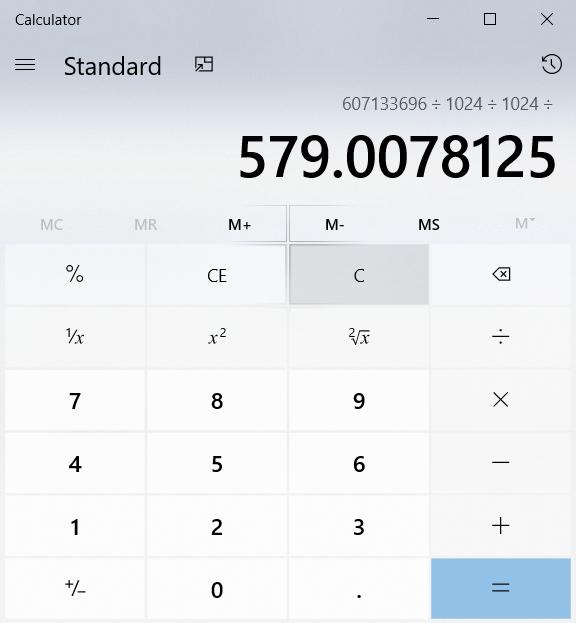
Hi @boyjarv, It seems that you were running a Server with 512 MB RAM

RAM Calculation

I too once had this Problem with some specific version of PHP 7.3. But didn't remember the Solution I found out :-(

Try Googling

boyjarv's avatar

still not working, I updated server performance level 5 which gave me 768mb and 19gb max ram

Please help

hemantghatawal's avatar

Did you found the solution yet?? cause im facing the same problem.

Please or to participate in this conversation.