
Level 5
I can't get HMR running either, it just shows "Cannot GET /". Anyone knows how to fix this?
Anyone have any luck getting browsersync working with laravel mix in a fresh laravel 5.4 install? I've gotten so used to 5.3 with gulp and browsersync I don't think I can go back. HMR I understand is supposed to be better with stateful updates, but I can't get that to trigger on a view or styl update either. In fact once I do the npm run anything on a fresh install of laravel 5.4 my localhost:8080 just returns
Cannot GET /
Instead of the welcome page.
EDIT: POST BEST ANSWER: You can find the docs for mix.browserSync('your-domain.dev'); https://github.com/JeffreyWay/laravel-mix/blob/master/docs/browsersync.md
I can't get HMR running either, it just shows "Cannot GET /". Anyone knows how to fix this?
Ok, apparently you are not supposed load localhost:8080 (like how it worked with Browsersync). You can just open your site as normal (for example on localhost or myproject.dev), but the path to your app script needs to point to localhost:8080. Laravel mix will handle this for you when you use:
<script src="{{ mix('js/app.js') }}"></script>
See: https://github.com/JeffreyWay/laravel-mix/blob/master/docs/hot-module-replacement.md
I can't get versioning to work though, npm run hot throws the error Cannot use [chunkhash] for chunk in '/js/[name].[chunkhash].js' (use [hash] instead)
@generator, Thanks, but I'm not having any luck with that, I was able to get it to reference by changing CSS however I still have to manually refresh.
Browsersync rocks my world for rapid blade development and tweaking. Even though I've only been using gulp / elixir /stylus / post css for 3 - 4 months, I could never go back, I'd say conservatively, it doubled my speed. And thanks @JeffreyWay for that.
Since I'm not doing tons of JS, I'm finding gulp is pumping out changes in about 2-3 seconds on my laptop, while webpack is currently (for me and my initial settings) more like 7-8. Plus I loose hot reload.
I know this will eventually be amazing and change the way I code again, but I think right now, it's going to take me learning webpack, and unless forced, it's not in my next 60 day availability.
As much as some of the new features 5.4 would save me hours, and I'm really eager to dive in, unless there is a new screen cast on mix, that really covers hotreload on blade assets stylus and postcss, I'll stick to 5.3 until I have some downtime.

I also get Cannot GET / when i run npm run hot
Stading server with domain and https :/
is that on your app.dev? or on localhost:8080?
Anyone know how to unselect an answer? I chose a best answer instead of thumbs up. This essentially will close peoples interest and never provide a solution to people who find this later
I have mix compiling CSS and JS upon file save with the setup @generator mentioned. However, the changes are not being injected into the page.
Do you get any errors in your terminal or browser console? Does your console show "[HMR] Waiting for update signal from WDS"?

I'd like to use Browsersync too and I've got the same problem with localhost:8080.
So apparently HMR only works with .vue components. Been trying to get browser-sync working again (just via its cli for now) but the browser-sync snippet isn't being injected at the end of the body tag. This is my second day spent trying to get my environment usable after upgrading to 5.4 ¯_(ツ)_/¯
Hey Joel, is it only for vue components or an JS framework components? I feel your pain on the browsersync side. I was about tos tart a new project in 5.4 and it's been thrown into 5.3 for exactly this reason.
Yeah, if I could rewind 48 hours I'd stick with 5.3 for a while.
Not sure if HMR works with other non-Vue JS components, sorry. I imagine it would, although the default config may be set up for Vue out-of-the-box.
Some good news though: just in the last half hour I have managed to get BrowserSync working by using https://www.npmjs.com/package/browser-sync-webpack-plugin
Here is a screenshot of my webpack.mix.js file: https://dl.dropboxusercontent.com/s/6rll7evsp7u0g1s/bs-mix.png?dl=0
Really hope this helps someone.
I just want to be explicit in case it saves anyone time:
@if (getenv('APP_ENV') === 'local')
        <script id="__bs_script__">//<![CDATA[
            document.write("<script async src='http://HOST:3000/browser-sync/browser-sync-client.js?v=2.18.6'><\/script>".replace("HOST", location.hostname));
        //]]></script>
@endif
npm install --save-dev browser-sync browser-sync-webpack-plugin
</body> tag in my layout.blade.php file (see the code above).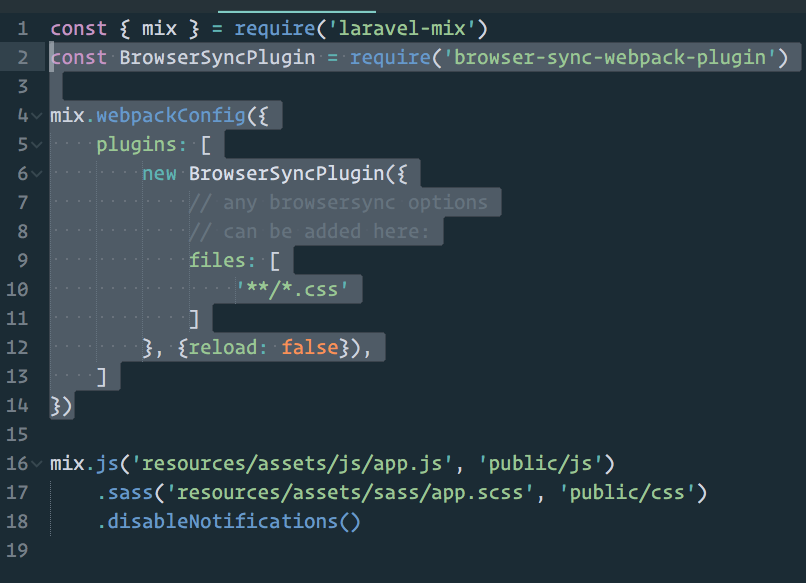
php artisan serve & npm run watch
CSS gets injected without a full refresh. Changing files to an array and adding **/*.php to it doesn't break this. It just does a full refresh when saving *.php files, as you would expect.

Hey! Something about HMR / npm run hot (in 5.4)
What you need to do to solve the Cannot GET / problem is, use a "real" server. I couldn't get it working with using the "php artisan serve" server so I set-up apache which works great.
So now The site wasn't hot-reloading since "npm run dev" doesn't even watch - it just compiles a dev-version.
With "npm run watch", you need to manually refresh.
So to get HMR working, you don't need to "Change the .vue file". You need to add following to your welcome.blade.php
<!DOCTYPE html>
<html lang="en">
    <head>
        <meta charset="utf-8">
        <meta http-equiv="X-UA-Compatible" content="IE=edge">
        <meta name="viewport" content="width=device-width, initial-scale=1">
<link rel="stylesheet" href="{{ mix('css/app.css') }}" />

        <title>UR Title</title>

    </head>
    <body>
        <div id="app">
            <home></home>
        </div>
        <script src="{{ mix('js/app.js') }}"></script>
    </body>
</html>
then in your resources/js/app.js:
Vue.component('home', require('./components/Home.vue'));

const app = new Vue({
    el: '#app',
    mounted () {
        $('#select').dropdown()
    }
}).$mount('#app');
Now "npm run hot" will work :)
I could run npm run hot veery straightforward. However when I change .scss file the browser doen't refresh.
Any idea?
@joel_birch Thanks for the info. That worked for me!

BrowserSync seems to have been ditched from the official docs, but looking into the source code it is still there, also conveniently configured and ready to be launched.
Just edit your webpack.mix.js file to include mix.browserSync(); and then run npm run watch on your console.
By default, a browser window will open pointing to localhost:3000. Change and save any file and you should see your browser instantly refresh to reflect the change.
@chrisandrew.cl for the win!! Well @JeffreyWay as well for adding it to the docs and designing it in the first place. ( https://github.com/JeffreyWay/laravel-mix/blob/master/docs/browsersync.md )
I was still a few weeks from looking at this but this lefts me shift immediately into 5.4! Thanks again Jeff, this changed the way I code forever.

I fixed with writting cubiapp.app as first parameter.
where 127.0.0.1 cubiapp.app in my hosts file.
mix.browserSync('cubiapp.app');

Or if you work in a team it may help to use mix.browserSync(process.env.APP_URL) and add APP_URL in .env
ENV: ubu 16.04 / Homestead / Laravel 5.5
npm i -D browsersync WRONGnpm i -D browser-sync CORRECTThis is what got me. I was having some of the same issues mentioned above.
npm i -D browser-sync-webpack-plugin
webpack.mis.js
let mix = require('laravel-mix');

mix.js('resources/assets/js/app.js', 'public/js')
   .sass('resources/assets/sass/app.scss', 'public/css');

mix.browserSync('projectapp.app');
Please or to participate in this conversation.