Level 60
Hi, after selecting a font, that modal in the bottom right corner has a download button, just download on your localhost and use it:)
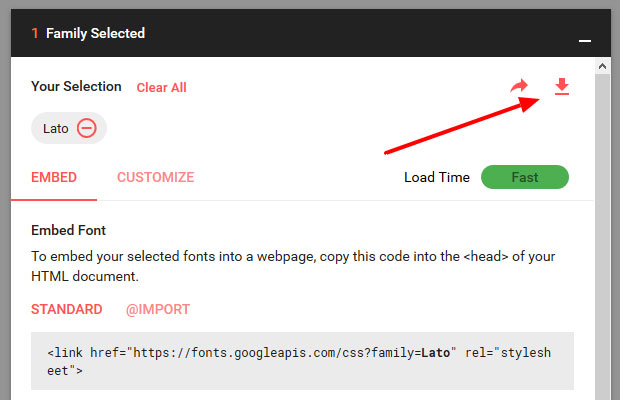

Hi, I am developing an application that does not have Internet access. What would be a good way to include a Google Font for offline access? I can either include the font as part of my Blade setup or use Webpack.
Hi, after selecting a font, that modal in the bottom right corner has a download button, just download on your localhost and use it:)
Thanks, that's great,but I want to include it as part of my build.
I have tested with https://www.npmjs.com/package/typeface-merriweather and Laravel Mix does pick up on it and copies the files but does not seem to load the css.
git:(master) ✗ npm run dev

> npm run development


> @ development /Code/safe
> cross-env NODE_ENV=development node_modules/webpack/bin/webpack.js --progress --hide-modules --config=node_modules/laravel-mix/setup/webpack.config.js

 95% emitting

 DONE  Compiled successfully in 4117ms                                                                                              10:55:13 AM

                                                                                                       Asset     Size  Chunks                    Chunk Names
fonts/vendor/typeface-merriweather/files/merriweather-latin-700italic.woff2?8b0db67123584893c6591accbc51640c  18.9 kB          [emitted]
      fonts/vendor/typeface-merriweather/files/merriweather-latin-300.woff2?a50c381443e6993188ed9cc4b6806866  18.7 kB          [emitted]
fonts/vendor/typeface-merriweather/files/merriweather-latin-300italic.woff2?bd410cbf8c272acd4fbdd9f61a7015bf  18.7 kB          [emitted]
 fonts/vendor/typeface-merriweather/files/merriweather-latin-300italic.woff?9deeb422b65afb1daacc039296bb3640  22.9 kB          [emitted]
      fonts/vendor/typeface-merriweather/files/merriweather-latin-400.woff2?f936cb550d4dcd769f75c453207ac5e6  18.8 kB          [emitted]
       fonts/vendor/typeface-merriweather/files/merriweather-latin-400.woff?ab0616e6d856817eff54eb8c5e1664e4    23 kB          [emitted]
fonts/vendor/typeface-merriweather/files/merriweather-latin-400italic.woff2?5c9a23d08e2c851e5a25795b940acd4f  18.7 kB          [emitted]
 fonts/vendor/typeface-merriweather/files/merriweather-latin-400italic.woff?0ab4b54f3b1e8b14cf755970fde8ce35  22.9 kB          [emitted]
      fonts/vendor/typeface-merriweather/files/merriweather-latin-700.woff2?1636f13a52ca3f0eb8784c9c57f62082  18.5 kB          [emitted]
       fonts/vendor/typeface-merriweather/files/merriweather-latin-700.woff?cc673c945b482dc1378d4a3c95ffd175  22.7 kB          [emitted]
       fonts/vendor/typeface-merriweather/files/merriweather-latin-300.woff?2c73b119ad85e697123658b8a091ff83  22.9 kB          [emitted]
 fonts/vendor/typeface-merriweather/files/merriweather-latin-700italic.woff?513649f5b9ba4675cff15cf3f7ad4f2a    23 kB          [emitted]
      fonts/vendor/typeface-merriweather/files/merriweather-latin-900.woff2?46631a9aab93dec3ed34f429dd1a5646  18.6 kB          [emitted]
       fonts/vendor/typeface-merriweather/files/merriweather-latin-900.woff?a0528570caa2c785891308ce604d8db7  22.8 kB          [emitted]
fonts/vendor/typeface-merriweather/files/merriweather-latin-900italic.woff2?a26a8168916e5d4e5485081171d7fdb0  18.8 kB          [emitted]
 fonts/vendor/typeface-merriweather/files/merriweather-latin-900italic.woff?db42a3f34378e69ef5aebb6717f1f33e  22.9 kB          [emitted]
      fonts/vendor/material-design-icons-icondist/MaterialIcons-Regular.eot?e79bfd88537def476913f3ed52f4f4b3   143 kB          [emitted]
    fonts/vendor/material-design-icons-icondist/MaterialIcons-Regular.woff2?570eb83859dc23dd0eec423a49e147fe  44.3 kB          [emitted]
     fonts/vendor/material-design-icons-icondist/MaterialIcons-Regular.woff?012cf6a10129e2275d79d6adac7f3b02  57.6 kB          [emitted]
      fonts/vendor/material-design-icons-icondist/MaterialIcons-Regular.ttf?a37b0c01c0baf1888ca812cc0508f6e2   128 kB          [emitted]
                                                                                                  /js/app.js  1.59 MB       0  [emitted]  [big]  /js/app
How do I tell Laravel Mix to load the css? Should I maybe stick the CSS in app.scss?
I'm using L5.7.
This tool came in handy:

You can host Google fonts manually without additional tools. It's easy.
I wrote post for doing it within WordPress theme but tutorial is framework independent:
1. Download fonts style sheet from Googleapis.com
https://fonts.googleapis.com/css2?family=Montserrat:wght@400;700&family=Open+Sans:ital,wght@0,300;0,400;0,600;0,700;1,300;1,400;1,600;1,700&display=swap
to the file right into your theme so it’s now:
https://www.domain.com/theme/fonts.css
2. Download fonts.woff2 and edit fonts.css
When you open newly saved fonts.css file, there is content which looks like this:
/* latin-ext */
 @font-face {
   font-family: 'Montserrat';
   font-style: normal;
   font-weight: 400;
   font-display: swap;
   src: url(https://fonts.gstatic.com/s/montserrat/v15/JTUSjIg1_i6t8kCHKm459Wdhyzbi.woff2) format('woff2');
   unicode-range: U+0100-024F, U+0259, U+1E00-1EFF, U+2020, U+20A0-20AB, U+20AD-20CF, U+2113, U+2C60-2C7F, U+A720-A7FF;
 }
...
Save font from “url” in newly created folder “fonts” in your theme and replace path in fonts.css so it’s:
src: url(/theme/fonts/JTUSjIg1_i6t8kCHKm459Wdhyzbi.woff2) format('woff2');
In my case, there were 20+ fonts to download :-)
3. Add fonts.css to your child theme
<link rel="stylesheet" id="local-fonts-css" href="https://www.domain.com/theme/fonts.css?ver=1.0" type="text/css" media="all">
Flush cache and done.
Please or to participate in this conversation.