
Level 74
Read the One-to-many With Different Properties part of this post https://tray2.se/posts/database-design-part-2
2 likes

Hello guys,
I am developing an e-commerce store so i want to create a multi-product variants with multi prices
so basically till now i have 5 tables:
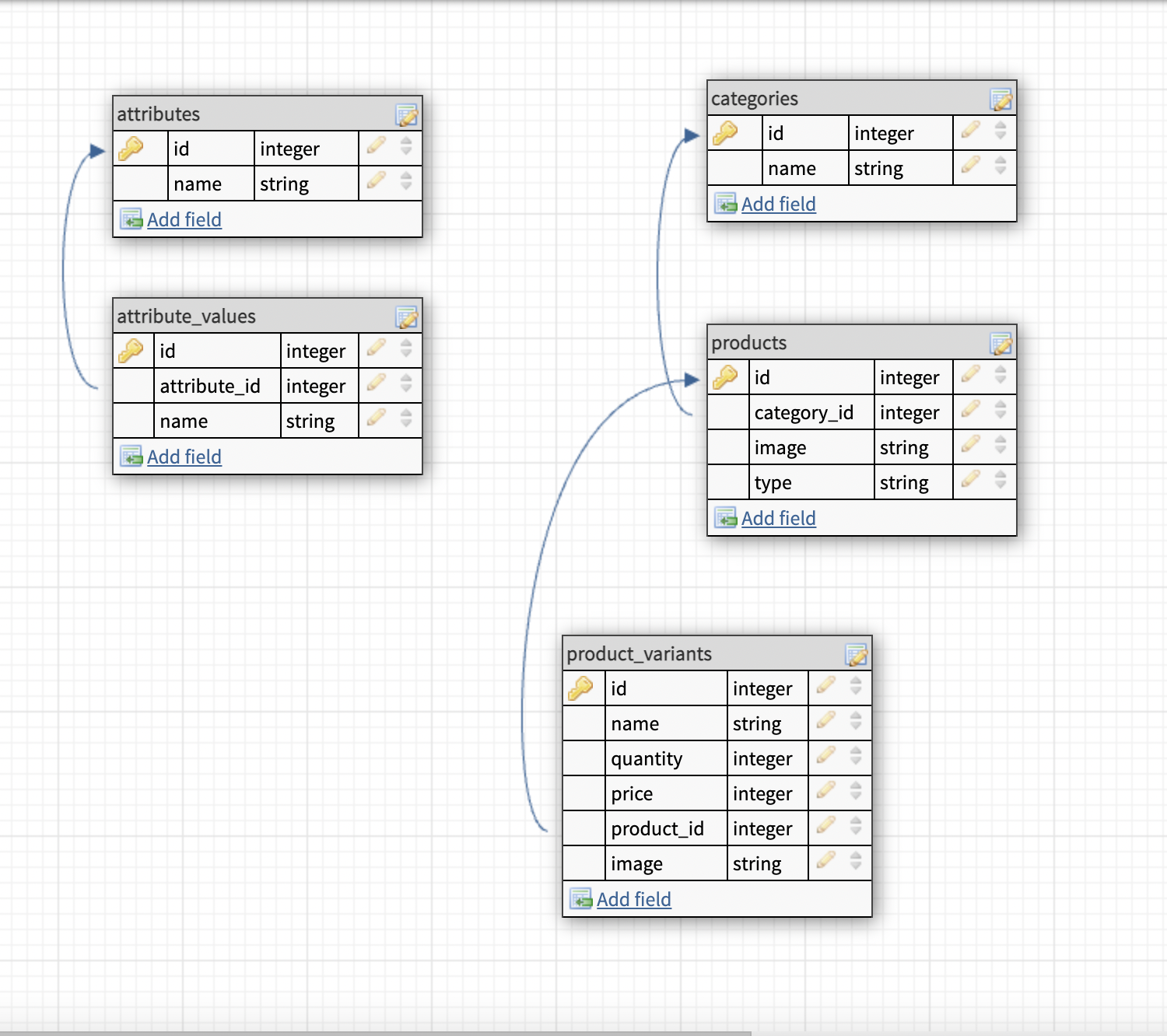
So my idea is to make all products as variant product till if the product had just one color and one price
but the problem how to connect the attributes to the product_variants table
for example i have T-Shirt product i want to assign (Color, Size) Attribute to the product_variants table In Attribute_values table we have the values (red, L, XL)
so in the end the product variants should be like this:
1. T-shirt Red, L = 40$
2. T-shirt Red, XL = 50$
So can i have some help with database structure: because i think i need 2 more table
also i feel there is problem with product_variants table because how can i know which product_variant for(red xl)
Thanks for all
Read the One-to-many With Different Properties part of this post https://tray2.se/posts/database-design-part-2
@Tray2 So after read that part this is the solution?
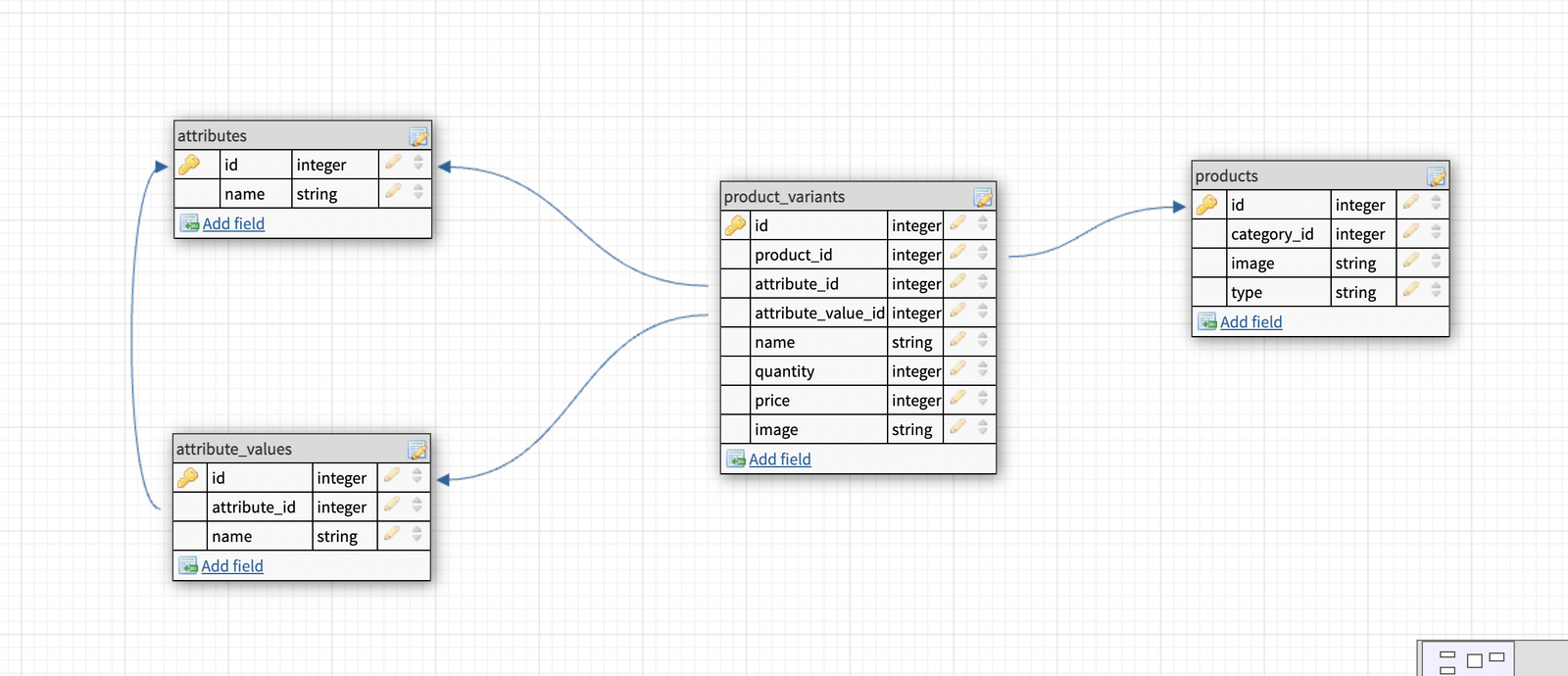
@hasanhatem That should work, maybe not exactly how I would have done it.
@hasanhatem You’re pretty much there! And similar to what I do when modelling e-commerce.
I’ll usually have the following models:
A product can have many attributes (colour, size, etc). A product would be the “top-level” description of a product, like its name, description, etc. A product would then have many SKUs. In merchandising, a SKU represents a single variant of a product, so the Sku model would be your “variant” model.
You would then have a pivot table between SKUs and attributes. So if you had an attribute for size, you’d have a SKU for each size a particular t-shirt comes in. The pivot table would hold the value for each SKU and attribute combination:
$table->primary(['attribute_id', 'sku_id']);
$table->foreignId('attribute_id')->constrained()->cascadeOnDelete();
$table->foreignId('sku_id')->constrained()->cascadeOnDelete();
$table->string('value');
@martinbean Hello bro, I am sorry for late. But i had a lot of problems. Sorry Again. Depend on what you describe above, the database should be like that.

But i think in this case we force the product to have attributes, right? maybe the client have products without any attribute just (name, desc, images, and prices).
How can i avoid attributes table in this case?
@hasanhatem Why do you think a product is forced to have attributes? It isn’t. If a product doesn’t have attributes, then you don’t need to insert any rows.
@martinbean in this case i just want to insert sku row with attribute row? because as you see in the db i put the price in attribute_sku table is that right?
I am sorry just one more question, do you have any idea for better what to generate unique sku for each product
@hasanhatem No. Your price would be in your skus table, to you knew how much that particular SKU costs. For example, an XXL t-shirt might cost more than the same t-shirt but in S due to the extra material required.
In your example, if a product didn’t have any attributes (because it only comes in one variant) then you wouldn’t have an attribute_sku record to add the price to.
@martinbean so bro in this design
i can do like this
T-shirt
xxl red - 20$
xxl white - 20$
xl white - 20$
@hasanhatem No, because you still have the price column in the attribute_sku pivot table. It should be on the skus table instead. Otherwise you have nowhere to put the price if a product doesn’t have any attributes.
You also need to pay attention to naming, as you have typos, and randomly abbreviating words (“desc”) when there’s no need to. Just call the column description. That’s what it is.
Schema::create('products', function (Blueprint $table) {
    $table->id();
    $table->string('name');
    $table->text('description')->nullable();
});
Schema::create('attributes', function (Blueprint $table) {
    $table->id();
    $table->foreignId('product_id')->constrained()->cascadeOnDelete();
    $table->string('name');
});
Schema::create('skus', function (Blueprint $table) {
    $table->id();
    $table->string('sku')->comment('The actual alpha-numeric SKU code');
    $table->foreignId('product_id')->constrained()->cascadeOnDelete();
    $table->char('currency_code', 3);
    $table->unsignedInteger('unit_amount');
});
Schema::create('attribute_sku', function (Blueprint $table) {
    $table->primary(['attribute_id', 'sku_id']);
    $table->foreignId('attribute_id')->constrained()->cascadeOnDelete();
    $table->foreignId('sku_id')->constrained()->cascadeOnDelete();
    $table->string('value')->comment('The value for this SKU and attribute combination, i.e. Small, Red, etc.');
});
Obviously add any other columns you may need.
@martinbean Thank you so much
@martinbean bro please can u give me an example how to fill this columns.
if i have product: t-shirt, with (color, size) attributes, and the values (red, white) (s, xl).
because i don't understand how the pivot table should work and how to put the value in pivot table
@hasanhatem You add the values to the attribute_sku pivot table.
So if you have a product with two attributes (size and colour) then you’d store the values for each SKU and attribute combination in the pivot table:
+--------+---------------+--------+
| sku_id |  attribute_id | value  |
+--------+---------------+--------+
| 1      | 1             | red    |
| 1      | 2             | small  |
| 2      | 1             | red    |
| 2      | 2             | medium |
| 3      | 1             | red    |
| 3      | 2             | large  |
| 4      | 1             | blue   |
| 4      | 2             | small  |
+--------+---------------+--------+
So if attribute 1 is color, and attribute 2 is size, then:

Hi @martinbean All your replies in this thread are very helpful to me.
Can you please share the best way to generate sku for each product variation?
@vasanthan You can just use something like Str::random(8).
Just be sure that the sku column in your database table also has a unique key constraint.

@martinbean If I understand correctly - I can place the price and balances in the table "skus"? Your answers are very helpful for me in this topic)
@VolodymyrVi Yes. The price is in the skus table in my example migration above: it’s held in the unit_amount column.

@martinbean I have created my db design a lot like yours. But how would you bind the product to an order. From your design it should be SKU that was binded to the order. Is this also how you would do it. I would really like to have it so it was product id that was bound to order, but i cannot see any way for this to be done because we have variations.
So is there anything i have not thinked about or should i just accept that i cannot bind product_id to order table. Maybe it is just in my head it would be cleaner and easier to understand for a 3 party reading my DB design with product_id vs sku_id
@andreas_baran You would have an order model, which has-many order item models. Your order item model can then have a foreign key pointing to the SKU.
You would bind a SKU and not a product because what if a product, say a t-shirt, comes in many sizes? If you just relate a product then you have no idea what size or colour the customer ordered. Same if the customer orders two sizes (one for them and one for a partner or friend who’s a different size). If you just have two rows with the same product, you don’t know which one is which.
@martinbean thanks. Agree. I just wanted to hear if there was some smart Thing i could do. Because in my head it is easier to read the db design if it was product id.

@martinbean I am following your method , and the model looks like this. But my question is, how can I display it on my frontend? I am quite confused about this.
class Product extends Model
{

    protected $guarded = ['id'];
    protected $with = ['attributes'];

    public function skus(): HasMany
    {
        return $this->hasMany(Sku::class);
    }

    public function attributes(): HasMany
    {
		return $this->hasMany(Attribute::class);
    }

    public function images(): HasMany
    {
        return $this->hasMany(ProductImage::class);
    }

}
class Attribute extends Model
{
    protected $with = ['skus'];

    protected $fillable = ['name'];

    public function product(): BelongsTo
    {
        return $this->belongsTo(Product::class);
    }
    public function skus(): BelongsToMany
    {
        return $this->belongsToMany(Sku::class,'attribute_sku')->withPivot('value');
    }
}
class Sku extends Model
{
    protected $guarded = ['id'];
    public function attributes(): BelongsToMany
    {
        return $this->belongsToMany(Attribute::class,'attribute_sku')->withPivot('value');
    }

    public function product(): BelongsTo
    {
        return $this->belongsTo(Product::class);
    }
}
for example i have color (Red,Green,Blue) and size (M,L,XL,XXL) then i will chose Red it's should be displaying the size of Red right? but how if some size are not available for example the size L of Red is out of stock.
if the variant is out of stock the option button will be disabled. The video below is an example of what I need
http*s://pomf2.lain.la/f/hssssmdt.gif
(it's my first day on laracast i can't include the link so i censored the link :) )

@hasanhatem - This works well when there is 2 attribute - how about if we have multiple attributes ? like color , size and weight.
@priyalaks actually i don't know i am confusing now @martinbean ;)
@priyalaks What do you mean, it works well when there is 2 attributes? Two attributes is “multiple” attributes. You can have as many attributes as you need to support. That’s why it’s a has-many relation for a product.

Hi @martinbean I found this topic a week age this helped me a lot. I want to add others columns to my product, and I'm not exactly sure where I need to put them.
For example, I want to add a slug to my product (so in skus table i think) and how would you manage the stock with this db ? I can give you my mld if you need more info
@Dazento You’d put the slug in the products table since the slug would belong to a product and not a single SKU. So if your product is named “Awesome Band T-Shirt” and came in various sizes, then the slug (awesome-band-t-shirt) would want be on the products table.
Inventory is a whole other topic. But you want to associate inventory with SKUs so that you know how much of each SKU you have, and where if you store stock in multiple locations (i.e. multiple stores, or warehouses).
@martinbean Okk, i adpated it to my needs and i think it works well, thank you so much :) (sry for the late response)
I’ve written a blog post that summarises my advice from this thread: https://martinbean.dev/blog/2023/01/27/product-variants-laravel/
@martinbean Thank you so much. I will mark this answer as best answer to make all people read this helpful article. is that ok?
@martinbean Sorry to bother you again, I have a last question. How do i do to show my products on my home page or all products page ? Do I give my product and get Variants or the opposite ? (because the price is in my variants) And on my product page how can i update my price when i change the selected variant ?
@Dazento Products has-many SKUs. You would query your products as normal for display in a catalogue page:
$products = Product::query()->where('active', '=', true)->paginate();
If you want to display prices then you’re going to need to decide how to handle that, given different SKUs can have different prices. For example, a garment that comes in different sizes; or a pack of widgets that comes in packs of different sizes, so each page is going to have a different price (i.e. $100 for 10, $200 for 25, etc). You’ll need to load the SKUs for each product, and then determine how you’re going to present the price(s):
$product = Product::query()->where('active', '=', true)->with('skus')->paginate();
You might have a method on your Product model to return the amount, or a Blade component that takes the SKUs collection and displays an appropriate amount, based on if there is one or many SKUs, whether the SKUs have different prices, and so on:
// app/Models/Product.php
public function getPriceAttribute(): string
{
    // Get all of the distinct prices from the product's SKUs...
    $distinctPrices = $this->skus->pluck('price')->unique()->sortBy('price');

    // Get the lowest price from the collection and format it...
    $lowestPrice = $distinctPrices->first();
    $lowestPriceFormatted = format_amount($lowestPrice);

    // If there is only one SKU, or one distinct price...
    if ($distinctPrices->count() === 1) {
        return $lowestPriceFormatted;
    }

    // Otherwise show the lowest price as the "From" amount...
    return sprintf('From %s', $lowestPriceFormatted);
}

@martinbean This post has helped me a great deal, I wanted to ask about images for skus. I want to create a page like Amazon where, when you click on a variant (ie colour) then the images change.
Should this images table be related to the products table, sku table or the attribute_sku table?
I am thinking that it should be a product_images table with the following setup:
Schema::create('product_images', function (Blueprint $table) {
    $table->id();
    $table->string('filename');
    $table->boolean('is_default')->default(false);
    $table->foreignId('product_id')->nullable();
    $table->foreignId('attribute_sku_id')->nullable();
    $table->timestamps();
});
This would allow images for the product to be loaded if it has no attributes or if the attribute has no images, alternatively if the attribute has images then these would be loaded instead.
@peterdickins Hi bro, I am really have Media model that connected to all other models need to have images. so in my Sku Model i have this relation
    public function media()
    {
        return $this->morphMany(Media::class, 'mediaable');
    }
try to have Media model in you app it will save your time
@hasanhatem thank you for your reply, but I think in this schema design the image(s) should not be related to the sku. It should be related to a product, or a sku_attribute if it has an entry.
Actually, maybe this could be a polymorphic relationship:
Schema::create('product_images', function (Blueprint $table) {
    $table->id();
    $table->string('filename');
    $table->unsignedInteger('imageable_id');
    $table->string('imageable_type');
});

I really like this solution, but what if I wanted a product without attributes, would I use the sku model? but that implies that it is related to at least one attribute and attribute_sku should have a value
How do I solve it? Would I have to create an attribute and an attribute_sku called "Default"? I'm not sure, what should I do?
@JoelVeloz I cover attributes in my blog post: https://martinbean.dev/blog/2023/01/27/product-variants-laravel/#product-attributes
@martinbean I understand, now I have another problem, usually in an ecommerce if you have products. You must generate a purchase order, but, how should the order structure be? The simplest answer would be to relate an Order model with several Skus, but what would happen if the ecommerce administrator decides to delete or update the SKU properties, so that it is not the same as when the order was generated? So, wouldn't it be convenient to make a relationship like that? should there be restrictions? Should we create a SKU history? What would be the best solution for this problem? Also, if the order implies quantity, should there be an intermediate table?
@JoelVeloz I don’t really understand what you’re asking? A SKU represents a single variant. You wouldn’t have a SKU FOO123 represent a blue, small T-shirt one day, and then change it to be a large, red T-shirt another day. The different variants would have different SKUs.
So yes, documents like purchase orders, invoices, etc should use SKUs in line items; not products. Otherwise if you just add “T-shirt” as a line item, neither the business nor the customer is going to know what specific colour or size is being ordered.

@martinbean I hop eyou doing good.
I have followed your instruction and able to make this
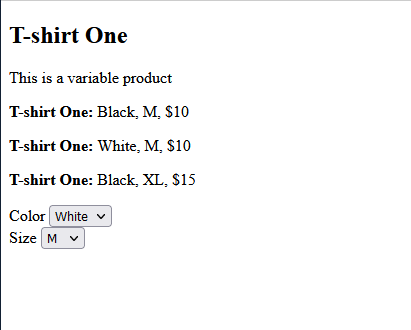
now I am trying to show the variation filter , where I want to fetch the sku with {'id': productid, 'Color': 'white', 'size' : 'L' }
but I don't understant what should be the query to get the exact sku with these data.
thank you
public function getSku(Request $request)
    {
        $attributes = $request->data;
        $product = Product::where('id', $request->id)->first();

        foreach ($attributes as $attributeName => $attributeValue) {

            $sku = $product->attributes()->where('name', $attributeName);
        }


        return response(['data' => $sku, 'message' => 'success']);
    }

```php
<div class="product">
        <h2>{{ $product->name }}</h2>
        <p>{{ $product->description }}</p>
        @if($product->type === 'variable')
            @foreach($product->skus as $sku)
                <p id="{{ $sku->id }}">
                    <strong>{{ $product->name }}: </strong>
                    @foreach ($sku->attributes()->get() as $item)
                        {{ $item->pivot->value }},
                    @endforeach
                    ${{ $sku->price }}
                </p>
            @endforeach
            {{-- Variation Filter --}}
            @foreach ($product->attributes as $i => $attribute)
                <div>
                    <label>{{ $attribute->name }}</label>
                    <select name="variation" class="variation_field" data-attribute="{{ $attribute->name }}">
                        @php
                            $attributeValues = $attribute->skus->pluck("attributes.{$i}.pivot.value")->unique();
                        @endphp
                        @foreach ($attributeValues as $value)
                            <option value="{{ $value }}">{{ $value }}</option>
                        @endforeach
                    </select>
                </div>
            @endforeach
        @else
            <p>{{$product->name}}: {{$product->skus->first()->attributes()->where('name', 'Color')->first()->pivot->value}} {{$product->skus->first()->attributes()->where('name', 'Size')->first()->pivot->value}} ${{$product->skus->first()->price}}</p>
        @endif
    </div>


<script>
    $(document).ready(function() {
        $.ajaxSetup({
              headers: {
                  'X-CSRF-TOKEN': $('meta[name="csrf-token"]').attr('content')
              }
          });

        $('.variation_field').change(function() {
            var selectedAttributes = {};
            $('.variation_field').each(function() {
                var attribute = $(this).data('attribute');
                var selectedValue = $(this).val();
                if (selectedValue !== '') {
                    selectedAttributes[attribute] = selectedValue;
                }
            });

            var id = {{$product->id}};

            $.ajax({
                url: "{{route('products.getsku')}}",
                method: 'POST',
                data: {data: selectedAttributes, id},
                success: function(response) {
                   console.log(response)
                },
                error: function(xhr, status, error) {
                    console.log(error);
                }
            });

        });
    });
</script>
Thanks. I have solved it with :
public function getSku(Request $request)
    {
        $attributes = $request->data;
        $sku = Sku::where('product_id', $request->id);

        foreach ($attributes as $attributeName => $attributeValue) {
            $sku->whereHas('attributes', function ($query) use ($attributeName, $attributeValue) {
                $query->where('name', $attributeName)->where('attribute_sku.value', $attributeValue);
            });
        }

        $product = $sku->first();
        return response(['data' => $product, 'message' => 'success']);
    }
I wll be happy to learn others best way to achieve this.
Please or to participate in this conversation.