Be part of JetBrains PHPverse 2026 on June 9 – a free online event bringing PHP devs worldwide together.

saeed7m's avatar

create combination from values and attributes

For the product entry section, I want to give the admin the ability to register a combination of different variable states with different prices. For example, after selecting size and color as variables, they should be able to enter or select one or more values for each, such as color and size with green, red, large, and small as their values. Up to this point, there is no problem, but when I want to show the admin the combination of these values so they can register different prices for each combination if available, I have a problem. I don't know how to create a loop in the view to generate 2x2 combinations, which results in 4 different states. For example:

State 1: Green with medium size - $100 State 2: Green with large size - $110 State 3: Red with medium size - $120 State 4: Red with large size - $130

In summary, I want a method that allows me to create forms for entering prices, quantities, etc., after selecting values and variables, and to register each one that the user sets a price for in the SKU table. If sending the tables would help, let me know so I can send them. Currently, my tables are these:

Product | SKU | Attribute | Value | sku_value

1 like
10 replies
vincent15000's avatar

Given that you don't show your code, I can only guess what you are handling.

@foreach ($colors as $color)
	@foreach ($sizes as $size)
		{{ $color.' / '.$size }}
	@endforeach
@endforeach
2 likes
saeed7m's avatar

@vincent15000 Thank you for your response.

The problem lies in finding the data that you placed inside the loop. What I did was create a temporary table that stores the variables and their corresponding values that the user selects during the product definition stage. After that, the user is asked to complete the necessary values based on the loop you wrote. However, the challenge I have is that it is unclear whether one, two, or more variables are defined, and each of them has several values. How should I write the necessary query based on the product ID to create the appropriate loop and show all possible combinations, which could be 4 or 9, to the admin? product_value

1 like
vincent15000's avatar

@saeed7m Better than a temporary table, why not a database view ?

But sure it's impossible to help you if you don't show the structure of your database.

1 like
saeed7m's avatar

@vincent15000 structure I think the structure I used might be suitable, but my problem is more with implementing the UI, especially the admin part and data entry for all the different combinations of attributes. Suppose there are 2 attributes with 2 values each; this will give you 4 different combinations, each of which can have its own price and quantity.

1 like
jlrdw's avatar

If you search for past answers from @martinbean and @tray2 they have given some good answers on product variations.

3 likes
saeed7m's avatar

@martinbean Thank you. I had previously seen your very good article and used it. The only thing is that the content you wrote is useful for when I want to add a t-shirt with colors like blue, red, green, etc. My problem is in a case where, for example, my t-shirt has sizes in addition to color, which creates several combinations, and I actually want to have the option to register different prices for each combination. For example, a red t-shirt with a large size, a red t-shirt with a small size, a blue t-shirt with a large size, and so on. Do the tables you wrote cover this issue? Can you provide an explanation about this? Of course, I did this with several tables, but I feel that it is not efficient at all, and I encounter problems in querying as well as in building the UI for both the admin and the user. Especially in the place where the admin needs to define the product and set the price dynamically for all combinations.

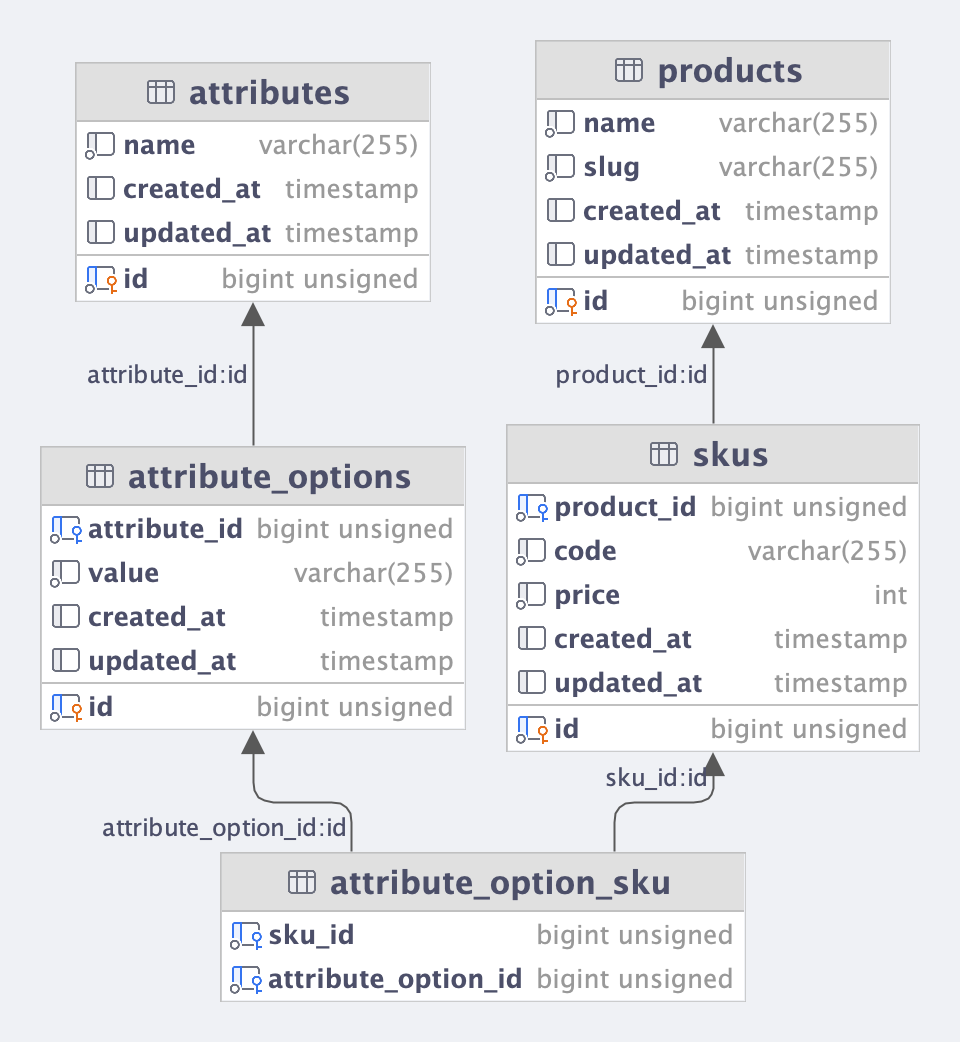
This is the structure that I used, with very minor changes.

structure

1 like
martinbean's avatar

My problem is in a case where, for example, my t-shirt has sizes in addition to color, which creates several combinations, and I actually want to have the option to register different prices for each combination. For example, a red t-shirt with a large size, a red t-shirt with a small size, a blue t-shirt with a large size, and so on. Do the tables you wrote cover this issue?

@saeed7m Yes. You would just create multiple attributes for a product. Then for each SKU, you would specify the value for each attribute as individual rows in the product_attribute_sku pivot table. The schema I wrote about is not restricted to a single attribute per product at all, and nowhere do I say it is.

3 likes
saeed7m's avatar

@martinbean Thank you for sharing your experience with us.

I have read your content several times, but I might not have fully understood it or conveyed the meaning correctly. At the end of your message, you provided an example like this:


product_attribute_sku (product_attribute_id, sku_id, value) VALUES (1, 3, 'blue');


You also mentioned that we can use a foreign key for the value as well. Up to this point, everything is correct, but let’s take the example a bit further. If my product, which is, for instance, a blue t-shirt with SKU code (3), also has size variations, what should we do?

Essentially, SKU (3) should be defined, and in the pivot table, it should look like this:

product_attribute_sku (product_attribute_id, sku_id, value) VALUES (2, 3, 'Large'); First of all, is SKU still defined as 3, right?

So in my SKU table, I have a product with code 3 named "Blue T-shirt with Large Size and specified price."

Well, it seems to me that everything works up to this point, but in practice, I have issues with queries and building the UI, especially where the user wants to select size and color, and the price is shown based on the simultaneous selection of these two items.

Was I able to convey my point?

Do you have an example where the query and UI are implemented based on your structure that could help me?

1 like
martinbean's avatar

@saeed7m How you present available SKUs is up to you. You can either show all available SKUs as a list and let the user select the SKU with the attribute combination they want, or use something like a <select> element per attribute, and as a user selects an attribute value, it then enables subsequent selects until a user has made a selection for all available attributes.

2 likes

Please or to participate in this conversation.