motinska94's avatar

Client-side caching large images that are fetched via API

I'm working on an app that allows users to upload images, and I use Google Drive for storing them. Since I'm not compressing these images (up to 5mb per image allowed) it can take a long time to show on the page, so I decided to load these images once and keep them cached on the client side. I used the following code for it :

public function display(Pic $pic)
    {
        auth()->id() !== $pic->user_id ? abort(404) : null;

        $image = Gdrive::get($pic->filename);

        return response($image->file, 200, ['Content-Type' => 'image/webp'])
        ->header('Cache-Control', 'public, max-age=604800');
    }

My problem is; even though this "604800" value should be caching the image for a week, it doesn't seem to be the case for some reason.
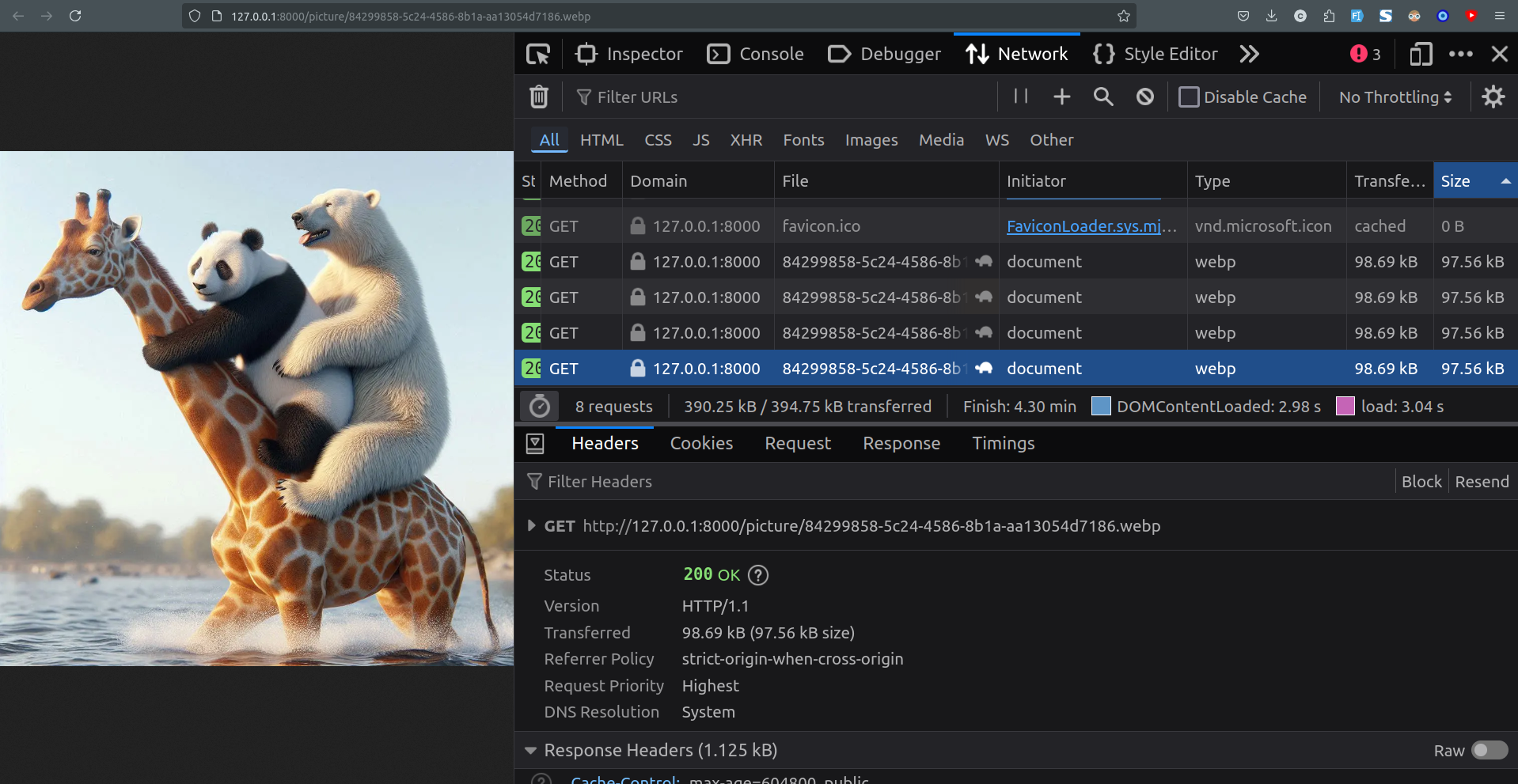
Image caching doesn't work example

Here's an example from devtools network tab, as you can see from the turtle icon, this image is not coming from the cache, and each of these requests took 3 to 5 seconds to load.

Interestingly though this happens only when I directly visit the image url. But since I'm also allowing users direct link access to their images, this is an issue for me. It seems to be caching and showing properly when I use the same url inside an img tag.

Same image inside an img tag

In this picture, selected image is the same exact one as the image in the previous screenshot. So it takes 3s+ to load when I visit the direct link but 0ms when it's inside an img tag.

Do you know what I'm doing wrong?

Also, do you know a better way of caching these images? Is using headers the only way for it?

I know I should be compressing these, and I already am, for the thumbnails. But this app is more about keeping the uploaded files without making any changes on them (you can think of it as a file storage app)

Thanks!

0 likes
7 replies
jlrdw's avatar

Have you considered amazon s3 bucket for images?

And I think cache is great for images not changing often. But a user may want to view various images while using the app. And large images are a little more time to load anyway.

But I have never tried google drive for this, so just my thoughts on it.

motinska94's avatar

@jlrdw Thanks for the answer, and sorry for the late response.

And I think cache is great for images not changing often.

The images on my app don't change often, actually they don't change at all. (meaning each image has their own UUIDs in their filename, as seen on the screenshots. And there can't be any other image in the same URL, nor does it change.

But a user may want to view various images while using the app.

I don't think that's the reason for my problem, nor it is the use case of my app, users can only view their own images and those are the ones I need to cache.

And large images are a little more time to load anyway.

As I said in the post, when the image is inside an img tag, it loads instantly. Even though the referring url is exactly the same. An image that is 1mb in size takes 3+ seconds to load on my local machine, I'm pretty sure it's not a loading issue but an issue of caching.

google drive vs s3

It's not about my storage provider either. Because if caching worked properly, it wouldn't have been making any requests in the first place.

Garet's avatar

Having a quick look on Stack Overflow, a few comments suggest that the headers are ignored when dev tools is open (even when the Disable Cache checkbox is unticked).

Is there any difference in load time if you close dev tools - i.e does it look like Chrome might be respecting the cache headers when dev tools is closed?

1 like
motinska94's avatar

@Garet No, it still takes quite a while. And I'm certain that it's because the image is being fetched from the gdrive. Because for example on first load it takes about 7 seconds to load while it only takes 2-3s on page refreshes. (The image in this case was 2.2mb in size)

I also just noticed a strange behavior; when I right click on the image and click "open image in a new tab", it loads immediately. Also same when I put a direct link to it inside the page where the image is being shown. In both cases, the image takes no time at all to show up.

But I'm not sure if this is a browser behavior or if caching actually works in this case. Since I can't open a new tab with devtools open I'm not sure how I can check if the image is coming from the cache or somewhere else (though if the browser was loading it I think it would still say cache)

There are only two options I can think of that makes sense to me :

  1. It's an issue with my browser (latest version of firefox, on linux mint).

  2. Either Laravel or this cache header keeps the referrer context while loading this endpoint. If the request is being made from a page "within the app", it takes no time to load but when I refresh or copy-paste the url into a new tab, it re-fetches it.

martinbean's avatar

@garet There are a number of things you can do to improve things here.

First, you should be uploading images to a storage solution rather than Google Drive. Google’s own Cloud Storage service would be fair more appropriate than Google Drive.

Secondly, you shouldn’t be serving images as uploaded by users. You should be doing some processing, even if it’s just to convert images to a consistent encoding (i.e. JPEG), and to a maximum file size/dimensions. You can tackle this by using something like Glide to serve appropriately-sized thumbnails instead of sending 5+ MB images over the wire if you don’t need to show pictures at anywhere near their full size.

Lastly, when you are serving appropriately-sized thumbnails, you can then use a CDN to cache thumbnails for all users. Client-side caching isn’t going to be helpful as if User A requests an image and you cache it client-side, then the cache is local to User A only. User B is not going to benefit from that cache. However, all users will benefit if you use a CDN to serve images instead. If you wish to stay within Google’s ecosystem, then Google Cloud has a CDN service too: https://cloud.google.com/cdn

motinska94's avatar

@martinbean Thanks for the reply. I don't know if I'm missing something because for the question I am asking, I think the service I use to store the pictures shouldn't matter. Especially since I'm using an endpoint that I myself wrote for getting (and hopefully caching) the image in the first place. But I will switch to Cloud Storage, I thought it was the same thing as drive, thanks!

Also, from the post;

I know I should be compressing these, and I already am, for the thumbnails. But this app is more about keeping the uploaded files without making any changes on them (you can think of it as a file storage app)

I think this part answers most of your concerns, there won't be a User B seeing User A's images. Users only see the images they have uploaded themselves, that's why I am checking for auth()->user() == $pic->user in the code snippet.

Since it's a file storage app I can't be changing their files in any way, because that wouldn't be "storage". (Also not 5+ mb, up to 5mb)

I will definitely check out those links, even though users aren't allowed to see each others' images, that cloud cdn might still work for my case. Thanks again so much!

martinbean's avatar

@motinska94 If you’re just storing users’ files in Google Drive, then why would someone use your app and not Google Drive directly? Especially given your Google Drive allowance is going to be shared amongst all users.

What happens if someone decides to upload a load of images and exhaust your Google Drive’s storage quota? No one else will be able to upload files then.

Please or to participate in this conversation.