Level 63
Can you show the controller from which you send the datas to the frontend please ?
Hi people!
I'm here again with another InertiaJS doubt. I would like to use Inertia router/form helper to reload same page but with different data (filtering users).
InertiaJS docs got this partial reloads section where explains exactly what I want to implement.
I have done it, however, I don't like the way it works.
When I use partial reload functionality, my component gets destroyed :( I see component life cycle runs again (created and mounted) every time reloads occurs...
Are there a way to keep component alive?
A simple page component that receives random server data from props and render it in a list.
There is a button to fire reload request. Each time it reloads, the componet is destroyed and recreated :/
<script setup>
import { router, usePage } from '@inertiajs/vue3'
import { onMounted, toRefs } from 'vue'
import AppButton from '@/components/core/AppButton.vue'

const { props } = toRefs(usePage())

console.log('onCreated')

const refresh = () => {
  router.visit('test', {
    only: ['data'],
  })
}

onMounted(() => console.log('onMounted'))

</script>
<template>
  <div class="border rounded-lg p-6">
    <h1>This is Test Page</h1>
    <ul>
      <li v-for="item in props.data"
          :key="item"
          v-text="item"/>
    </ul>
    <app-button
      label="Refresh"
      class="mt-5"
      @click="refresh"
    />
  </div>
</template>
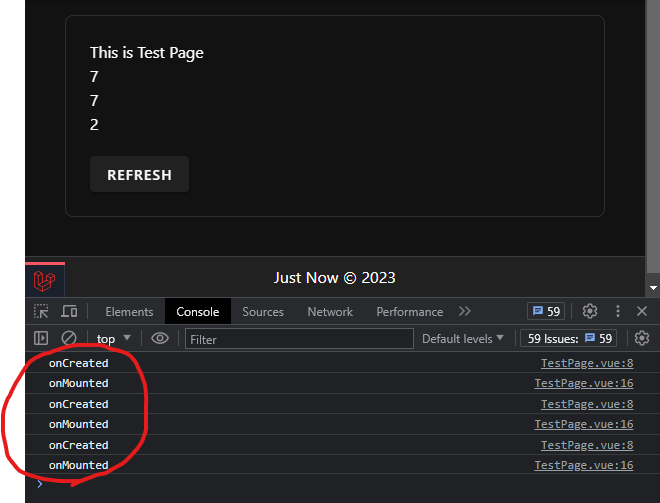
Any help will be appreciated.
Thanks!
@Zalo I suggest you to have a look at the partial reloads and especially the lazy data evaluation.
Please or to participate in this conversation.