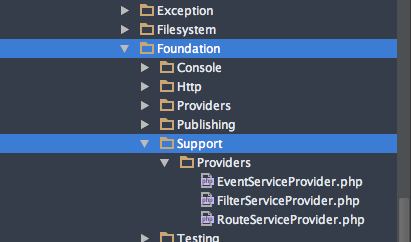
i worked the last days on L5 and everything is working great! Until today. I put into the composer.json the faker package and did a composer update. But it didn't walk through. It ends up with the following (thrown by the artisan clear-compiled)
{"error":{"type":"Symfony\\Component\\Debug\\Exception\\FatalErrorException","message":"Class 'Illuminate\\Routing\\FilterServiceProvider' not found","file":"\/htdocs\/project\/app\/Providers\/FilterServiceProvider.php","line":5}}
Any ideas? The file does exist. Namespace is correct.
That is cool. Thanks. I changed that. Thanks for that help. But: I don't have that Providers in my /vendor folder. Seems i have an older version. How can i upgrade? I just thought composer update is enough, when i have in my composer.json file "laravel/framework": "5.0.*@dev" - but it seems as it is not enough. Do you know that?
Hm, it's strange. I customized the files for the providers, according to my namespace. Now it is working. But why i don't understand nevertheless, why in the vendor folder these folder is missing.
Illuminate\Foundation\Support.... I don't have any "Support" folder there. That's why also my IDE is crying. But i am on latest framework ref. 49e3c77.
I am really really confused. I created for test reasons another new project to see if the folder is there. And: Yeah, it is there. I got back to my actual project and suddenly folder is also there :-D I did not change anything. Does anybody as a explanation for that behavior?
@nWidart: Yeah it is. So much time? Omg. Never saw that it took so much time. I will observe it :-) Thanks for your time and help! (and of course all the others :-))
Holy, my whole project is a mess right now. Whatever I do, there's always another error...
Argument 2 passed to Illuminate\Foundation\Support\Providers\RouteServiceProvider::namespaced() must be an instance of Closure, none given, called in /var/www/Storyte/app/Providers/RouteServiceProvider.php on line 38 and defined
Any my RouteServiceProvider:
<?php namespace [APP]\Providers;

use Illuminate\Contracts\Routing\UrlGenerator;
use Illuminate\Foundation\Support\Providers\RouteServiceProvider as ServiceProvider;

class RouteServiceProvider extends ServiceProvider {

    /**
     * Called before routes are registered.
     *
     * Register any model bindings or pattern based filters.
     *
     * @param  UrlGenerator  $url
     * @return void
     */
    public function before(UrlGenerator $url)
    {
        $url->setRootControllerNamespace(
            trim(config('namespaces.controllers'), '\\')
        );
    }

    /**
     * Define the routes for the application.
     *
     * @return void
     */
    public function map()
    {
        $this->app->booted(function()
        {
            // Once the application has booted, we will include the default routes
            // file. This "namespace" helper will load the routes file within a
            // route group which automatically sets the controller namespace.
            $this->namespaced(function()
            {
                require app_path().'/Http/routes.php';
            });
        });
    }

}
In general it should not be so hard to get it solved. What i did: Do a composer update to get latest L5 version. Maybe you know when you created the new L5 project. I would check the repository from that time and see what changed. Mostly there are only some handful changes, that can be also done in your installation.
For me personally, i just had to create some new files, move some files, modify namespace and that's it.