Level 102
Can you explain what you mean by
I've checked webdev tools, and the color is reloaded in the code
You mean in the injected css on the page you can see the new color? Classes exist on the page they should work. Can you give an example?
I have new Laravel installation with Livewire. I've installed everything like I did in few previous projects with no problems. But I've noticed something odd when I try to add custom colors into Tailwind using extend. Whenever I change color be it text or background of an element that change is not reflected on the page. I've checked webdev tools, and the color is reloaded in the code but it is not showing on the screen. I've tried disabling the cache on browser whenever dev tools are open, with no change. Reloading the page manually also does nothing. Only 2 options are to stop npm run dev and run it again, or to just use npm run build. Only on that two occasions I can see the changes, and both of them negates the purpose of hot reload. Here is my vite.config.js and any help would be nice since I ran out of ideas (and I've tried dozen of them already from various articles and forum posts)
import { defineConfig } from 'vite';
import laravel from 'laravel-vite-plugin';

import livewire from '@defstudio/vite-livewire-plugin'

export default defineConfig({
    plugins: [
        laravel({
            input: [
                'resources/css/app.css',
                'resources/js/app.js'
            ],

            refresh: true,
        }),

        livewire({
            refresh: ['resources/css/app.css'],
        }),

    ],
});
Can you explain what you mean by
I've checked webdev tools, and the color is reloaded in the code
You mean in the injected css on the page you can see the new color? Classes exist on the page they should work. Can you give an example?
What I've meant is that if I change text color from text-red-500 to text-yellow-500 I see that change in source code of the page (either by going to source code or inspecting it from web dev tools) but the color is still red on page. No matter how I reload the page color is still red. Only when I stop and rerun Vite do I see the change. I can provide screenshot of the page and source if you want.
@zlatiborac that would be great I think. As I understand it you see the class change, but the code inside the style tags does not?
Moment when I changed color from red-500 to blue-500. When I switch to browser window text is black, and web dev inspector shows class as blue-500. Any other change is shown except the color

Here you can see source code, and color here is also blue-500

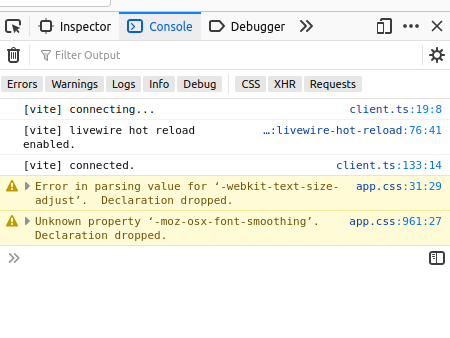
Console is showing that vite is connected and livewire hot reload is enabled
Then I go and stop npm run dev and turn it back on. Voila, text is now blue. And this I need to do for every change of the color.

And, here is the tailwind.config.js file
/** @type {import('tailwindcss').Config} */

module.exports = {
    content: [
        "./resources/**/*.blade.php",
        "./resources/**/*.js",
        "./resources/**/*.vue",
    ],
    theme: {
        extend: {
            colors: {
              f1cultured: '#F5F3F4',
              f1lightgrey: '#D3D3D3',
              f1blackshadows: '#B1A7A6',
              f1imperialred: '#E5383B',
              f1carnelian: '#BA181B',
              f1rubyred: '#A4161A',
              f1bloodred: '#660708',
              f1erieblack: '#161A1D',
              f1richblack: '#0B090A'
            },
            fontFamily: {
                'anton': ['Anton'],
                'ptserif': ['PT Serif']
            },
        },
    },
    plugins: [],
}
and vite.config.js file
import { defineConfig } from 'vite';
import laravel from 'laravel-vite-plugin';

import livewire from '@defstudio/vite-livewire-plugin'

export default defineConfig({
    plugins: [
        laravel({
            input: [
                'resources/css/app.css',
                'resources/js/app.js'
            ],

            refresh: true,
        }),

        livewire({
            refresh: ['resources/css/app.css'],
        }),

    ],
});
If you have any idea I am willing to give it a go since I have none left.
@zlatiborac do you see vite restart in the console when you change the tailwind config? Can you try npm update
OK, when I edit tailwind.config file and I explicitly click Save All (ctrl+s in PHPStorm) I do get notification that tailwind.config file is changed.
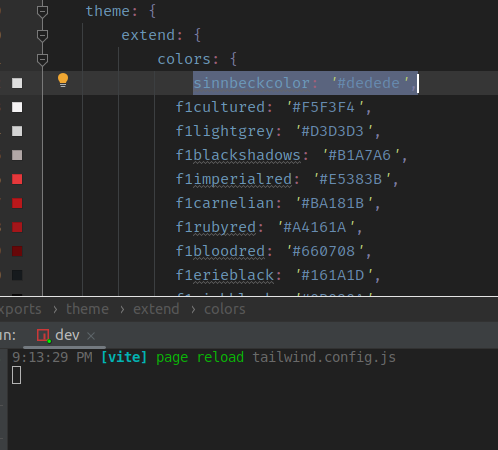
When I do another change to tailwind.config file, and also change the color in other file, and I hit Save All, I get notification that tailwind.config is changed, but when I switch to browser color of the text is again black, and I need to stop run dev and run it again to see changes. composer and npm update is something I do before almost every start of IDE
@zlatiborac I cannot recreate the problem. Be absoiutely sure that you have the newest vite-plugin (0.5) and vite is at 3.0 if you installed it manually
My vite config
laravel({
            input: [
                'resources/css/app.css',
                'resources/js/app.js',
            ],
            refresh: ['resources/views/**'],
        }),
@Sinnbeck I am trying something, and I think I found where the problem is/was. I will post it here in few minutes just to double check, but this is now becoming much more intriguing
@zlatiborac if I recall correctly, those messages in the console was removed in vite 3, so I think the problem is that you are running vite 2
@Sinnbeck OK, what I did is disabled Livewire and Livewire hot-reload from vite.config and app.js inside resources/js folder
vite.config
import { defineConfig } from 'vite';
import laravel from 'laravel-vite-plugin';

// import livewire from '@defstudio/vite-livewire-plugin'

export default defineConfig({
    plugins: [
        laravel({
            input: [
                'resources/css/app.css',
                'resources/js/app.js'
            ],

            refresh: true,
        }),

        // livewire({
        //     refresh: ['resources/css/app.css'],
        // }),

    ],
});
and app.js
import './bootstrap';

import Alpine from 'alpinejs';
// import {livewire_hot_reload} from 'virtual:livewire-hot-reload'

window.Alpine = Alpine;

Alpine.start();

// livewire_hot_reload();
also package.json (just to show that I run vite 3.0)
{
    "private": true,
    "scripts": {
        "dev": "vite",
        "build": "vite build"
    },
    "devDependencies": {
        "@defstudio/vite-livewire-plugin": "^0.2.4",
        "@tailwindcss/forms": "^0.5.2",
        "alpinejs": "^3.4.2",
        "autoprefixer": "^10.4.2",
        "axios": "^0.27",
        "laravel-vite-plugin": "^0.5.0",
        "lodash": "^4.17.19",
        "postcss": "^8.4.6",
        "tailwindcss": "^3.1.0",
        "vite": "^3.0.0"
    }
}
I am now thinking that the problem might be in the order in which scripts are imported... If you see anything not in order tell me because I am a bit burned out from all the trying.

Does your resources/css/app.css look like this?
@tailwind base;
@tailwind components;
@tailwind utilities;
@citricguy sure, nothing in there at all except those 3 lines. I was trying to avoid using @apply directive.
Out of curiosity, did you start with bare Laravel and install Livewire and Tailwind, or did you use a starter like Breeze or Jetstream?
@citricguy it was Breeze starter, but here is something I just found on vite-livewire-plugin installation documentation
Warning This Vite plugin, as Livewire needs to persist in page, is not fully compatible with other plugins that full refresh the page when a .blade.php file changes (i.e. laravel/vite-plugin with refresh option active) in order to make them work together, blade files in /livewire/ should be excluded from blade hot reload.
It looks like that I can only use one fully, laravel-vite plugin or vite-livewire... so if I remove vite-livewire from vite.config and app.js it all goes back to normal.
@zlatiborac interesting. I am going to start working on a livewire project soon. If I find a way to make it work I will let you know.
One idea is to create the complete design in a regular blade file first. That's what I have done so far (livewire isn't even installed yet)
@Sinnbeck Please do. This is also my first project where I use livewire, and this was the first problem. I hope it's the last one :)
@zlatiborac Just had a chance to test out that livewire plugin, and I have the exact same issue. It does not actually pick up any tailwindscss changes at all. It seems to reload the css file, but the changes arent there.
I have switched back to using regular full page refresh until it gets fixed
laravel({
            input: [
                'resources/css/app.css',
                'resources/js/app.js',
            ],
            refresh: ['resources/views/**'],
        }),
Edit: I added a question on their page, to see if there is a known fix: https://github.com/def-studio/vite-livewire-plugin/discussions/20
@Sinnbeck Thanks for raising this issue with them. I still have no solution for both of them to work together.
@zlatiborac happy to help. Just to be sure, it works if you just use the plain laravel vite plugin right?
@Sinnbeck Yes, no problem with that. Only when using combination of both does it stops working
@zlatiborac feel free to post that you have the same issue. Maybe we together can help figure out the cause
sounds like you need to add tailwind config file to the watched paths?
@Snapey I get the same problem by simply adding new classes. No tailwind is refreshed using that plugin :)
OK, they fixed the issue thanks to @sinnbeck for raising this on git.
@zlatiborac yup works now 👍. Please mark a best answer to set the thread as solved
@zlatiborac Please mark the best answer to @sinnbeck and not to you ;).

I am having a similar problem with Laravel 10, breeze React install, none of the default color classes are showing

specific colors u want used in the safelist
content: [
    "./resources/**/*.blade.php",
    "./resources/**/*.js",
    "./resources/**/*.vue",
],
safelist: [
    'bg-red-700',
    'bg-red-500',
    'bg-yellow-500',
    'bg-yellow-300',
    'bg-green-600',

  ],
theme: {
    extend: {
        colors:{
            'gray-light': '#d3dce6',
        }
        // fontFamily: {
        //     sans: ['Figtree', ...defaultTheme.fontFamily.sans],
        // },
    },
},

plugins: [forms],
};
@lite thank you so much, I had given up on finding the solution for this issue

@lite thanks! This solved the problem for me. To help anyone else, this is found in the tailwind.config.js file and you need to add the safelist:[] group.
Please or to participate in this conversation.