Level 102
Didn't you point a domain to it? If not you can access it using a test domain in the settings for the site. I doubt it will work with the ip, as it allows you multiple sites on 1 server
1 like
Hi,
I have deployed an app on Ploi.io and Ploi showed that deployment was successful. I logged into its DO droplet and made sure that migrations are in place. When accessing the IP, it's showing message 403 Forbidden Nginx.
Another interesting thing is I didn't see any log files under storage folder when I logged into a droplet.
Didn't you point a domain to it? If not you can access it using a test domain in the settings for the site. I doubt it will work with the ip, as it allows you multiple sites on 1 server
@Sinnbeck Thanks again! Yeah, I was pointing a subdomain which is not showing correct IP address when I ping it. Maybe I need to wait for when DNS gets updated. By the way, is it possible to add a site without pointing a domain name in the beginning?
@tenzan yeah just add a dummy domain. It needs it for the folders. So give it the name you plan on using later. Then after the site is ready, go to setting and active the test domain. You can then access it from the menu to the left
https://ploi.io/news/testing-domains-rolling-back-deployments
@Sinnbeck Thanks! I'll try again from scratch and let you know how it goes.
@tenzan you can still do it with your current site. Only thing you need is to enable the test domain. No need to start over
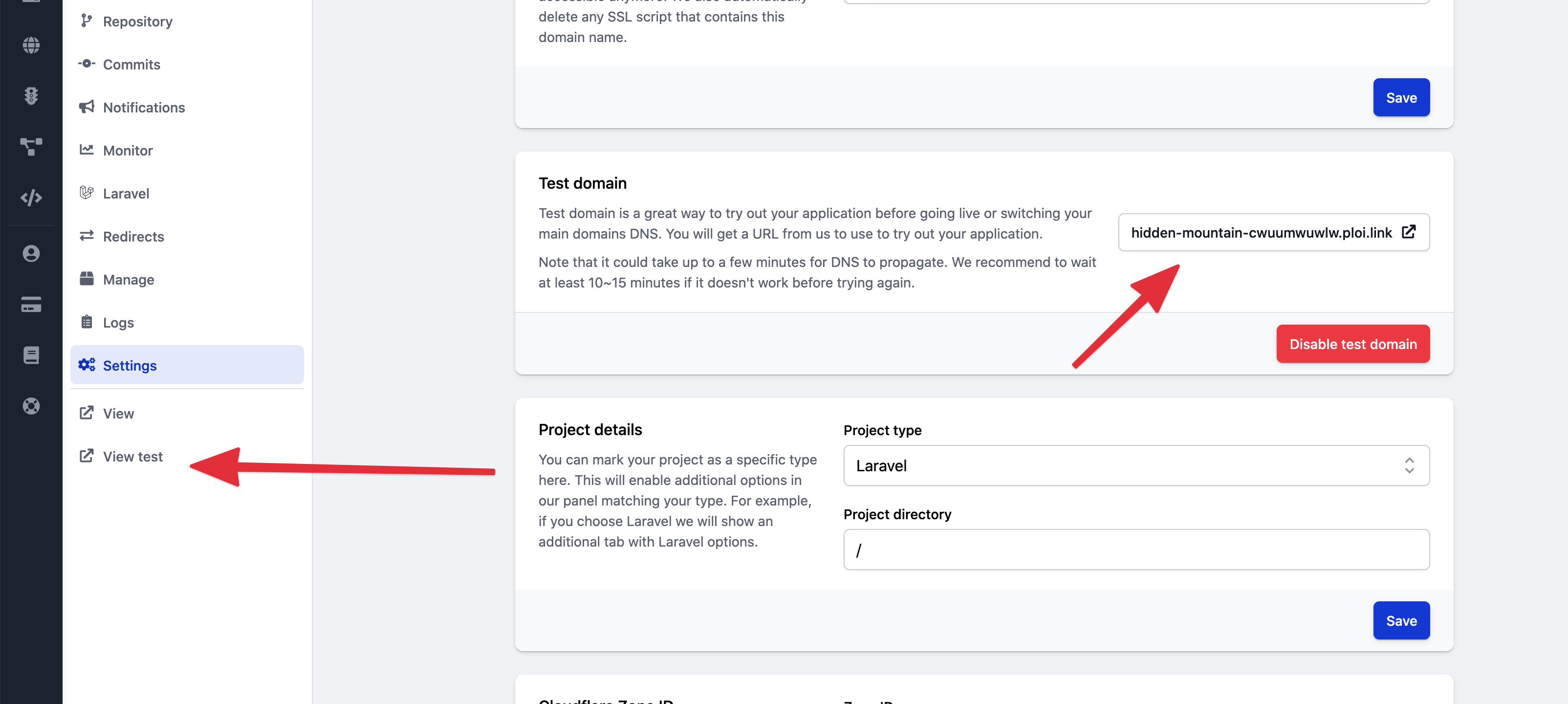
@Sinnbeck I think I tried it also before but can't recall if I did this time or previous experiments. Anyway, I already removed the server I was having issues. At the moment, a new server is being rolled up...
@tenzan ok no worries. Luckily it's easy and fast to start over 👍
@Sinnbeck Indeed such sort of SaaS sites are saving our times to focus on development :)
@tenzan indeed. It's so incredibly easy to use. I can recommend getting the ploi cli tool also. It makes it easy to deploy from shell if needed (or manage the servers)
@Sinnbeck New server is fired up and when I enter just one 1 word for domain field, it's complaining The domain is not a valid hostname....
@tenzan yeah you need to give it an actual name. Personally I just use the real one, but don't point the dns until it's ready. But "fake.yourdomain.com" can also work
@Sinnbeck http://chirper.asin.pw/ and test URL https://balmy-pine-cgpvfodg4h.ploi.link/ both are showing same error...
@tenzan is this laravel site? If it is, be sure that the path is set to /public in settings
@Sinnbeck yep...
@tenzan and the path is set correctly? And you selected laravel project in the drop down?
@Sinnbeck For domain, I put chirper.asin.pw and path is /current/public.
Yes, I selected Laravel from drop-down and the project directory is /, i.e. which was set by default.
@tenzan this sounds wrong /current/public
It should just be /public
At least that's how I always set it, as it goes from the root of the project
Seems you fixed it. Click the key:generate button in the laravel page
@Sinnbeck Thanks. I changed to /public and re-deployed. Now I see 500 Server Error
@tenzan yeah perfect. That is laravel. Most likely just a missing key. Check you env file:)
@Sinnbeck I already have a value for APP_KEY= in my .env.
And I don't see key:generate button in the laravel page...
@tenzan then it's fine. Check the log in there (second tab if I recall correctly). The error is clearly laravel so it's working
Or if you don't have data on there yet, set APP_DEBUG to true to see the error (turn it off at once afterwards so you don't forget)
@Sinnbeck I see error Vite manifest not found at: /home/ploi/chirper.asin.pw/public/build/manifest.json (View: /home/ploi/chirper.asin.pw/resources/views/app.blade.php)
@tenzan ah. Either add your built assets to git. Or ssh into the server and run npm run build
I have it in my deployment script
@Sinnbeck if possible, could you please share generic content of your deployment script?
@tenzan I mostly use the default. I just added npm run build on a new line. Do that, click save, and click deploy
Like this
npm install
npm run build
@Sinnbeck I had an error
> build
> vite build

/tmp/build-21c3667e.sh: 1: vite: not found
Not sure if this helps, I'm trying to deploy https://github.com/tenzan/chirper which I created based on https://bootcamp.laravel.com/
@tenzan are you sure you have npm install? It can't build without the node_modules :) see my example above
@Sinnbeck Oops, I forgot line npm install. After adding 2 lines you showed, the issue is solved. Thanks a lot for your time!!! :)
@tenzan happy to help. Now deployments should be easier. I suggest activating zero downtime deployment
@Sinnbeck Yeah, I will do so 🙏
Please or to participate in this conversation.