Be part of JetBrains PHPverse 2026 on June 9 – a free online event bringing PHP devs worldwide together.

bufferoverflow's avatar

Broken tab icons

Did a fresh install of Spark for a new project and found that all tab icons are uncolored and missing some margins.

I have no errors in console and did npm install and run. Also tried clearing cache but icons are still broken. Also checked if classes still there and yes, but seems like svg.icon-20 not loading. Maybe mix problem?
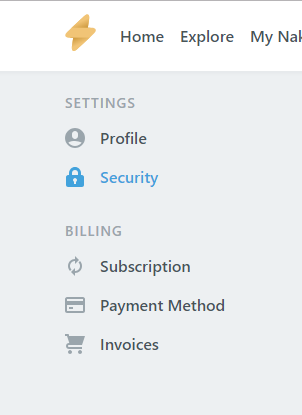
Working screenshot

Not working screenshot

Any ideas where to search? Are your fresh installations working?

Thank you!

0 likes
3 replies
bufferoverflow's avatar

@lawdoc71 I opened an issue in the spark-aurelius repository but still no answer. Meanwhile you can just override vendor styles with:

Put these styles in resources/assets/sass/app.scss.

// Fix tabs 
.nav-link { 
  display: flex; 
  align-items: center; 
  padding-top: 5px; 
  padding-right: 0; 
  padding-bottom: 5px; 
  padding-left: 0; 
  font-size: 1rem; 
  font-weight: 600; 
  color: $nav-link-color; 
 
  svg { 
    fill: currentColor; 
    margin-right: 15px; 
    color: $gray-500; 
    flex-shrink: 0; 
  } 
 
  &:hover { 
    font-weight: 600; 
    color: $primary; 
    svg { 
      fill: $primary; 
    } 
  } 
 
  &.active { 
    font-weight: 600; 
    color: $primary; 
    svg { 
      fill: $primary; 
    } 
  } 
} 

Please or to participate in this conversation.