Be part of JetBrains PHPverse 2026 on June 9 – a free online event bringing PHP devs worldwide together.

hrosenthal's avatar

PHP Confusion

I just downloaded Laravel (on Windows 10) and am going through the online learning. Although everything seems to function properly in the examples, I get several errors when creating a new project. The problems all seem to stem from the fact that I have PHP 5.6.25 and need 7.1.3.

I'm still a bit confused about what was installed during the laravel install, but it seems that a localhost server was set up (this starts when I use the php artisan serve command). I assume php was also installed as part of the laravel installation.

So the question is, how do I bring my php up to the required 7.1.3. While I don't understand why the laravel install wouldn't have included the required version, I assume this is something I'll have to update regularly.

Thanks for your assistance

0 likes
4 replies
Dalma's avatar

I don't think that laravel loaded Php on your computer, it must have been installed previously. Normally on a windows machine a package like WAMP is installed which provides Php and MySql. I would guess that you already had Php on your machine.

Sergiu17's avatar
Sergiu17
Best Answer
Level 60

I assume php was also installed as part of the laravel installation

No

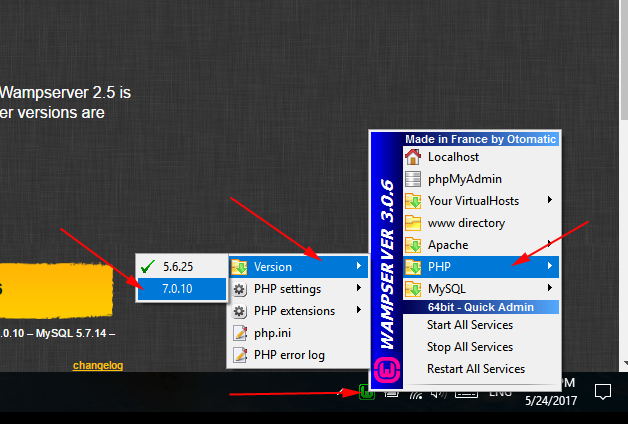
how do I bring my php up to the required 7.1.3.

If you are using WAMP:

While I don't understand why the laravel install wouldn't have included the required version

https://github.com/laravel/laravel/blob/master/composer.json#L11

This is just composer, PHP version it's included in composer.json file, it forces you to have PHP 7 because, Laravel uses PHP 7 features - http://php.net/manual/en/migration70.new-features.php - you will find some PHP 7 features in Laravel core

lostdreamer_nl's avatar

installing laravel does not install php and a webserver for you.

But PHP has a build-in webserver for local development (which is what is being used when you use php artisan serve)

As you're just starting out, I suggest going the laragon route: https://laragon.org/

uninstall your current PHP version (probably via control panel, depends on how you installed it) and than install laragon in a folder of your choosing. (d:\www ?)

Now you will have PHP > 7.1, MySQL, redis and 2 webservers to choose from (Apache / nginx), 1 will be selected and setup by default.

From within laragon you just have to 'start all' and it will also auto setup your hosts file to create fake development domains ( d:\www\foldername\public becomes available on http://foldername.test )

" While I don't understand why the laravel install wouldn't have included the required version...." Most servers run multiple websites, and those websites can also be ran by different PHP versions on that same server..... simply installing php over an already installed version is a very good way to break your server..... so this is why no piece of software will 'just include the required version' it's up to the server admin to make sure everything is setup to use your software.

hrosenthal's avatar

I updated the the latest version of WAMP because I'm already familiar with it. thanks for the help

Please or to participate in this conversation.