maikeltweak's avatar

Dynamically rendering components in livewire

Hey guys,

Im working on a stepper component that renders different component based on the current step.

I came up with the following test scenario, but its not working and i don't understand why:

<?php

namespace App\Http\Livewire;

use Livewire\Component;

class ParentTest extends Component
{
    public $component_name;

    protected $listeners = ['setChild'];

    public function setChild($number): void
    {
        $this->component_name = 'child' . $number;
    }

    /**
     * @throws \Exception
     */
    public function render()
    {
        return view('livewire.parent-test');
    }
}
<div>
    <div class="p-8">
        <x-button type="button" wire:click="setChild(1)"
                  label="{{ __('Child 1') }}" class="mb-3"/>

        <x-button type="button" wire:click="setChild(2)"
                  label="{{ __('Child 2') }}" class="mb-3"/>

        <x-button type="button" wire:click="setChild(3)"
                  label="{{ __('Child 3') }}" class="mb-3"/>
    </div>

    <p class="bg-green-500 text-white p-2">{{$component_name}}</p>
    
    @if(isset($component_name))
        @livewire($component_name)
    @endif
</div>
Route::get('/nested', ParentTest::class);

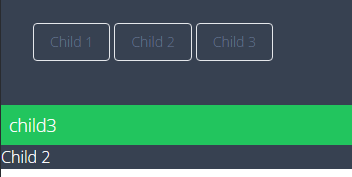
Only the first button i clicked seems to render, if i click on another button the $component_name (green text) is changed, but the @livewire($component_name) does nothing:

To be clear i have 3 child components that only render a view with the text Child 1, Child 2 and Child 3 in it.

0 likes
9 replies
LaryAI's avatar
Level 58

You can use the wire:init directive to dynamically render components in Livewire. The wire:init directive will allow you to pass a component name as a parameter and render it.

In your case, you can use the wire:init directive in the parent-test view like this:

@if($component_name)
    <livewire:{{ $component_name }} />
@endif

Then, you can call the setChild method from the parent component and pass the component name as a parameter.

<button wire:click="setChild('Child1')">Set Child 1</button>
<button wire:click="setChild('Child2')">Set Child 2</button>

This should render the corresponding child component based on the parameter passed to the setChild method.

maikeltweak's avatar

@chiragparekh I just asked chatgpt and they said the same thing and it works now! Thanks a lot!

@if(isset($component_name))
    @livewire($component_name, key($component_name))
@endif
1 like
all1.ai's avatar

Another way I needed to do this was to get this all sorted out in the Php file so I was able to load the entire livewire with the javascript info/ and mounted into a variable using below:

``	$livewire = Blade::render('@livewire($component)', ['component' => $component ]);  ``

What this does is in an instance computer an entire blade file with the livewire blade shortcode and execute everything necessary to render the components.

ZermattChris's avatar

This works, but I have a feeling it's for Livewire 2...

I can get components to switch out properly, but am stuck at passing properties to the dynamic sub-components.

  • If this is a Livewire 2 concept, what's the Livewire 3 version?
  • How can I pass my data to the sub-components (properties)?

Any pointers greatly appreciated from this Livewire beginner :-)

ZermattChris's avatar

As usual, I think I've figured it out (at a basic level), directly after a public posting for help :-)

Somehow I totally missed the entry in the docs. Doh. https://livewire.laravel.com/docs/nesting#dynamic-child-components

This is what's working now:

In the parent component, I'm switching sub components with:

			<button type="button" wire:click="setView('subComponent1')" />
			<button type="button" wire:click="setView('subComponent2')" />

		    @if(isset($view_name))
			<livewire:dynamic-component :component="$view_name" :key="$view_name" :mydata="$myData"/>
			@endif

and then capture the incoming 'myData' in the sub-component's mount() method.

I've still got to figure out Livewire's way of binding/updating data, but at least this first step is working in Livewire 3.

-Chris

4 likes

Please or to participate in this conversation.