Be part of JetBrains PHPverse 2026 on June 9 – a free online event bringing PHP devs worldwide together.

motinska94's avatar

Site is fast on my pc, but slow on server AND on my client's pc (Waiting for server response)

TL;DR : Livewire ajax request takes 70ms on my localhost, but it takes somewhere between 2 and 8 seconds on both my client's computer's localhost, and on the server (I've seen it take as long as 20 seconds).

I've built a site for a client a month ago and it's still haunting me because of its speed problems, I have cached almost everything there is to cache but still a simple livewire request (to get data from cache - no db queries) takes somewhere between 1.5 to 4 seconds.

The app is very simple, shows restaurant tables on homepage, where you can click on them to view and see/add orders.

On the table page I have 4 livewire components,

  1. table-categories component : Lists food/product categories (data comes from cache, only using livewire to emit an event to the following component)

  2. table-products component : Shows a list of all its food items when clicked on a category, also cached by category id.

  3. table-options component : After selecting the food, select quantity, portion, ingredients, notes etc. and click a button to create an order.

  4. table-orders component : A list of all the products that table has ordered, this one makes a query but it is eager loaded, extremely efficient and polls every 5 seconds just in case another waiter has changed/took an order from the same table.

Here's my network tab when I select a category. (Disregard xhr ones, they're from debugbar)
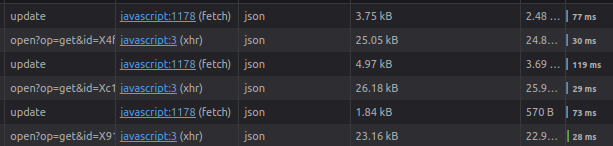
But today I installed the same exact laravel app, with same exact database on my client's computer all these requests took longer than 1-2 seconds "each".

Here's the details page of one of those ajax requests, from my client's computer. Literally running the same way as it does on my own pc, php artisan serve (sorry for bad quality)

And this is how it looks on the server :

The code that runs on these actions are nothing more than getting data from cache. There's not a single database query running.

At first I wanted to blame the hosting company, after a lot of support tickets today I went to my client to install the site on their machine locally until I can fix the problem, and I saw it's not much better than the server on their machine as well. Again, same exact code, same exact database.

I'm not sure what else I'm supposed to do. Suggest them to change the hosting provider? Give them my own computer? I've spent an entire month optimizing the site, and I've done pretty much everything I can at this point.

I'm sorry if I over/undershared. I have never dealt with servers other than my own localhost before.

0 likes
15 replies
jlrdw's avatar

Are you trying to load all records instead of paginating.

Have you taking a relational database course for a better understanding. I have worked with databases with 10's of thousands of records without any cache, and with correct indexing and paginating all worked fast.

Of course there are "slow times" on any internet connection at heavy traffic times.

Edit:

You didn't install debug tools on production? That would slow things down as well.

1 like
motinska94's avatar

@jlrdw Thanks for the answer!

Are you trying to load all records instead of paginating.

Yes, and since there are maximum 10 products on each (4) category, I don't think that would be an issue.

Have you taking a relational database course for a better understanding.

Will do, but as I said in the post, it's not about database queries since there's none running :

The code that runs on these actions are nothing more than getting data from cache. There's not a single database query running.

Of course there are "slow times" on any internet connection at heavy traffic times.

And that's exactly why today I went to my client's office to install the app locally to their computer, I ran the site same way I do on my own pc (php artisan serve) and still getting up to 5 seconds of response time.

You didn't install debug tools on production? That would slow things down as well.

I did not, it's installed as dev dependency.

jlrdw's avatar

@motinska94 do you have plenty of memory? Not enough will make cached items slower.

motinska94's avatar

@jlrdw

Hosting plan has : 2GB RAM, 2 cores (>=2GHz), 3GB SSD disk space.

I chose this for my customer, thinking this plan would suffice for a simple webapp like this.

Obviously I would assume my client's computer specs are better than these, I haven't asked.

jlrdw's avatar

@motinska94 what cache driver, have you tried Redis.

Edit:

Compare cached verses just running the queries.

1 like
motinska94's avatar

@jlrdw

what cache driver, have you tried Redis

It's set to file, I haven't tried anything else. Shouldn't that be good enough though, considering the server uses SSD?

Compare cached verses just running the queries.

Just tried on the server, not much difference, each click still takes ~5 seconds to load the products. I seriously can't wrap my head around it, same exact thing takes 70ms on my local.

jlrdw's avatar

@motinska94 What region are you in, are you sure it's not slow for everyone and not just you.

How many products are you loading?

1 like
motinska94's avatar

@jlrdw

I live in Turkey, so does my customer, and the hosting company is also located here. I'm pretty sure it's slow for everyone since I've tried mobile data, several different wifi networks, devices and so did my client. Hosting company said there's nothing wrong with their servers, and I guess they're right since it's just as slow on client's local.

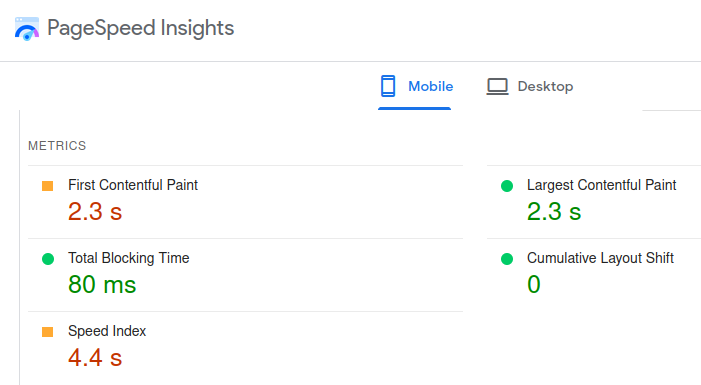
Here's a test result from pagespeed insights (pagespeed.web.dev)

How many products are you loading?

Products are cached as 'products_' . $category_id, the category with most products has 8. There are 4 categories all of their products cached separately. So the max amount of products I'm loading at a time is 8.

jlrdw's avatar

@motinska94 but are other websites slower there, like laracast.com.

Clear your browser cache and close browser, then open browser, does laracasts take a little time to load?

Also try some other sites.

1 like
motinska94's avatar

@jlrdw Nothing different than usual. I have 20mbps connection and client had 40mbps, I tested this morning when I was there.

Also the site being just as slow on client's computer on local makes me think that it's not internet related either. If only I knew what my pc has that both their pc and the server don't. I considered the possibility that I'm using linux and client has windows, but the server is also linux and it's just as slow there.

Bogey's avatar

Maybe server configuration is not optimized on the slower machi e or background processes.

satore11's avatar

Hi folks, I have the same problem on my project. It runs fine on the local machine but on the vm the client (browser) waits for the server response for at least 1.5 seconds. It's unusable

Around the internet I found many solutions which unfortunately don't solve the problem. Someone suggests to install the MySQL instance on the same machine and the lag remains, someone else says to change the livewire configuration inject_morph_markers to false, but nothing changes.

In my case there are sections of a form that make up a wizard, and with each selection the next section appears (with the blade if directive). The most complex component is an autocomplete that works on a table that now has 12 records.

I hope someone can suggest a solution

Many thanks

satore11's avatar

Solved! In my case I also have a library, PHP Filament, which requires all icons to be cached before being executed in production mode. This simple action drastically reduced the time of ajax calls.

Maybe it doesn't solve it in your case but in general I recommend you also take a look at the best practices of using Livewire, I found this repo that collects some of the main best practices.

https://github.com/michael-rubel/livewire-best-practices

I hope they can help you

1 like
Timberman's avatar

@satore11 Hi!

What do you mean by that? I have the same problem as this, but I can't seem to find any documentation of that anywhere on the site you've linked.

Please or to participate in this conversation.