Level 102
There was just added a new way of adding multiple attachments. Might be worth a shot https://github.com/laravel/framework/pull/43080
https://laravel-news.com/laravel-9-22-0
Just do a minor update to 9.22
1 like

Hello,
I have a small application where I create invoices. One feature of the app is to send the invoice as pdf attachment via mail to clients. This worked great. Now I added the option to add further pdf files to the mail.
I use a Mailable like this:
<?php

namespace App\Mail;

use App\Models\Client;
use App\Models\Invoice;
use Illuminate\Bus\Queueable;
use Illuminate\Mail\Mailable;
use Illuminate\Queue\SerializesModels;
use Storage;

class NewInvoice extends Mailable
{
    use Queueable, SerializesModels;

    /**
     * Create a new message instance.
     *
     * @return void
     */
    public function __construct(
        public Client $client,
        public Invoice $invoice,
        public string $emailText,
        public string $additionalAttachmentsPath
    )
    {
        //
    }

    /**
     * Build the message.
     *
     * @return $this
     */
    public function build()
    {
        $user = $this->client->user;
        $mailable = $this->from($user->email, $user->name)
            ->view('emails.new-invoice')
            ->with([
                'user' => $user,
                'emailText' => $this->emailText,
            ]);

        if ($this->additionalAttachmentsPath !== '') {
            $additionalAttachments = Storage::files($this->additionalAttachmentsPath);

            foreach ($additionalAttachments as $additionalAttachment) {
                $mailable->attachFromStorage($additionalAttachment);
            }

            Storage::deleteDirectory($this->additionalAttachmentsPath);
        }

        $mailable->subject(__('New invoice'))
            ->attachData(
                $this->invoice->getPdf()->output(),
                $this->invoice->fileName,
                [
                    'mime' => 'application/pdf',
                ]
            );

        return $mailable;
    }
}
This is then used in a service as follows:
class InvoiceService
{
    public function sendInvoice(
        Invoice $invoice,
        Client $client,
        string $emailText = '',
        array $emailCC = [],
        string $additionalAttachmentsPath = ''
    )
    {
        $mailable = new NewInvoice($client, $invoice, $emailText, $additionalAttachmentsPath);

        try {
            Mail::to($client->email)
                ->cc($emailCC)
                ->bcc($client->user->email)
                ->locale($client->language)
                ->queue($mailable);

            $invoice->update([
                'sent_on' => today(),
            ]);
        } catch (TransportExceptionInterface $exception) {
            Log::error($exception->getMessage());
        }
    }

	...
}
Now the problem is that I always get the following error, when I add additional attachments:
The body must be a string or a resource (got "null").
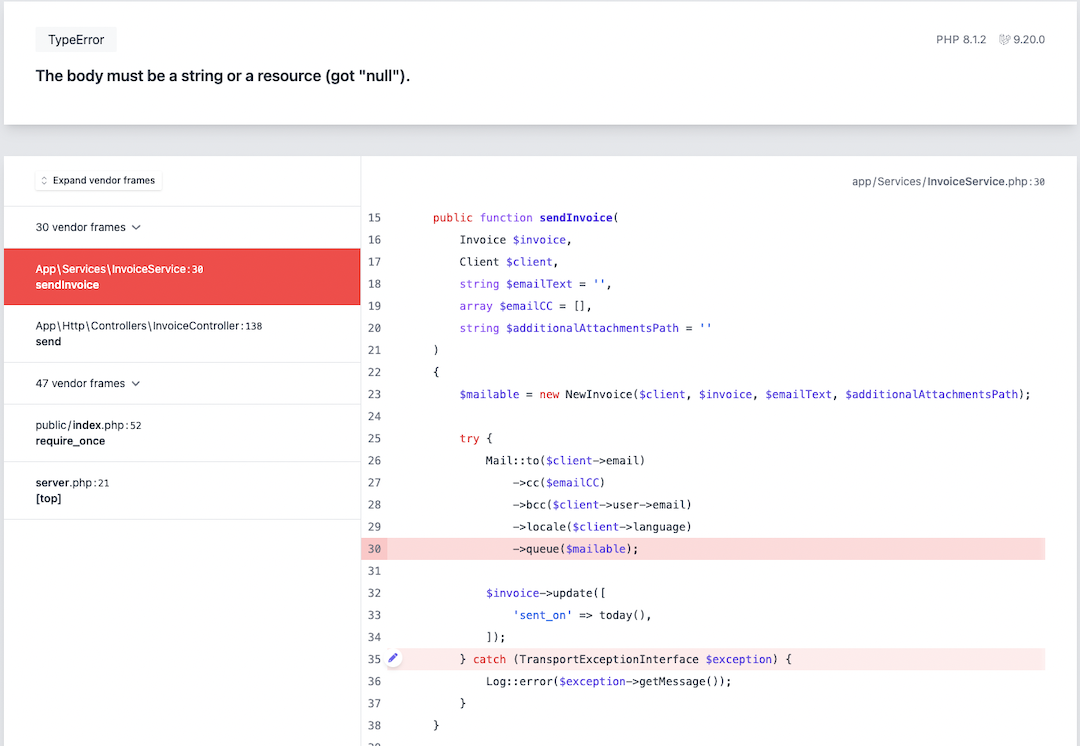
As you can see I use PHP 8.1 and Laravel 9.20 for this application.
I already spend a whole evening to search for what could be the reason, but couldn't find anything. Hopefully I get some help here. It's very much appreciated.
Thanks, Michael
Thanks to @sinnbeck again, although the update of Laravel didn't solve my issue, but it pointed me to the issue with a better error message while using the new attachMany() method. So I solved the issue 🙂.
The problem was that I deleted the temporary folder with the additional attachments directly after I attached the files to the mailable. But at this point the mail wasn't send already. So the files where gone when Laravel actually wanted to send the mail. And this caused the error, also it wasn't really helpful. I only recognized it, because the attachMany() method, was complaining about that it couldn't find the files at the given path.
So now I moved the line where the temporary folder is deleted after the mail is send and this works great.
Please or to participate in this conversation.