
Level 73
UPDATE table
SET column = <value>
WHERE id = <id>
1 like

Be part of JetBrains PHPverse 2026 on June 9 – a free online event bringing PHP devs worldwide together.

Hello all,
i am creating a custom menu with 1 level depth concept as per the requirement
currently i am sorting my menu as per the menu_order
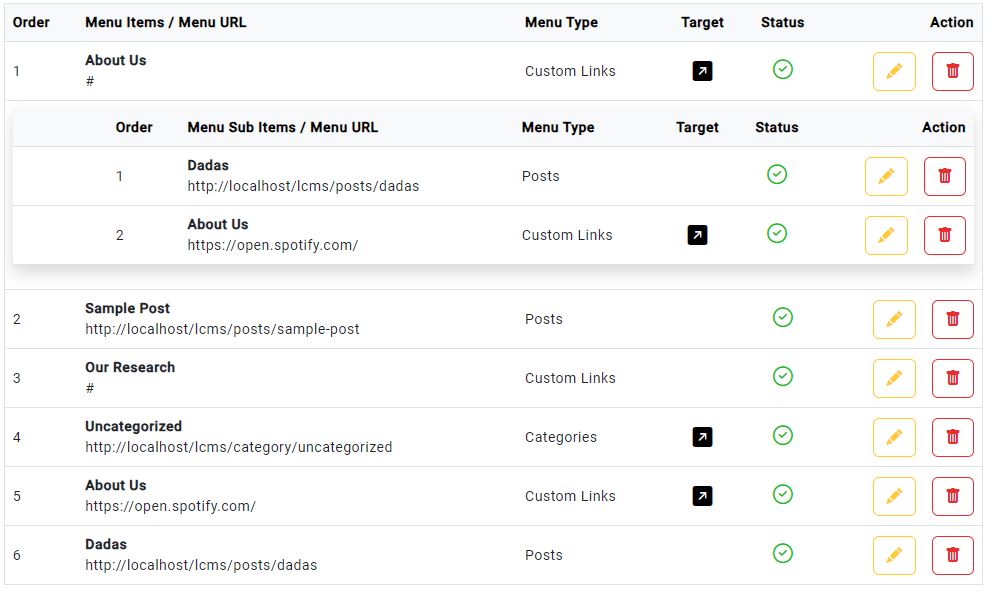
at store method, i am checking menu_order with the MenuItem present in there and adding +1 in it, also i havenot added any form option to the user to add new menu_order
$data['menu_order'] = MenuItem::where('menu_id', $data['menu_id'])->count() + 1;
But in update method, i want to change as per the user wants, suppose if he want his order {uncategorized to be 1) which is currently in menu_order 4, as per the given image
i want to change its menu_order to 1 along with 2 in about -us, 3 in simple post , 4 in our research, and so on
how to sync only one column in the table as per the user request ???
can any one help me ???
Please or to participate in this conversation.

