Rretzko's avatar

Cloning existing GitHub repository yields 'Invalid "america/new" locale' error

Hi folks - This has me pulling my few remaining hairs out. I'm migrating to a new machine. I've installed Herd and am using PhpStorm 2025.2. I've cloned my github repository, copied the new .env file, and run "composer install". This gives me a bunch of error and advises that I should run "composer update". When I run composer update, it all seems to be doing the expected work until I hit this error:

> Illuminate\Foundation\ComposerScripts::postAutoloadDump
> @php artisan package:discover --ansi

   Symfony\Component\Translation\Exception\InvalidArgumentException

  Invalid "america/new" locale.

  at vendor\symfony\translation\Translator.php:452
    448▕      */
    449▕     protected function assertValidLocale(string $locale): void
    450▕     {
    451▕         if (!preg_match('/^[a-z0-9@_\\.\\-]*$/i', $locale)) {
  ➜ 452▕             throw new InvalidArgumentException(\sprintf('Invalid "%s" locale.', $locale));
    453▕         }
    454▕     }
    455▕
    456▕     /**

  1   vendor\nesbot\carbon\src\Carbon\AbstractTranslator.php:160
      Symfony\Component\Translation\Translator::assertValidLocale()

  2   vendor\nesbot\carbon\src\Carbon\AbstractTranslator.php:254
      Carbon\AbstractTranslator::resetMessages()

Script @php artisan package:discover --ansi handling the post-autoload-dump event returned with error code 1

In checking my code (which is running fine in production and I don't hit this error on my older machine), I see my .env file has:

APP_TIMEZONE=America/New_York
APP_URL=http://localhost

APP_LOCALE=america/new_york
APP_FALLBACK_LOCALE=en
APP_FAKER_LOCALE=en_US

my config/app.php has:

'timezone' => env('APP_TIMEZONE', 'America/New_York'),
 'locale' => env('APP_LOCALE', 'en'),

    'fallback_locale' => env('APP_FALLBACK_LOCALE', 'en'),

    'faker_locale' => env('APP_FAKER_LOCALE', 'en_US'),

and when I do shift-shift ALL, I don't find any examples which are "america/new" or "america/new ", but all are "America/New_York". I'm dead in the water at this point, so any suggestions on how I can troubleshoot or work around this are appreciated! Thanks - Rick

0 likes
23 replies
LaryAI's avatar
Level 58

Hi Rick,

The error message:

Invalid "america/new" locale.

means that somewhere in your configuration, the locale is being set to america/new, which is not a valid locale string. Locale values should use underscores or hyphens (like en_US or en), not slashes.

Let's break down your .env and config/app.php:

Your .env:

APP_TIMEZONE=America/New_York
APP_URL=http://localhost

APP_LOCALE=america/new_york
APP_FALLBACK_LOCALE=en
APP_FAKER_LOCALE=en_US

Your config/app.php:

'timezone' => env('APP_TIMEZONE', 'America/New_York'),
'locale' => env('APP_LOCALE', 'en'),
'fallback_locale' => env('APP_FALLBACK_LOCALE', 'en'),
'faker_locale' => env('APP_FAKER_LOCALE', 'en_US'),

The Issue

  • APP_TIMEZONE is correct: America/New_York (for timezones, slashes are valid).
  • APP_LOCALE is set to america/new_york, which is not a valid locale. Locales should look like en, en_US, fr, etc.

The error message refers to america/new, which suggests that somewhere, the value is being truncated or misread (possibly due to a typo or an environment variable parsing issue).

Solution

1. Change your .env to use a valid locale:

Replace:

APP_LOCALE=america/new_york

with:

APP_LOCALE=en

or, if you want US English:

APP_LOCALE=en_US

2. Clear your config cache:

After updating your .env, run:

php artisan config:clear
php artisan cache:clear

3. Try running composer again:

composer dump-autoload
composer install

Why did this work on your old machine?

  • Your old machine may have had a cached or default value for APP_LOCALE.
  • The new machine is reading the .env as-is, and the invalid value is causing the error.

Summary

  • Locales (APP_LOCALE) should be like en, en_US, fr, etc.
  • Timezones (APP_TIMEZONE) can be like America/New_York.

Final .env example:

APP_TIMEZONE=America/New_York
APP_URL=http://localhost

APP_LOCALE=en
APP_FALLBACK_LOCALE=en
APP_FAKER_LOCALE=en_US

Let me know if this solves your issue!

Glukinho's avatar

I definitely saw somebody's answer here telling you should have

APP_LOCALE=en

But now the answer disappeared.

Glukinho's avatar

@ghabe my guess is people often don't take AI-generated answers seriously and better appreciate exact human answer of 2 lines rather than AI generated "may be nonsense" answer of 2 pages.

martinbean's avatar

@rretzko This is not a valid locale:

APP_LOCALE=america/new_york

The locale should be something like en_US.

As an aside, you should also be storing dates and times as UTC in your database to prevent oddities with converting timezones, daylight savings, etc.

Rretzko's avatar

Thanks, guys. I made that change:

APP_LOCALE=en_US
APP_FALLBACK_LOCALE=en
APP_FAKER_LOCALE=en_US

and tried running

php artisan cache:clear
php artisan config:clear

and hit the identical error. I ran the global "find" on PhpStorm looking for the phrase "new york" thinking that maybe I've left the underscore out somewhere and found nothing helpful. Any other thoughts on troubleshooting? Thanks again!

martinbean's avatar

@rretzko I imagine the “bad” locale value’s gotten cached somewhere deep within your application/the framework.

Can you try running php artisan optimize:clear and post the error you get, if you do get one?

Glukinho's avatar

@Rretzko make APP_LOCALE=en not en_US

At least, default .env file after fresh Laravel install has APP_LOCALE=en.

upd: and don't forget php artisan optimize:clear of course

Rretzko's avatar

OK, I've found a way to move forward, but not to solve the problem: I've changed the APP_LOCALE to en-US. If I change the .env file APP_TIMEZONE to:

APP_TIMEZONE=UTC

the php artisan commands work as expected. If I change it back to

//selected from the select box
APP_TIMEZONE=America/New_York

and then run php artisan optimize, I get the error noted below. In fact, if I change it to ANY other selection (ex. Americas/Anchorage, Europe/Amsterdam) I get the error

  Symfony\Component\Translation\Exception\InvalidArgumentException 

  Invalid "europe/amsterdam" locale.

  at vendor\symfony\translation\Translator.php:452                                                                                             
    448▕      */
    449▕     protected function assertValidLocale(string $locale): void
    450▕     {
    451▕         if (!preg_match('/^[a-z0-9@_\\.\\-]*$/i', $locale)) {
  ➜ 452▕             throw new InvalidArgumentException(\sprintf('Invalid "%s" locale.', $locale));
    453▕         }
    454▕     }
    455▕
    456▕     /**

  1   vendor\nesbot\carbon\src\Carbon\AbstractTranslator.php:160
      Symfony\Component\Translation\Translator::assertValidLocale()                                                                            

  2   vendor\nesbot\carbon\src\Carbon\AbstractTranslator.php:254

Does this trigger any other thoughts?

martinbean's avatar

@Rretzko You’re clearly changing the locale, not the timezone!

The error message tells you as such:

Invalid "europe/amsterdam" locale.

So again:

  1. Set APP_LOCALE=en_US
  2. Set APP_TIMEZONE=UTC
  3. Run php artisan optimize:clear
  4. Paste error if you still get one after the above steps
Rretzko's avatar

Hi All - Thanks for the response:

  1. @ghabe: I didn't know that command, thanks. When I run it, I get this:
 [149] => America/Monterrey
    [150] => America/Montevideo
    [151] => America/Montserrat
    [152] => America/Nassau
    [153] => America/New_York
    [154] => America/Nome
    [155] => America/Noronha

so I think that's set up properly. 2. @martinbean - I agree that's what the error message says, but the only property that I'm changing is the APP_TIMEZONE. This works:

APP_DEBUG=true
APP_TIMEZONE=UTC
APP_URL=http://localhost

APP_LOCALE=en_US
APP_FALLBACK_LOCALE=en_US
APP_FAKER_LOCALE=en_US

this fails:

APP_DEBUG=true
APP_TIMEZONE=America/New_York
APP_URL=http://localhost

APP_LOCALE=en_US
APP_FALLBACK_LOCALE=en_US
APP_FAKER_LOCALE=en_US

and it is this second version (after successfully clearing cache and config) that generates the error on

 php artisan optimize

   Symfony\Component\Translation\Exception\InvalidArgumentException 

  Invalid "america/new" locale.

Thanks for the continued assistance!

Glukinho's avatar

@Rretzko and if with quotes?

APP_TIMEZONE='America/New_York'

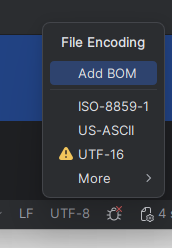
Is your .env file is UTF-8 without BOM encoded?

Any hidden symbols, maybe you use strange editor?

Rretzko's avatar

I added some extra logging in the AppServiceProvider::boot() method

public function boot(): void
    {
        Event::listen(
            SendWorkEmailVerificationListener::class,
        );
Log::info('***** app.timezone: ' . config('app.timezone'));
Log::info('***** app.locale: ' . config('app.locale'));
        Carbon::setLocale(config('app.timezone'));
...

and have these results:

[2025-08-29 10:20:13] local.INFO: ***** app.timezone: America/New_York  
[2025-08-29 10:20:13] local.INFO: ***** app.locale: en_US  
[2025-08-29 10:20:13] local.ERROR: Invalid "america/new" locale. {"exception":"[object] (Symfony\\Component\\Translation\\Exception\\InvalidArgumentException(code: 0): Invalid \"america/new\" locale. at C:\\Users\\RickRetzko\\PhpstormProjects\\tdr2025\\vendor\\symfony\\translation\\Translator.php:452)
[stacktrace]
#0 C:\\Users\\RickRetzko\\PhpstormProjects\\tdr2025\\vendor\\nesbot\\carbon\\src\\Carbon\\AbstractTranslator.php(160): Symfony\\Component\\Translation\\Translator->assertValidLocale()

Truly odd.

Rretzko's avatar

I added some extra logging in the AppServiceProvider::boot() method

public function boot(): void
    {
        Event::listen(
            SendWorkEmailVerificationListener::class,
        );
Log::info('***** app.timezone: ' . config('app.timezone'));
Log::info('***** app.locale: ' . config('app.locale'));
        Carbon::setLocale(config('app.timezone'));

...

and have these results:

[2025-08-29 10:20:13] local.INFO: ***** app.timezone: America/New_York  
[2025-08-29 10:20:13] local.INFO: ***** app.locale: en_US  
[2025-08-29 10:20:13] local.ERROR: Invalid "america/new" locale. {"exception":"[object] (Symfony\\Component\\Translation\\Exception\\InvalidArgumentException(code: 0): Invalid \"america/new\" locale. at C:\\Users\\RickRetzko\\PhpstormProjects\\tdr2025\\vendor\\symfony\\translation\\Translator.php:452)
[stacktrace]
#0 C:\\Users\\RickRetzko\\PhpstormProjects\\tdr2025\\vendor\\nesbot\\carbon\\src\\Carbon\\AbstractTranslator.php(160): Symfony\\Component\\Translation\\Translator->assertValidLocale()

Truly odd.

@glukinho - Here's my clip:

bom image

Glukinho's avatar

If you create new laravel project in new folder with composer create-project laravel/laravel and edit .env same way there - will you get any errors?

Glukinho's avatar
Level 30

By the way, what is it? Why you are setting timezone as locale? These are different things.

Carbon::setLocale(config('app.timezone'));
Rretzko's avatar

@glukinho - BINGO! You found it. I must have mistakenly typed this into the AppServiceProvider and just couldn't see the error. I changed this to:

Carbon::setLocale(config('app.locale');

and the system is working as expected with the timezone set to America/New_York. Thank you for this line of questioning and troubleshooting! Rick

1 like
Glukinho's avatar

@Rretzko I think you could find it earlier by looking at full exception backtrace in laravel.log. There must be this exact line mentioned.

Please or to participate in this conversation.