Level 102
It seems that you are opening the dev url for vite, not laravel. Be aware that you now have 2 urls. One for vite (which you should just ignore) and one for laravel (the one you would work on normally)
Summer Sale! All accounts are 50% off this week.

I have installed Laravel with Laradock, and Breeze with Vue ( which has Inertia in it ).
Now I run the project with docker-compose exec workspace bash and npm run dev
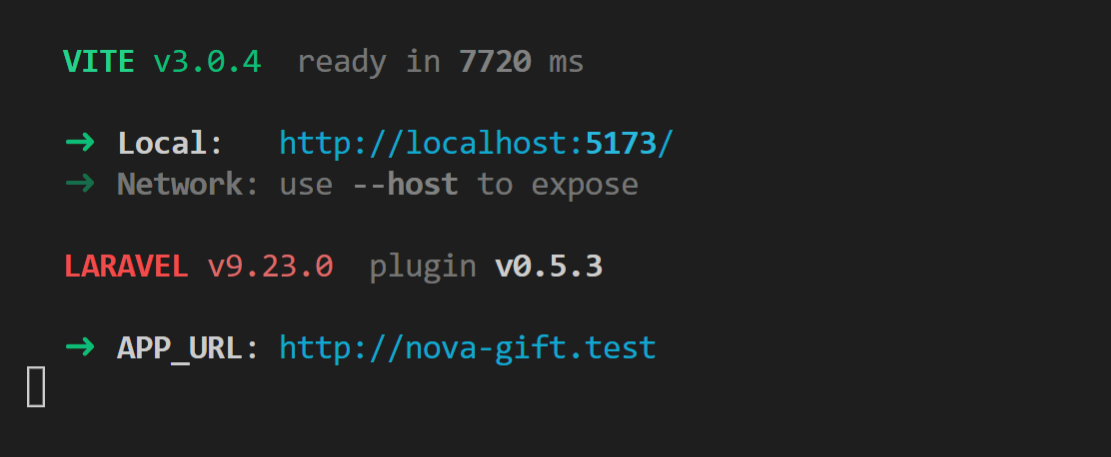
The only page that I see in every route is :

Changes in routes web.php and resources/js/app.js and resources/js/pages were detected in hot reload but do not work. I also tried --host and change host and hmr in vite.config but it was not helpful. every route in localhost:5173 shows one page. It should be said that 5173 is open in docker-compose.yml.
It seems that you are opening the dev url for vite, not laravel. Be aware that you now have 2 urls. One for vite (which you should just ignore) and one for laravel (the one you would work on normally)
Thanks for your reply, but I'm not in production and want to develop. If I open Laravel URL, I see slow pages with no hot reload and do not see the latest changes in vue.js files.
@faridfr Yeah you would never use npm run dev in production. What I am saying is that while developing there are 2 servers. 1 is for laravel and one is for vite. You use the laravel one and laravel uses the vite one (in blade)
VIte does not write to any files when in dev mode. It injects the js and css directly into the website.
How are you checking the hot reloading? Are you seeing any errors in the console?
@faridfr Most likely due to cors. You are running the site on https and the vite dev server on http
https://laravel.com/docs/9.x/vite#working-with-a-secure-development-server
@faridfr Ah I can see in your url that you are in fact not running the site with https. Try setting https: false, and try again. What error is it giving now?
@Sinnbeck due to my npm run dev results that I sent here, Vite running with http. But to be sure I set it manually in vite.config and the result are the same.
@faridfr So if you turn off https (false) it is still saying empty response in the error?
@Sinnbeck Yes
Try adding this inside the server: {}
        hmr: {
            host: '127.0.0.1',
        },
so it looks like this
    server: {
        hmr: {
            host: '127.0.0.1',
        },
       host: '127.0.0.1'.
    },
I tried with: 127.0.0.1, localhost, and 0.0.0.0 but every time results are same ( empty response in errors with these URLs )
Here is my vite.config :
import { defineConfig } from 'vite';
import laravel from 'laravel-vite-plugin';
import vue from '@vitejs/plugin-vue';

export default defineConfig({
    server: {
        hmr: {
            host: '127.0.0.1',
        },
       host: '127.0.0.1',
    },
    plugins: [
        laravel({
            input: 'resources/js/app.js',
            refresh: true,
        }),
        vue({
            template: {
                transformAssetUrls: {
                    base: null,
                    includeAbsolute: false,
                },
            },
        }),
    ],
});
@faridfr and still empty response error?
@Sinnbeck Yes
@faridfr is this on windows?
@Sinnbeck Yes
@faridfr I found this tread with the exact same issue, but sadly the solution there is the same as you have already tried it seems: https://laracasts.com/discuss/channels/vite/breeze-and-vite-in-wsl2-does-not-load-css-or-js
@laksh Are you running npm run dev inside of docker? Which container? Is the port open on that container?
@Sinnbeck yes. I added 5173 on workspace ports and I wrote commands on the workspace.
@faridfr Ok I honestly dont know. If you can get that url to show your content it all should start working.
Maybe try just this
server: {
        hmr: {
            host: '127.0.0.1',
        },
    },
I am also experiencing this issue. The solution I use is run yarn run dev in local (outside laradock) then your-project.test will work normally
I hope someone can solve this. I'll be following this thread since this is exactly my problem

In laradock is not open the 5173 port. Modify the docker compose file of workspace and restart laradock and it will work. I’ve tested it today

I have the same issue and solved by adding this object in vite.config.js
 server: {
        hmr: {
            host: 'localhost'
        },
    }
If you are using Valet or another virtual host like WAMPP, your can fill the host value with 'yourapp.test'
Note: If you are using windows, make sure to define the localhost to 127.0.0.1 in the hosts file in system32/drivers/etc

Laradock with WSL2 on Win 11, solved this with :
localhost is configured in hosts file as 127.0.0.1WORKSPACE_VITE_PORT=5173 is set in .env in laradockvite.config.js
vite.config.js: server: {
host: '0.0.0.0',
hmr: {
host: 'localhost'
},
},```

@makowskid tks, for your time!

@makowskid Thank You, it works for me

@makowskid Thanks a lot! This made it work for me.

@makowskid why its not working for me
Please or to participate in this conversation.


