Level 58
To extract the "Name" value, such as "Super Admin", from the JSON object you provided, you can use PHP to decode the JSON and access the desired property. Here's a simple example of how you can achieve this:
<?php

$jsonString = '{"Id":2,"Name":"Super Admin","Guard Name":"Web","Created At":"2024 12 20 T17:09:27.000000 Z","Updated At":"2024 12 20 T17:09:27.000000 Z","Pivot":{"Model Type":"App\\Models\\User","Model Id":1,"Role Id":2}}';

// Decode the JSON string into a PHP associative array
$data = json_decode($jsonString, true);

// Access the "Name" property
$roleName = $data['Name'];

echo $roleName; // Outputs: Super Admin
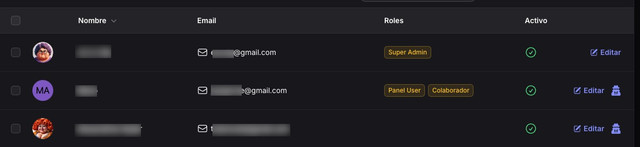
In the context of the Filament Shield plugin and the code snippet you provided, it seems like you are trying to format the state of a column. If you want to specifically format the role name in a table column, you can modify the formatStateUsing function to extract and format the role name:
use Illuminate\Support\Str;
use Filament\Tables\Columns\TextColumn;

TextColumn::make('roles')
    ->label('Roles')
    ->formatStateUsing(function ($state) {
        // Assuming $state is the JSON string
        $data = json_decode($state, true);
        $roleName = $data['Name'] ?? 'Unknown Role';

        return Str::headline($roleName);
    });
This code assumes that the $state variable contains the JSON string. It decodes the JSON, extracts the "Name" field, and formats it using Str::headline(). Adjust the logic as needed based on how your data is structured and passed to the column.