Be part of JetBrains PHPverse 2026 on June 9 – a free online event bringing PHP devs worldwide together.

Filip_Zdravkovic's avatar

Refreshing doesn't fix: `The page has expired due to inactivity. Please refresh and try again.`

  • Laravel Version: 5.6.23
  • PHP Version: 7.2.4
  • Firefox 60.0.2
  • Windows 7 64-bit / XAMPP v3.2.2

The page with the form:

    <form method="POST" action="{{ route('admin.users.update', $user) }}">
         @method('PUT')
         @csrf
         . . .

... was opened in Firefox for some time and there was no activity (I was AFK).

When I came back and tried to submit it - I got the following message:

The page has expired due to inactivity. Please refresh and try again.

... which was expected. But the problem is that I cannot get rid of this message. Going back one page and refreshing the form (_Ctrl + Shift + R_ to get the new token) doesn't solve the problem - I'm still getting this error message.

I also tried to clean browser's cache and Laravel cache (php artisan cache:clear, php artisan config:clear, php artisan view:clear) - but that didn't work.

Closing and re-opening the browser seems to solve this problem sometimes.

############################

I'm worried about the end users of the website, if that happens to them - they will be lost...

As for the possible misconfiguration (on my side) - session.php was not changed after installation:

'driver' => env('SESSION_DRIVER', 'file'),
'lifetime' => env('SESSION_LIFETIME', 120),
'expire_on_close' => false,
'encrypt' => false,
'files' => storage_path('framework/sessions'),
'connection' => null,
'table' => 'sessions',
'store' => null,
'lottery' => [2, 100],
'cookie' => env(
    'SESSION_COOKIE',
    str_slug(env('APP_NAME', 'laravel'), '_').'_session'
),
'path' => '/',
'domain' => env('SESSION_DOMAIN', null),
'secure' => env('SESSION_SECURE_COOKIE', false),
'http_only' => true,
'same_site' => null,

... and there's nothing in .env that is used in config/session.php except:

SESSION_DRIVER=file
SESSION_LIFETIME=120

... which was already there after installing Laravel.

0 likes
10 replies
newbie360's avatar

i remeber is 2 hours if no action, u will get that page

but i just press ctrl+F5 in Firefox then all is fine

Cronix's avatar

but i just press ctrl+F5 in Firefox then all is fine

depending on the scenario, that won't always work though.

I just use an ajax call on a timer to hit an endpoint within the auth middleware. That will keep the session alive, so it won't timeout in those situations. It doesn't have to do anything...just hit an endpoint.

Here's a good package that does it automatically on any page that has a csrf token. https://github.com/GeneaLabs/laravel-caffeine

I usually set the timer to be 1/2 of what my session max time is.

Snapey's avatar

Typically, just refreshing the page will not have the desired effect because the browser will try to re-post the data.

You need to put the cursor in the address bar and hit enter so that the page GET is run again - however if using authentication I would expect to be directed to the login page.

Filip_Zdravkovic's avatar

@Snapey Yes, but as I wrote:

Going back one page and refreshing the form (Ctrl + Shift + R to get the new token) doesn't solve the problem - I'm still getting this error message.

So, I am refreshing the page with the form (to get the new token) - but that doesn't work for some reason (I'm still getting that error message when I submit it).

Clearing browser's cache & Laravel's cache & refreshing the form doesn't work - when I try to submit the form - I'll get The page has expired due to inactivity. Please refresh and try again. again.

Usually I have to close and re-open the browser in order to be able to submit that form.

Also, session.php was not changed after installation, and in .env there is only SESSION_DRIVER=file SESSION_LIFETIME=120 (which was already there after installing Laravel).

Snapey's avatar

So maybe the form was being served from browser cache?

Filip_Zdravkovic's avatar

Not sure because clearing the Firefox cache didn't work.

Also, bypassing the cache by pressing "Ctrl + Shift + R" didn't fix it.

Maybe closing/re-opening the browser is required after clearing the browser's cache? (because closing and re-opening the browser seems to solve this problem sometimes)

I'm thinking about using the package that @Cronix mentioned because I do not want this problem to happen to end users of the site.

But I'm still wondering why this is happening, I've never had that problem before. I'm not sure if this issue is related to Laravel framework, browser (Firefox), XAMPP, or something on my side...

Filip_Zdravkovic's avatar

The same problem exists with Google Chrome (67.0.3396.87). So, it definitely has nothing to do with the browser.

DebugBar / Session before refreshing the page with the form:

session before refreshing

DebugBar / Request before refreshing the page with the form:

request before refreshing

DebugBar / Session after refreshing the page with the form:

session before refreshing

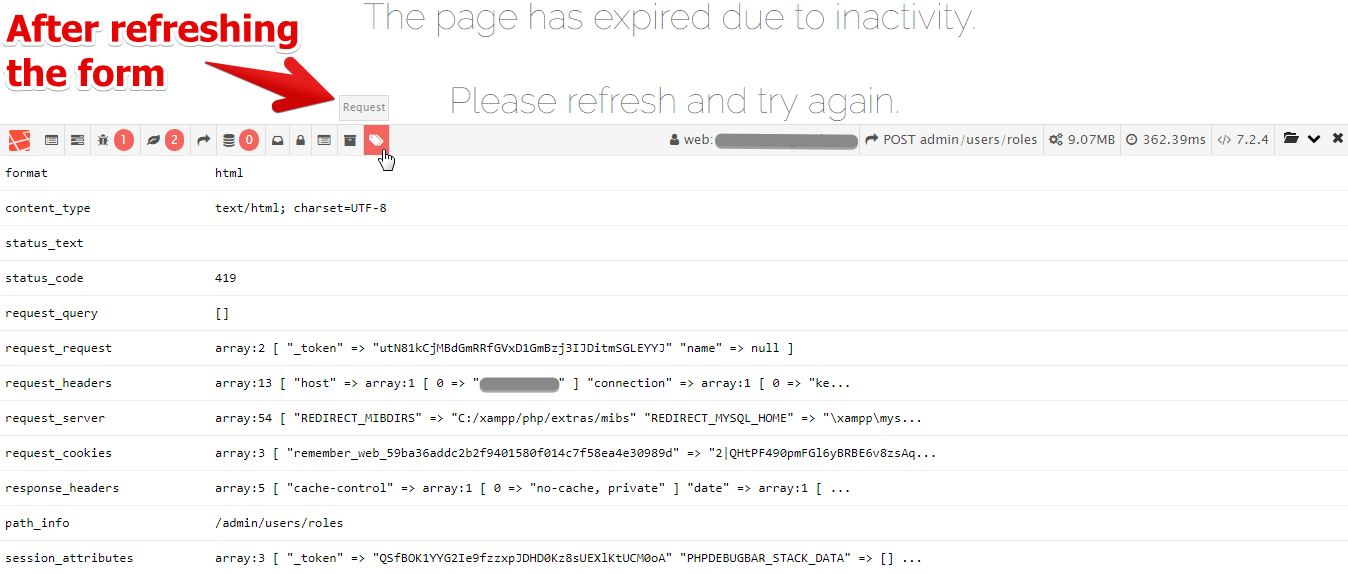
DebugBar / Request after refreshing the page with the form:

session before refreshing

Please or to participate in this conversation.